Code Beautifier
Five Languages, One Indent
This code beautifier reads a file the way the language does, then lays it out again. Pick one of five modes, set the indent and the brace style, and copy the result back into your editor. Nothing you paste leaves the browser.
- FreePrice
- 5Languages
- NoneSign-up
- NoneUploads
Code Beautifier
Reindent Java, C, C++, ActionScript or a crontab, and see the line numbers of anything unbalanced
Ready. Paste a file, or press one of the sample buttons.
What A Code Beautifier Does To A File
Layout and meaning are separate things in source code. Therefore a code beautifier can change every space without changing what the program does.
That is the whole promise. This code beautifier reads the file, works out where each block starts and ends, and writes the lines back with an indent that matches the nesting.
Five modes sit behind one editor in this code beautifier: Java, C, C++, ActionScript and crontab. Because the first four share a brace grammar, they share most of the reader, and each one adds its own rules on top.
Everything runs in this tab. So you can tidy a file under a confidentiality clause without it touching a server.
The result is a file a reviewer can read. Since a diff shows the layout change in full, you keep control of what goes back into the repository.
How A Code Beautifier Reads A File
A formatter cannot simply count spaces. Instead it walks the text once, tracking the state it is in.

The walker knows four states: ordinary code, a string literal, a character literal and a comment. Because a brace means one thing in code and nothing at all inside a string, the state decides everything.
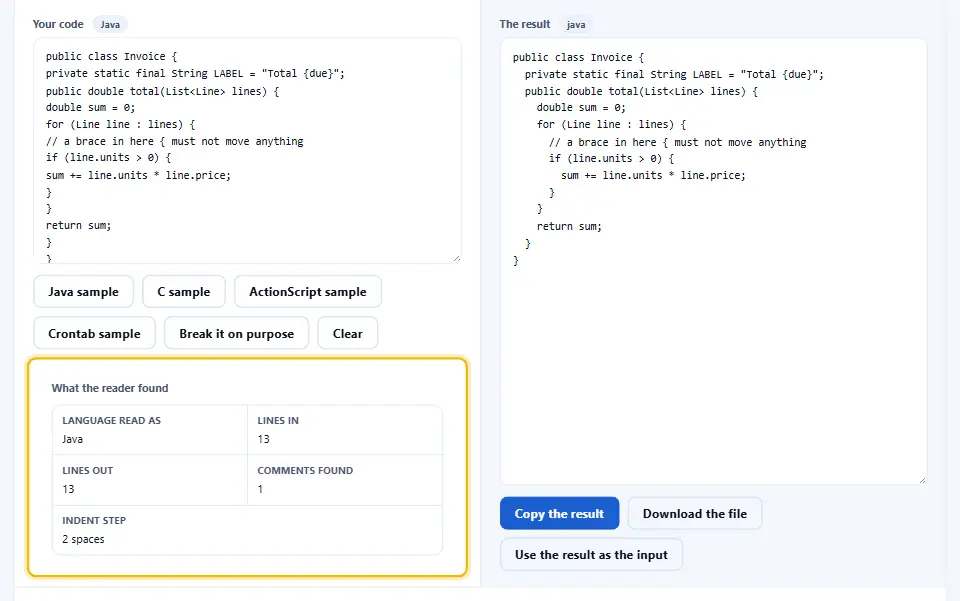
That single rule is what separates a beautifier from a search and replace. A regular expression which indents on every opening brace will move the lines inside a string that happens to hold a brace.

So the walker measures a line rather than rewriting it. Then the depth it holds at the newline sets the indent for the next line.
Depth rises at an opening brace and falls at a closing one. Meanwhile the walker passes over a brace inside a comment or a literal, and the depth stays where it was.
Why A Brace Inside A String Matters
Consider a line which builds a message out of a stray brace, or a regular expression written as a literal. To a counter, each one looks like the start of a block.
From that point the indent is wrong for the rest of the file. The mistake is silent, because the file still compiles. It simply reads badly from one line onward.
The walker avoids it by refusing to count inside a literal. So a brace in a string is text, a brace in a comment is text, and only a brace in code moves the depth.
The walker handles an escaped quote the same way. Because a backslash inside a literal keeps the walker in that literal, a quote in the middle of a string does not end it.
The same state machine explains three of the common failures listed further down this page. Hence it is worth reading twice.
Indent And Brace Style, Side By Side
Two settings do most of the visible work in a code beautifier. The first is the indent, and the second is where the opening brace sits.

Indent width is a number of spaces, two to eight, or a single tab. Because the choice is a house style rather than a correctness question, either answer is fine as long as the file is consistent.
The brace style has three common answers, and the disagreement is old enough that Wikipedia lists the named variants. In the first, the brace opens at the end of the line that needs it. In the second, the brace opens on a line of its own at the same indent. In the third, the brace opens on its own line indented one level in.
Mixing them inside one file is what makes a codebase hard to skim. Therefore the setting applies to the whole file at once, and the body is re-laid out under the new choice.
A closing brace always sits at the indent of the line that opened it. That one rule is what makes a long method readable, since the eye can find the end of a block without counting.
What Crontab Formatting Adds
A crontab file is not a brace language, so the reader switches to a different job. Instead of nesting, it checks that each line has the right number of fields.
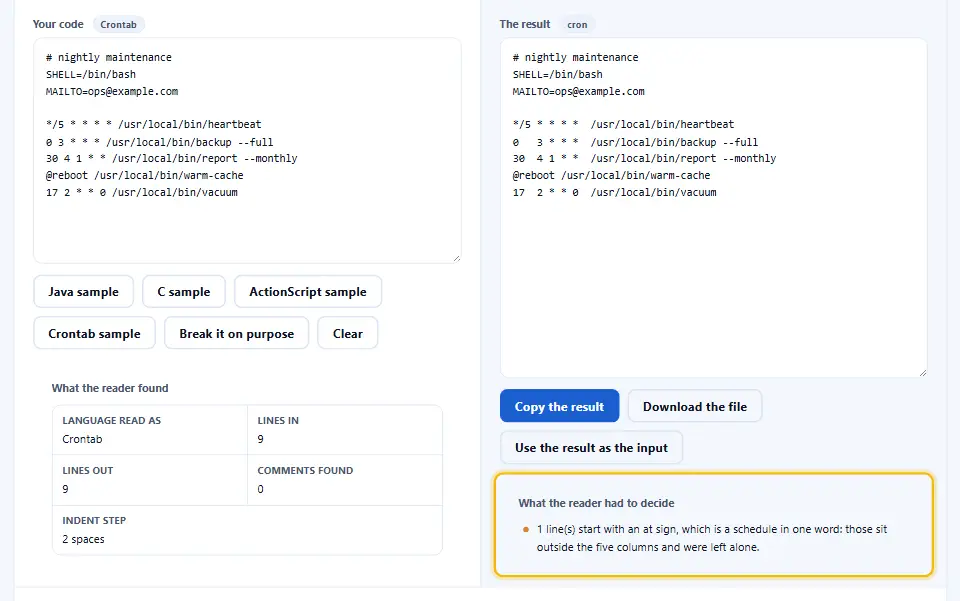
Five fields make a schedule: minute, hour, day of the month, month and day of the week, as the cron reference sets them out. Then a command follows, and its own spaces are left alone.
So the tool counts the fields, names any that are missing, and points out a value that cannot mean anything. An hour of 26 and a minute of 61 are both impossible, and both are easy to type.
A step value and a range get the same treatment. Because five slash two and nine dash seventeen are the two shapes people mistype most, the tool checks each against its own limits.
Comments beginning with a hash are kept where they are. Consequently the file comes back with its notes intact and its columns lined up.
How To Use The Code Beautifier
Four steps, and none of them need an account. The code beautifier does the rest.
- 1
Pick the language
So choose Java, C, C++, ActionScript or crontab. The mode decides which reader runs, and it is the only setting that changes what the tool understands.
- 2
Paste the file
Then paste a whole file or a single method. Because the walker reads the text rather than a compiled form, a fragment is fine as long as its braces balance.
- 3
Set the indent and the brace style
Next, pick two, four or eight spaces, or a tab. Then choose where the opening brace sits. So the result matches the house style rather than your editor default.
- 4
Read the notes, then copy
Finally, work through the notes under the preview. After that, copy the result back, or download it as a file with the extension the mode suggests.
Why Use This Code Beautifier
Five reasons, and each one saves a round trip.
It reads strings and comments
Because the walker tracks its state, a brace inside a literal or a comment never moves the indent. Therefore a file with a message full of braces comes back correct.
Five modes, one editor
So you switch between Java and a crontab without opening a second tab. Between them they cover most of what a build directory holds.
Nothing uploads
The reading and the rewriting both run in this tab. Hence a file under a confidentiality clause is no different from a public one here.
The notes name the line
Because the notes name the line of an unbalanced brace, a file that will not settle is easy to find. So the tool doubles as a quick sanity check.
It does not touch meaning
Only whitespace changes. So a token, a string or a comment keeps every character it had, and the difference in a review is layout alone.
Habits That Keep Formatted Code Readable
Six habits that decide whether a formatted file stays readable.
- Format the file, not the fragment So run the whole file through at once. A method formatted on its own can land at a different depth from the class around it, and the join shows.
- Keep one indent per repository Because a mixed repository makes every diff noisy, the number matters less than the consistency. Pick one and leave it in the editor config.
- Format before the review, not during it So put the layout change in its own commit. Then a reviewer sees a whitespace-only diff, and the logic change stays a separate read.
- Leave long string literals alone A beautifier cannot wrap a literal without changing it. Since a wrapped URL or SQL statement means something else, keep those lines long.
- Check the crontab columns by eye So read the five fields once after formatting. A value the tool accepts can still schedule the job at the wrong hour, and the file is where that shows.
- Watch the first line count Finally, compare the line count before and after. Because a formatter only moves whitespace, the count should match, and a difference means something else changed.
Six Ways A Formatter Surprises You
Each of these looks fine in the preview and costs time later.
Formatting a file that does not compile
Watch out here. An unbalanced brace leaves the walker one level out for the rest of the file. So the preview looks shifted and the notes name the line where it went wrong.
Expecting a preprocessor to be understood
The reader takes a hash line such as a define or an include as a line rather than as code. Therefore a macro which opens a brace confuses the depth count, and the tool says so.
Pasting two files at once
Two translation units in one pane share a depth counter. Because the counter never resets, the second file starts wherever the first one ended.
Trusting an indent while a string stays open
An unclosed quote keeps the walker inside a literal to the end of the file. Hence the walker passes over every brace after it, and the indent stops moving altogether.
Reformatting a file that is under review
A layout change on a branch somebody else is reading makes the real diff hard to find. So agree on the moment, or wait for the merge.
Assuming the language mode is a compiler
The mode only decides which reader runs. Because this reader builds no syntax tree, it reports no wrong type and no missing semicolon.
Code Beautifier Questions
Is this code beautifier free?
Yes. There is no account, no limit and no paid tier. So you format as many files as you like.
Which languages does it format?
Five: Java, C, C++, ActionScript and crontab. The four brace languages share one reader, and each adds its own rules.
Does it change what my program does?
No. Only whitespace moves. Every token, string and comment keeps the characters it had, so the output compiles the same way.
Will it indent a brace inside a string?
No. The walker goes into a literal state and passes over anything inside it. Therefore a message or a regular expression full of braces leaves the indent alone.
Does it fix syntax errors?
No. It reports an unbalanced brace and names the line, which is useful evidence. Fixing the code is still your job.
Can I choose the indent width?
Yes. Two, four or eight spaces, or one tab. The setting applies to the whole file rather than to a selection.
Which brace styles can I choose?
Three. The opening brace at the end of the line, on its own line at the same indent, or on its own line indented one level in. Allman and K&R are the two you have probably met.
Does it collapse blank lines?
Yes, it can. A run of blank lines inside a method becomes one, while the single blank line between two methods stays.
Can it format a crontab file?
Yes, that is the fifth mode. It aligns the five schedule fields, keeps comment lines where they are, and flags a value outside its range.
Does it run my code?
No. It executes nothing, compiles nothing and evaluates nothing. The file is read as text and written back as text.
Is my code uploaded anywhere?
No. Both the reading and the rewriting happen in this browser tab. So a file under a confidentiality clause stays on your machine.
Can I paste a whole file?
Yes. A file of a few thousand lines formats in a moment. The limit is your machine rather than a server quota.
Does it handle a header file?
Yes. A C or C++ header is the same grammar, so it formats the same way. Only the macro-heavy sections need a second look, as noted above.
What line endings come out?
The ones the input used. Because a file with carriage returns keeps them, pasting the result back does not turn every line into a change.
Can I download the result?
Yes. The download uses the extension the mode suggests, so a Java file arrives as a text file rather than as a page.
Does it sort imports or reorder anything?
No. Lines keep their order. Because reordering can change meaning, the tool only moves whitespace.
Can it minify as well as beautify?
No, and that is deliberate. Minifying strips comments too, which is a different decision. The minifiers here handle that job.
Why is my file still indented oddly?
The usual cause is an unclosed quote or an unbalanced brace earlier in the file. The notes under the preview name the line where the depth stopped matching.
Does it work on a phone?
Yes. The panes stack and the settings wrap into rows. So a small fix is possible away from a desk, though a whole file is easier on a keyboard.
Does it keep my comments?
Yes. A line comment and a block comment both survive, and the depth counter passes over both. So a comment never changes the layout around it.
Is the formatted code mine?
It is yours. Nothing here claims a licence over your file, and there is no credit to give.
Do I need an account or a plugin?
No. There is no sign-up, no plugin and no extension to add. So you close the tab when the file is tidy.
Tools That Go With This One
Four pages the same job usually leads to.
CSS minifier
Once a stylesheet is laid out, take the whitespace back out. Because a shipped file pays for every comment and newline, this is the step before upload.
Open tool →JavaScript minifier
Then shrink a script the same way. So the file a browser downloads is smaller than the file a reviewer reads.
Open tool →JSON formatter
A JSON document deserves the same treatment as a source file. Because a nested object on one line hides its own shape, this page unfolds it.
Open tool →CSS selector tester
When a rule in the stylesheet matches nothing, this page names it. Since a selector that matches nothing fails silently, that is worth a check.
Open tool →
Reindent The File And Get On With It
Pick the language, paste the file, set the indent and the brace style, then read the notes. Nothing uploads, nothing executes, and only whitespace changes. Most files are readable again before the kettle boils.