CSS Validator
The Line, The Property, The Fix
This CSS validator reads a stylesheet the way a browser does and reports what it would drop. Every note carries a line number, the property at fault and what the parser expected. Nothing you paste leaves the browser.
- FreePrice
- 6Checks
- NoneSign-up
- NoneUploads
CSS Validator
Read a stylesheet and name every declaration the browser would drop, with the line it sits on
Nothing read yet.
Nothing to report. Every name here is one the reader knows, and every value is one that property takes.
Ready. Paste a stylesheet, or press one of the sample buttons.
What A CSS Validator Catches
A browser is forgiving about CSS, and that is the problem. Therefore the browser drops a rule it cannot read, in silence, and the page simply looks wrong.
This CSS validator names what the browser would discard. Each note carries a line number, the property or selector at fault, and the reason the parser stopped.
It reads the stylesheet in order, tracking whether it is inside a rule, a string, a comment or an at-rule. Because the state decides what a character means, a brace inside a comment never opens a block.
This CSS validator checks six families of mistake. Two of them break the file, and the other four cost you a declaration without breaking anything.
Everything runs in this tab. So a stylesheet for a site under a confidentiality clause is no different from a public one here.
How A CSS Validator Reads A Stylesheet
The reader walks the text once. At each character it knows which of five states it is in: a selector, a declaration block, a value, a string, or a comment.

From that state it can tell whether a brace opens a block, whether a colon starts a value, and whether a semicolon ends a declaration. The grammar itself is short, and the CSS syntax module is where the working group writes it down.
Because the walk is stateful, a stray brace in a comment changes nothing. A reader that counts characters instead would treat it as the start of a block and misplace every line after it.
Recovery matters as much as detection. When a browser meets a declaration it cannot parse, it skips to the next semicolon and carries on. So one bad value costs one declaration rather than the file.
So a rule that lost a declaration can sit on a live site for months. The page keeps working, one property short, and nothing in the console says so.
Why Silent Drops Are Worth Finding
A typo in a property name is the cheapest mistake in CSS to make and the hardest to notice. One letter out and the declaration is gone.

Because the rest of the rule still applies, the element keeps most of its styling. So the page looks almost right, and the missing part is easy to blame on something else.
The same holds for a unit. A length written without one is valid in a few places and invalid in most. Therefore the browser drops a margin of ten rather than ten pixels, and the space it was meant to create never appears.
A validator turns three of those into three lines of output. That is the entire value: the browser stays silent and the page does not.
The Six Checks, And What Each One Means
The first check is brace balance. An opening brace with no match, or a closing one with no opener, gets a note naming the line where the count went wrong. This is the one mistake that can cost you the whole rest of the file.

The second is a missing semicolon. Because the browser then reads the next property as part of the value, one missing mark swallows two declarations. The note names both lines.
The third is an unknown property. The reader reports anything it does not recognise as a probable typo, and offers the closest match when one exists.
The fourth is a value the property does not accept. A color written as a word that is not a color name, or a length written as a percentage on a property that takes no percentage.
The fifth is a misspelled unit. A length with no unit, a unit that is not one of the recognised ones, and a unit on a property that takes a plain number.
The sixth is a duplicate. The same selector twice in one block, or the same property twice inside one rule. Because the later declaration wins, an old value can sit there looking authoritative and do nothing.
What Valid Is Not
A validator answers one question: will the browser parse this. It cannot answer whether the rule was a good idea.
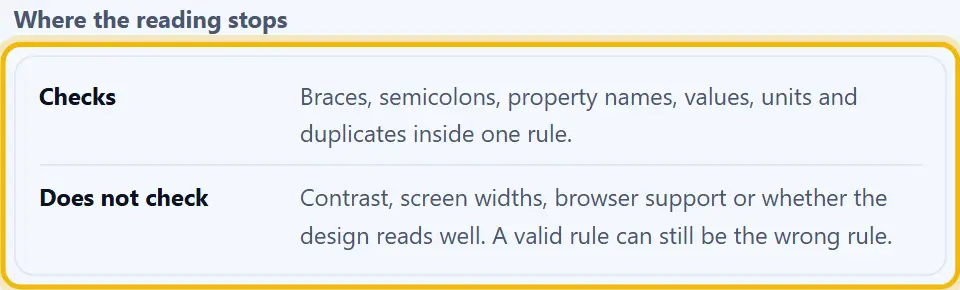
So a stylesheet can pass every check and still be wrong. A color that fails contrast, a fixed width that breaks at a narrow screen, a font size in pixels where a relative unit belonged. None of those are grammar.
The same goes for support. A property can be perfectly valid and still do nothing, because the browser has not implemented it. Validation says nothing about that, and a green result read as a compatibility promise will mislead.
That is why this page links to the contrast checker and the selector tester. Those two answer the questions a validator cannot.
How To Use The CSS Validator
Four steps, and none of them need an account.
- 1
Paste the stylesheet
So paste a whole file or one rule. Because the reader takes text rather than a compiled form, a fragment is fine as long as its braces balance.
- 2
Pick the strictness
Then choose whether an unknown property is an error or a warning. Since a new property may simply be ahead of this reader, the warning level lets it through with a note.
- 3
Read the notes in order
Next, work down the panel. The notes follow line order, so the first one usually causes the two after it.
- 4
Fix, re-run, then copy
Finally, edit the sheet in your own editor and paste it back to confirm the count is zero. After that, copy or download the clean file.
Why Use This CSS Validator
Five reasons, and each one saves a debugging session.
It names the line
Because every note from this CSS validator carries a line number, you go straight there rather than reading the file. So a two hundred line stylesheet is a two minute job.
It explains the reason
A CSS validator note says what the parser expected, not just that it stopped. Therefore the fix is usually obvious from the note alone.
It reads the way a browser reads
So a CSS validator tracks strings, comments and at-rules the same way. Hence a brace inside a comment does not produce a false report.
Nothing uploads
The whole check runs in this tab. So a stylesheet under a confidentiality clause is no different from a public one here.
It stays quiet about taste
Because grammar is the whole job, the tool passes no comment on your naming, your nesting or your choice of units. So a green result means parsed, and nothing more.
Habits That Keep A Stylesheet Clean
Six habits that keep a stylesheet readable and easy to validate.
- One declaration per line So a missing semicolon shows up as a red line in your editor rather than as a note here. Multi-line rules are also far easier to diff.
- Never write a length without a unit A zero may stand alone, and nothing else may. Because the browser drops a unitless length, the spacing simply never appears and the cause is hard to guess.
- Keep custom properties spelled once A custom property is a name you invent, so a typo in it is silent everywhere. Therefore declare it at the top of the file and copy the spelling rather than retyping it.
- Validate before the minifier, not after A minifier trusts its input, so a broken rule comes out broken and harder to read. Since the line numbers survive in the unminified file, check that one first.
- Watch the last rule in a block The final declaration is where a missing semicolon hurts least and hides best. Because the next line is a closing brace, the rule still works and the note never appears.
- Treat a vendor prefix as normal A prefixed property is valid and the reader knows it. So a warning about one is a check to update rather than a mistake to fix.
Six Ways Stylesheets Break Quietly
Each of these leaves the page almost right, which is what makes it slow to find.
A dropped declaration in a shorthand
Watch out here. A shorthand such as margin expanded badly loses the whole line rather than the one part, so four sides move instead of one.
A value the property does not take
A percentage where the property wants a length, or a word where it wants a number. Because the browser skips to the next semicolon, the next declaration survives.
A duplicate property in one rule
The later value wins, so an old one can sit there looking authoritative. Therefore delete rather than comment it out, or the next reader will trust it.
A missing semicolon before a closing brace
The last declaration in a block is the one place the mistake costs nothing. Hence it survives a review and only shows up once somebody adds a declaration after it.
An unclosed comment
A comment that never closes swallows everything after it, including every rule. So the page renders unstyled from that point, and the file looks fine in a diff.
Trusting a green result on support
A valid property may still do nothing in the browser that matters. Since validation is grammar, check compatibility against your own target separately.
CSS Validator Questions
Is this CSS validator free?
Yes. There is no account, no limit and no paid tier. So you validate as many stylesheets as you like.
What does a CSS validator check?
Six families: brace balance, missing semicolons, unknown properties, values the property refuses, units written wrongly, and duplicates inside one rule.
Does it check my CSS against the specification?
It checks the grammar the CSS syntax module sets out, plus a list of known properties and the values each one takes. So this reader may flag a brand new property until its list catches up.
Why does my CSS look fine if it has an error?
Because a browser skips to the next semicolon and carries on. So one bad declaration costs one declaration, and the page keeps rendering without it.
Does it change my stylesheet?
No. The reader reports and the file stays exactly as you pasted it. Any edit is yours to make in your own editor.
Is my stylesheet uploaded anywhere?
No. The whole check runs in this browser tab. So a stylesheet under a confidentiality clause stays on your machine.
Can I validate SCSS or Less?
Not directly. Those add nesting and variables on top of CSS, so run them through the preprocessor converter first, then validate the plain CSS that comes out.
Does it check browser support?
No. A property can be valid and still do nothing in the browser that matters. Validation is grammar, and support is a separate question.
What is the closest thing to a real error?
An unbalanced brace. Because the browser then reads the rest of the file from the wrong depth, one missing brace can cost every rule after it.
Will it flag a vendor prefixed property?
No, the reader knows a prefixed property and accepts it. So a six prefix block for a single feature passes without a note.
Can I validate a fragment rather than a whole file?
Yes. A single rule or a group of rules works as long as its braces balance. The count then refers to the lines you pasted rather than to a file.
Does it check custom properties?
It checks the syntax and the use. Because a name you invented has no spelling to verify, it cannot tell that two spellings were meant to be one.
What is the difference between an error and a warning?
An error means the browser will drop the declaration. A warning means this reader does not know the property, which may simply mean it is new.
Can it count my rules and selectors?
Yes. The summary reports the number of rules, declarations and selectors, which is useful when you are trimming a file down.
Does it format or minify the stylesheet?
No, and that is deliberate. Formatting and validating are separate decisions. The minifier here handles the whitespace.
Why is a valid rule of mine still not applying?
The usual cause is the selector rather than the declaration. So run it through the selector tester, which asks whether it matches an element at all.
Does it work on a phone?
Yes. The panes stack and the notes wrap. So a quick check is possible away from a desk, though a long file is easier on a keyboard.
Can I download the notes?
Yes. The download saves the report as a text file, which is useful for a ticket or a review comment.
Is the stylesheet still mine?
Entirely. This page claims no licence over your file, and there is no credit to give.
Do I need an account or an extension?
No. There is no sign-up, no plugin and no extension to add. So you close the tab when the sheet is clean.
Tools That Go With This One
Four pages the same job usually leads to.
CSS minifier
Once the sheet is clean, take the whitespace out. Because a browser downloads every comment and every newline, minify after validating and not before.
Open tool →CSS selector tester
Then check that a selector matches something. Because a rule which matches nothing fails silently, that is the other half of the same job.
Open tool →Color code picker
A valid color can still fail contrast. So read the ratio before you commit the palette.
Open tool →CSS preprocessor converter
If the source is SCSS or Less, turn it into plain CSS first. Then the validator has something it can read.
Open tool →
Find The Declaration The Browser Dropped
Paste the stylesheet, read the notes in line order, fix the first one and run it again. Nothing uploads and nothing changes on your machine. Most sheets are clean before the tea goes cold.