Unix Timestamp Converter
Epoch Numbers Into Dates, and Dates Into Epochs
Paste a number into this Unix timestamp converter and see the date in any time zone, or pick a date and get the timestamp in seconds and milliseconds.
- FreePrice
- Every IANA zoneTime zones
- NoneSign-up
- In your browserRuns
Unix Timestamp Converter
Epoch time to date and back, in any time zone
Ready. Type a timestamp or pick a date.
| Format | Value | Copy |
|---|
| Result | Check | Details |
|---|
Convert a whole list of timestamps
| Input | UTC | Selected time zone |
|---|
Jobs This Unix Timestamp Converter Handles for You
This Unix timestamp converter changes epoch numbers into dates you can read, and dates back into epoch numbers. The clock at the top shows the current Unix time, ticking every second. Every amount is spelled out on your own device, so it works even when you are offline after the page loads.
Timestamps turn up everywhere developers look. Logs, databases, API replies, JWT tokens and analytics exports all store time as one long number. That number is compact and easy to sort, but nobody can read 1735689600 at a glance. So this epoch converter shows it as a date, in UTC and in the time zone you choose.
It also answers the questions that come next: which weekday it was, which ISO week, how long ago, and whether the value still fits in a 32-bit field. Each output line comes with a copy button.
What the Unix Clock Really Measures
Unix time tallies seconds from midnight UTC on 1 January 1970, the instant called the Unix epoch. The count is the same everywhere on Earth at the same instant, because it has no time zone. Only the way you display it changes.

It also ignores leap seconds, so every day counts as exactly 86,400 seconds. That makes the arithmetic simple: add 86,400 for a day, 604,800 for a week. Moments before 1970 are simply negative numbers.
Seconds, Milliseconds or Nanoseconds?
The same moment can be written as 10 digits in seconds, 13 in milliseconds, 16 in microseconds or 19 in nanoseconds. JavaScript and Java usually use milliseconds, while PHP, Python and most databases use seconds. Go and some logging tools use nanoseconds.
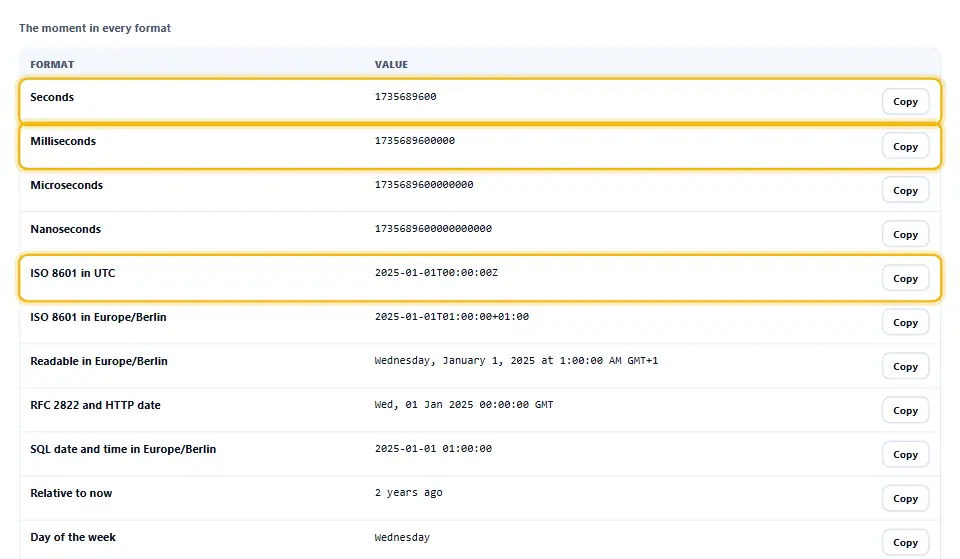
The converter counts the digits and picks the unit for you, then tells you what it picked in the checks. If a value is ambiguous, choose the unit yourself from the menu. Long values are read with exact integer maths, so a 19-digit nanosecond timestamp keeps every digit.
Timestamp to Date in Any Time Zone
Pick a zone from the menu and every result follows it. The list holds every zone your browser knows, taken from the IANA time zone database, which records each country’s daylight saving rules and their history. Therefore a date in 1995 uses the rules of 1995, not today’s.
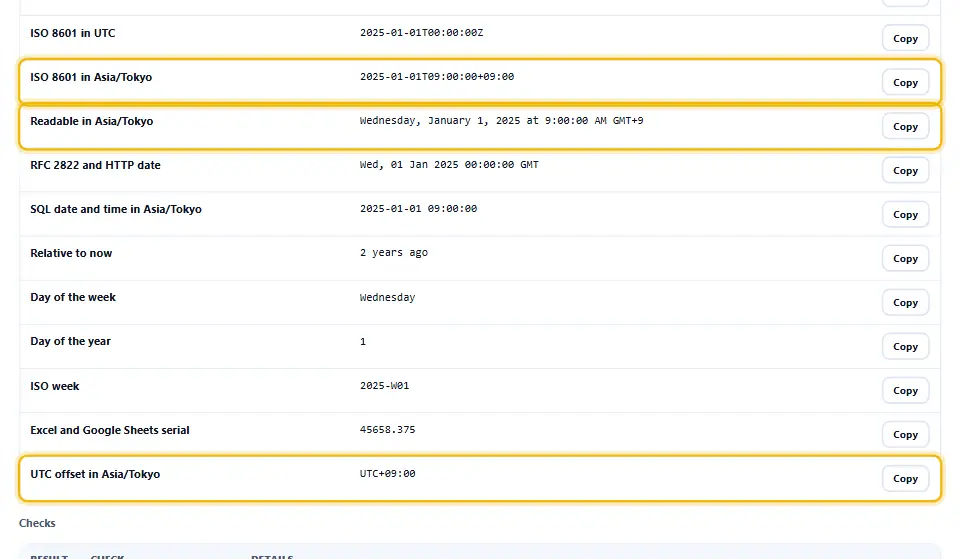
Each result shows the offset from UTC as well, such as UTC+05:00. In addition, the ISO 8601 line includes that offset, so the value can travel into another system without losing its meaning. That format follows RFC 3339, the profile of ISO 8601 most APIs expect.
Date to Timestamp, Even Around Clock Changes
Going the other way is where many converters slip. When clocks jump forward in spring, one hour of local time never happens. When they fall back in autumn, one hour happens twice. A naive tool silently picks something, and your scheduled job runs an hour off.
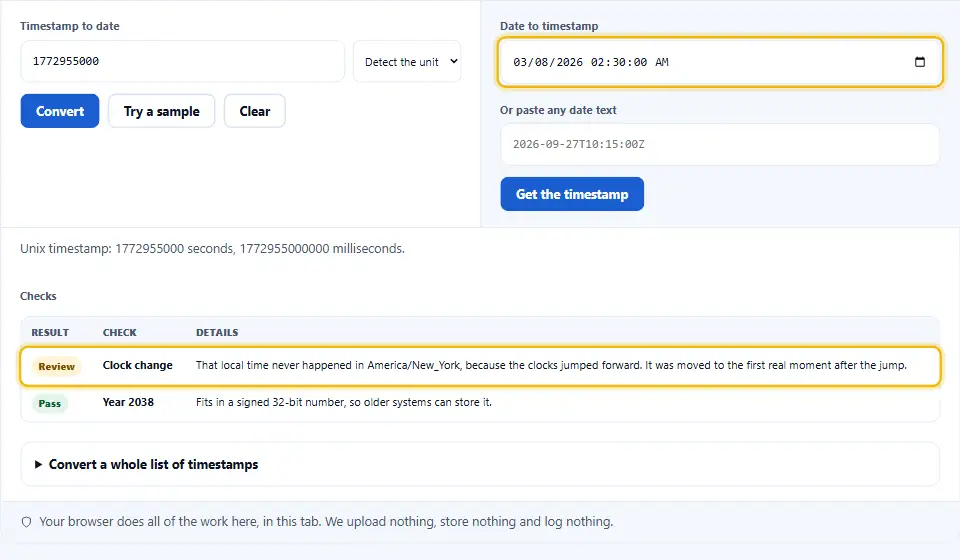
This converter checks both cases. A time that never happened is moved to the first real moment after the jump, and a time that happened twice uses the first of the two. Either way, the checks table says so in plain words.
The Year 2038 Problem
Plenty of older systems keep Unix time in a signed 32-bit integer. The largest value it holds is 2,147,483,647, which is 19 January 2038 at 03:14:07 UTC. One second later, such a counter wraps around to 1901. The checks table tells you whether each timestamp still fits, so you can spot risky database columns early.
Most modern systems already moved to 64-bit time, which lasts for billions of years. Still, small devices, old file formats and some database columns keep the 32-bit limit, so the check is worth a glance.
Epoch Converter Code for Common Languages
Getting the current timestamp is a one-liner almost everywhere. In JavaScript, Date.now() returns milliseconds, so divide by 1000 for seconds. In PHP use time(), in Python time.time(), and in a shell date +%s. MySQL has UNIX_TIMESTAMP(), and PostgreSQL has EXTRACT(EPOCH FROM now()).
Converting back is just as short, yet the time zone is where bugs hide. For example, JavaScript’s Date object always works in the visitor’s zone unless you ask for UTC. When a value looks one or more hours off, check it here in UTC first.
Turn a Full List of Timestamps Into Dates
Log files and exports rarely hold just one value. Open the list section, paste one timestamp per line, and the converter fills a table with the UTC date and the local date for each. Lines that are not timestamps are marked instead of stopping the whole list.
After that, save the table as a CSV for Excel or Sheets. If the data came as JSON, our JSON to CSV converter flattens it into columns first.
Where Timestamps Hide in Everyday Data
A JSON Web Token carries three of them: iat for when it was issued, nbf for when it becomes valid and exp for when it expires. Each of the three counts in seconds. So paste the exp value here, and you see at a glance whether a token has already expired.
Web servers use dates as well. The Expires and Last-Modified headers are written in the RFC 2822 style shown in the table, while most APIs return ISO 8601 or plain epoch seconds. Databases differ too: a MySQL TIMESTAMP column ends in 2038, whereas DATETIME and BIGINT columns do not.
Spreadsheets add one more twist. Excel and Google Sheets count days since 1899, so a date copied from a sheet may arrive as 45658. The serial row in the table gives you that number for any moment, which means you can paste it straight into a cell.
Converting a Unix Timestamp on Denwix
Going from timestamp to date takes a second, because the result appears while you type.
- 1
Paste the number
Enter or paste the epoch number. Spaces and commas between digit groups are fine.
- 2
Check the unit
Ten digits means seconds, thirteen means milliseconds, and the converter reads micro- and nanoseconds the same way. Change it if needed.
- 3
Choose the time zone
Your own zone is selected first. Pick UTC or any other zone from the list.
- 4
Grab whichever of the Denwix outputs suits your editor
Each line has a copy button, from ISO 8601 to the Excel serial number.
Built for Real Timestamps
A basic epoch converter handles the easy cases. These details cover the rest.
Exact to the nanosecond
Long values use integer maths, so no digit is rounded away.
Every IANA time zone
Historical daylight saving rules are applied for any date.
Clock changes caught
Times that never happened or happened twice are flagged.
Fifteen formats
ISO 8601, RFC 2822, SQL, ISO week, Excel serial and more.
Whole lists
Convert thousands of lines and download the result as CSV.
Works offline
Once the page loads, nothing else is fetched and nothing is sent.
Rules for Storing Time Safely
Most time bugs come from breaking one of these habits.
- Store instants in UTC. Store the epoch value or a UTC date, and switch to local time only on screen.
- Name the field created_ms or created_s so the unit is obvious. A column called created_at_ms leaves no doubt about milliseconds.
- Use 64-bit integers. They hold dates far beyond 2038, while 32-bit fields run out.
- Send dates like 2026-09-28T10:00:00+05:00. A value such as 2026-09-27T10:15:00Z means the same everywhere.
- Keep the zone for future events. For a meeting next year, store the local time and the IANA zone, since rules can change.
- Never do date maths in local time. Adding 24 hours across a clock change lands an hour off; add days in UTC instead.
- Update your time zone database regularly. Countries change their rules, so update the tz data your servers use.
- Test the edges. Check dates around clock changes, New Year and 29 February before release.
Six Timestamp Mistakes to Avoid
Each one produces a date that looks plausible and is wrong.
Confusing seconds with milliseconds
Read milliseconds as seconds, and the date leaps tens of thousands of years into the future.
Showing server time as user time
A date formatted in the server zone confuses every visitor elsewhere.
Ignoring daylight saving
A fixed offset such as +01:00 is wrong for half the year in many zones.
Rounding long IDs
Nanosecond values pushed through floating point lose their last digits.
Trusting 32-bit fields
They overflow in January 2038 and jump back to 1901.
Parsing dates without a zone
Text such as 2026-09-27 10:00 means a different instant in every city.
Unix Timestamp Questions People Ask
What does the number in a Unix timestamp measure?
It counts the seconds that have passed since midnight UTC at the start of 1 January 1970. The same number means the same moment in every time zone.
What steps turn an epoch number into a date on Denwix?
Drop it into the Denwix converter. The timestamp to date result appears at once in UTC and in your time zone, together with ISO 8601 and other formats.
My epoch value has 13 digits. Does that mean milliseconds?
Count the digits. Today a value in seconds has 10 digits and one in milliseconds has 13. The converter checks this for you.
How can I find the epoch number for a given date?
Pick the date and time in the date field, or paste any date text, then press Get the timestamp. The converter applies the time zone you picked.
Why is my date off by some hours?
Usually the time zone differs. Compare the UTC line with the local line, and check which zone the other system used.
Are leap seconds part of Unix time?
No. Every day counts as exactly 86,400 seconds, so a leap second repeats or smears the last second of the day.
Why could some systems fail in January 2038?
Signed 32-bit counters run out on 19 January 2038 at 03:14:07 UTC. Systems that use 64 bits are not affected.
Can a Unix timestamp go below zero?
Yes. Negative values count back from 1970, so -86400 is 31 December 1969 at midnight UTC.
What is the Excel serial number?
Spreadsheets store dates as days since 30 December 1899. Paste the serial into a cell and format it as a date.
How do I check when a login token expires?
Decode the token, copy the exp number and paste it here. If the date lies in the past, the token has already expired.
Which time zone does the converter use first?
It starts with the zone your browser reports. You can switch to UTC or any other IANA zone at any time, and every result follows.
Can I convert dates before 1970?
Yes. Pick any date, even centuries back, and the timestamp simply comes out as a negative number.
Does this Denwix tool send anything to a server?
No. The conversion uses your browser’s own clock and time zone data, and nothing leaves the page.
More Tools for Developers
Handy when timestamps sit inside bigger data.
Read and tidy the JSON a timestamp came from.
Open tool →Turn JSON logs into a table for a spreadsheet.
Open tool →Decode token parts that carry timestamps inside.
Open tool →
Ready to Convert Your Timestamp?
Paste the number and the date appears at once. This Unix timestamp converter is free, needs no account and works in your browser.