URL Encoder Decoder
With The Two Scopes Kept Apart
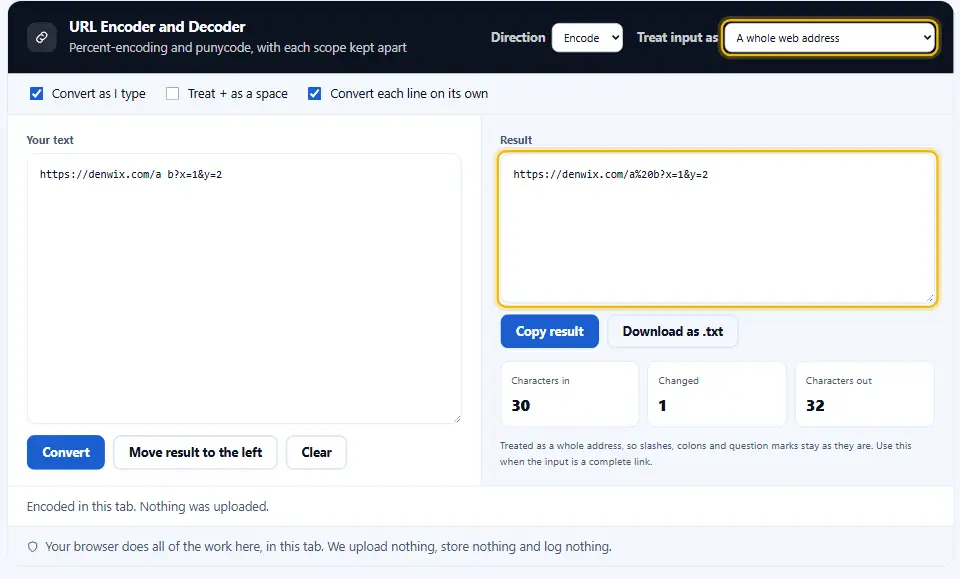
This URL encoder decoder escapes one value inside an address. It can also encode a whole address, leaving the slashes that hold it together alone, or turn an international domain into punycode and back. Pick which your text is and the rest follows.
- FreePrice
- 2Scopes
- NoneSign-up
- NoneUploads
URL Encoder and Decoder
Percent-encoding and punycode, with each scope kept apart
- Characters in
- 0
- Changed
- 0
- Characters out
- 0
A value inside an address needs every reserved character escaped. A whole address needs its slashes and colons left alone, or it stops being an address.
Ready. Paste something and it converts as you type.
The Job Percent Encoding Does
Only a short list of characters can travel safely in a URL. Letters, digits and just a few punctuation marks.
Everything else travels as a percent sign and two hex digits. A space becomes %20, a hash becomes %23, and an accented letter becomes two or three of those pairs.
The rules come from the URL Standard, which is what browsers implement. Older documents describe RFC 3986, and the two agree about the parts that matter here.
So percent encoding is not compression or security. It is a way of saying "these characters are data, not structure".
The Two Scopes, And Why They Differ
A whole address needs its structure left alone. The slashes separate path segments, the question mark opens the query, and the ampersands divide parameters.

One value inside that address needs the opposite. A slash in a product name is data. Leave it raw and the server reads it as another path segment.
That one difference matters, since choosing the wrong function is the classic URL bug. Percent-encoding has two functions in every language for exactly this reason.
The Plus Sign Problem
In a query string, a plus sign has meant a space since the first HTML forms. Inside a path, + simply stays a plus sign.

So the same character decodes two ways depending on where it sits. A decoder that guesses is wrong half the time.
The switch here makes the choice yours. Turn it on for anything that came out of a form, and off for a path or a fragment.
Double Encoding
A second encoding pass turns %20 into %2520. It happens when a framework escapes a value that already carried escapes. The sign is a percent sign followed by 25 in your logs.
What Never Needs Encoding
RFC 3986 leaves only letters, digits and - . _ ~ unescaped. They pass through every encoder unchanged, in every scope.

For the rest, the position decides. A colon is structure in a scheme and data in a parameter. The at sign and the comma behave the same way.
When in doubt, encode. An over-encoded value still works, while an under-encoded one breaks in ways that only show up with certain inputs.
Where Encoding Goes Wrong In Practice
A search box is the usual place. Somebody types a phrase with an ampersand in it. The code drops that phrase straight into a query string, and the server sees two parameters.
File names come second. A name with a space, a hash or a plus breaks a download link on some servers and not on others. That makes the bug hard to reproduce.
Redirect parameters come third. A whole address inside another address travels as one value. So every slash and colon in it needs escaping.
Encoding the value once, with the right function, cures all three. Escape the value, not the address, and let the URL builder assemble the rest.
Where Encoding Goes Wrong In Practice
A search box is the usual place. Somebody types a phrase with an ampersand in it, the code drops that phrase straight into a query string, and the server sees two parameters.
File names come second. A name with a space, a hash or a plus in it breaks a download link on some servers and not on others, which makes the bug hard to reproduce.
Redirect parameters come third. A whole address inside another address has to travel as one value, so every slash and colon in it needs escaping.
Encoding the value once, with the right function, cures all three. Escape the value, not the address, and let the URL builder assemble the rest.
Where Encoding Goes Wrong In Practice
A search box is the usual place. Somebody types a phrase with an ampersand in it, the code drops that phrase straight into a query string, and the server sees two parameters.
File names come second. A name with a space, a hash or a plus in it breaks a download link on some servers and not on others, which makes the bug hard to reproduce.
Redirect parameters come third. A whole address inside another address has to travel as one value, so every slash and colon in it needs escaping.
Encoding the value once, with the right function, cures all three. Escape the value, not the address, and let the URL builder assemble the rest.
URL Encoding and HTML Escaping Are Separate Jobs
Percent encoding makes text safe inside an address. HTML entities make text safe inside a document. Using one where the other belongs leaves you with a link that looks right and goes nowhere.
Working With the URL Encoder Decoder, Start to Finish
Three steps, and the second one is the only decision. Meanwhile the result follows every keystroke.
- 1
Paste your text
One address, one value, or a whole list. Each line converts on its own unless you turn that switch off.
- 2
Say what it is
A whole address keeps its slashes and colons. One value escapes everything, because everything in it is data.
- 3
Set the plus switch
Turn it on for anything from a form, where a plus means a space. Leave it off for a path, where a plus means a plus.
- 4
Check the round trip
Press Move result to the left and convert again. Anything that does not come back unchanged is worth a second look.
What Sets This URL Encoder Online Apart
Most converters offer one button and hope. The differences here are the scope switch, the plus switch and the honesty about failure.
Two scopes, stated in words
The menu asks what your text is rather than naming two JavaScript functions. Most mistakes come from that one decision.
The plus sign is your call
A plus means a space in a query and a plus in a path. One switch, and no guessing on either side.
Line by line
Paste a hundred addresses and each converts separately, so a list comes back as a list rather than one long string.
Real errors, not silence
A stray percent sign makes decoding impossible. This says so, instead of returning the input unchanged and letting you assume it worked.
A reversible round trip
Swap the panes and convert again. If what comes back differs from what you started with, something in the middle is wrong.
Nothing leaves your tab
Query strings carry tokens, emails and order numbers. Since every conversion happens in your browser, none of that reaches a server.
Rules For Encoding Addresses
Most URL bugs come from four or five habits. These eight cover them.
- Encode values, not addresses. Build the address from parts and escape each value as you add it. Encoding the finished string is where structure gets destroyed.
- Use the URL object in code. Each current programming language ships with one. It handles the escaping per part, which is the whole job you were about to do by hand.
- Never encode a value twice. If a value arrives escaped, leave it. Look for
%25in your logs, since that marks a percent sign that went through the encoder twice. - Keep the fragment out of requests. Anything after the # sign stays in the browser. A server never sees it, so encoding it for a server does nothing.
- Watch the ampersand. An unescaped ampersand inside a value splits one parameter into two. It is the single most common cause of a truncated query.
- Decode for display only. Show people the readable form, and keep the escaped one for links and requests. Storing the decoded version invites a double encode later.
- Remember non-ASCII is bytes. An accented letter becomes two percent pairs, an emoji four. That is UTF-8, and a length limit counts the escaped form.
- Try it with a genuinely messy value. A name with an apostrophe, a slash and a space finds every bug in ten seconds. Guessing which characters appear never does.
Six Encoding Mistakes That Break Links
Each of these produces a link that works for most inputs and fails for the interesting ones.
Encoding the whole address as a value
Every slash and colon becomes an escape, and the result is a string that no browser will open.
Leaving a value raw
A slash or an ampersand inside it rewrites the shape of the address, and the server reads something you never sent.
Double encoding on the way through
A framework escapes what a template already escaped, and the reader sees percent signs in the middle of a page title.
Assuming a plus is always a space
In the path, + keeps its plain meaning. A decoder that replaces every one of them corrupts file names for a living.
Encoding the hash for a server
The part after # stays in the browser. Escaping one for a request changes nothing except the length of the string.
Hand-rolling the escape table
A replace chain always misses a character. Use the built-in function, which follows the standard rather than somebody's memory of it.
Encoding Questions People Ask
How do the two scopes differ?
The component setting escapes every reserved symbol, slashes and ampersands included. A whole address leaves those alone, since they are what gives the address its shape.
Why did my address stop working after encoding?
Nearly every time, the scope is wrong. Encoding a complete link as a single value turns its slashes and colons into escapes, and nothing can open the result.
Does this url encoder online handle emoji?
Yes. An emoji becomes four percent pairs, because UTF-8 encodes it as four bytes. Decoding returns the emoji exactly as you typed it.
What does %20 mean?
A space. The 20 is hexadecimal for 32, which is the character code of a space, and every escape follows that same pattern.
Should I use %20 or a plus for spaces?
Use %20 everywhere. A plus works in query strings by convention, while %20 is correct in every part of an address.
Why does the decoder reject some strings?
Because a percent sign appears without two valid hex digits after it. That is not an escape, so the decoder cannot guess what it was meant to be.
Does percent encoding protect my site from attacks?
No. It stops characters being misread as structure, which prevents a class of bug. It does nothing about what you then do with the value.
Can the Denwix encoder process a full list of URLs in one go?
Yes. Leave the line switch on and paste as many as you like. Each line converts on its own and comes back on its own line.
Why does my address get longer after encoding?
Because each escaped character becomes three, and a non-ASCII one becomes six or more. That matters when a service caps the length of a link.
Why does my address get longer after encoding?
Because each escaped character becomes three, and a non-ASCII one becomes six or more. That matters when a service caps the length of a link.
Why does my address get longer after encoding?
Because each escaped character becomes three, and a non-ASCII one becomes six or more. That matters when a service caps the length of a link.
Does the text I paste into this Denwix tool leave my browser?
No. Your browser does the conversion in this tab, so tokens and order numbers in a query string never reach this site.
Tools For Working With Addresses
Encoding is one step. These three cover the ones on either side of it.
URL Parser
Take an address apart and label every piece.
Open tool →UTM Link Builder
Add campaign parameters without breaking the link.
Open tool →Base64 Encoder and Decoder
A different encoding, for bytes rather than addresses.
Open tool →
Ready To Convert Something?
Paste your text, pick the scope, and check the round trip. The URL encoder decoder is free, needs no account, and keeps every character on your device.