CSV Editor Online
View, Edit And Fix CSV
This CSV editor online shows your file as a table you can change. Fix cells, sort rows, clean duplicates and copy the result. We upload nothing.
- FreePrice
- 300+Rows shown
- NoneSign-up
- NoneUploads
CSV Viewer and Editor
Read CSV in a table, fix it by hand and copy it back
- Rows
- 0
- Columns
- 0
- Size
- 0 B
Click a cell, then use a button. Sort, add and delete act on the cell you picked. Press Enter inside a cell for a line break.
Ready. Paste CSV or open a file.
What A CSV Editor Online Does For You
A CSV file is plain text, so it is hard to read. Commas, quotes and line breaks run together. A spreadsheet fixes that, but it also changes your data. So many people want a lighter way to look at a file and fix it.
This tool does that in your browser. First, paste CSV or open a file. Then the table appears, and you can click any cell and type. The CSV on the right updates as you go.
It reads comma, semicolon, tab and pipe files. It finds the right one for you, and you can pick it by hand. It also keeps line breaks inside a cell, which many simple viewers lose.
Everything runs in your tab. Your file never leaves your device. That matters, because exports often hold names, emails and prices.
View CSV As A Table
First, paste your text or open a file. The tool splits it into rows and columns. The first row becomes the header, and you can switch that off if your file has none.

Long files show in pages of three hundred rows. Then a button loads more. So a big export still opens fast, even on a phone.
Also, if a row has fewer fields than the rest, the tool adds empty cells and tells you. That keeps the table square.
For more detail, see: Wikipedia article on CSV files.
Edit, Sort And Clean
Click a cell and type. The change shows in the CSV at once. Then use the buttons for bigger jobs. You can add or delete a row or a column, and you can sort by the column you picked.
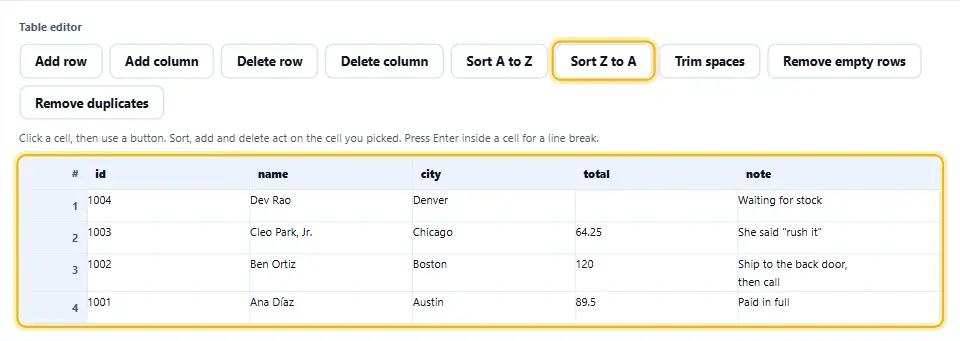
Three clean up buttons save a lot of time. One trims stray spaces. Another removes empty rows. The third removes duplicate rows, and it keeps the first copy.
The header row stays where it is when you sort. So your column names never jump into the data.
Escape And Unescape A Field
Some jobs need only one field. Maybe you must put a sentence with commas and quotes into a CSV. The escape box does that. It wraps the text in quotes and doubles every quote inside.
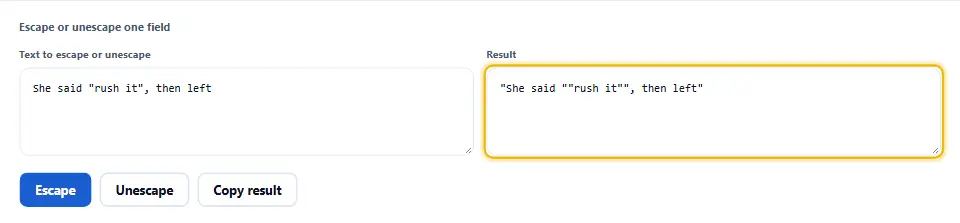
In the other direction, unescape removes the outer quotes and turns each doubled quote back into one. So you can read a field that came out of a file.
Line Breaks Inside Cells
A CSV cell can hold several lines, as long as quotes wrap it. Notes and addresses often do. Many tools break such a row in two. This one keeps it whole.
In the table, press Enter inside a cell to add a line break. Then the output wraps that cell in quotes for you.
So a file with multi line text opens, edits and saves without damage.
Delimiters And Quotes
CSV means comma separated values, but real files vary. Some use semicolons, because the comma is a decimal mark in many countries. Others use tabs or pipes. The reader checks the first lines and picks the right one.
You can also pick a different delimiter for the copy. So you can read a semicolon file and save it with commas, or the other way round.
The writer follows the standard rule. It quotes a field that has the delimiter, a quote, a line break or a space at the edge. You can also quote every field if a strict import needs it.
A Guard For Spreadsheet Formulas
A cell that starts with an equals sign can run as a formula when someone opens the file in Excel. That is a known attack, called CSV injection. So the guard adds an apostrophe in front of such cells.
It leaves normal numbers alone, even negative ones. You can switch the guard off if you know the data is safe.
Why Use An Online CSV Viewer
A spreadsheet app is heavy for a quick look. It also guesses types, so it can turn a ZIP code into a number and drop the zero. A plain viewer shows your text as it is.
Besides, the tool opens on any device, with nothing to install. So you can check a file on a laptop at work or on a phone on the train.
Finally, the output stays plain CSV. You can paste it into a database import, a script or an email.
Safe By Design
The tool draws cells as text and never as markup, so a hostile file cannot run code in your page. Also, it never runs a formula from your data.
Using The CSV Editor, Step By Step
Four steps take you from a raw file to a clean one.
- 1
Paste your CSV
Paste it, open a file, or try the sample.
- 2
Read the table
Check the columns. Switch the header option if the first row is data.
- 3
Edit and clean
Type in cells. Sort, add, delete or remove duplicates with a button.
- 4
Copy or save
Copy the CSV, or save it as a file with the delimiter you want.
What This CSV Editor Does Differently
It is light, it is private, and it keeps your data as you wrote it.
Real editing
Click a cell and type. No second window, no export step.
Multi line cells
Line breaks inside a field stay in that field.
Any delimiter
Comma, semicolon, tab and pipe, read and written.
Formula guard
Cells that look like formulas get a safe prefix.
No type guessing
ZIP codes keep their zeros. Long ids stay exact.
Nothing leaves your tab
Your browser does the work. We never see your file.
Habits For Editing CSV Files Safely
A few habits keep your data clean.
- Keep a copy. Save the original before you edit. A copy costs nothing.
- Check the delimiter. If everything lands in one column, pick the right delimiter by hand.
- Keep the header row. Column names make the file readable and keep imports working.
- Use UTF-8. It keeps accents and other scripts intact. The download starts with a mark so Excel reads it right.
- Quote text with commas. The tool does it for you, but check addresses and notes.
- Trim before you compare. Extra spaces make two equal values look different.
- Remove duplicates last. Trim first, then remove duplicates. Otherwise, copies with spaces survive.
- Sort on the right column. Click a cell in that column before you press a sort button.
- Keep zeros as text. Do not open a ZIP code column in a spreadsheet and save it back.
- Test with a few rows. Try ten rows in your import first. Then load the whole file.
- Mind private data. Delete personal columns before you share a file.
Common CSV Mistakes This Tool Prevents
Each of these quietly damages a file. The editor guards against them.
Lost leading zeros
ZIP codes and phone numbers keep their zeros as text.
Formula injection
A cell that starts with = gets a safe prefix.
Broken quotes
An unclosed quote shows a clear message instead of a messy table.
Split multi line rows
A cell with a line break stays in one row.
Wrong delimiter
The reader checks the first lines and picks the delimiter.
Uploading private files
Many viewers send your file to a server. This one never does.
CSV Editor Online Questions People Ask
Is this CSV editor online free?
Yes. It costs nothing, needs no account and has no limits. It runs in your browser, so we have no server cost to pass on.
Is my file uploaded anywhere?
No. Your browser reads the file and draws the table. Nothing reaches this site, and we keep nothing.
How do I open a CSV file?
Press Open a file, or paste the text into the left box. The table appears at once.
How big a file can I open?
A few megabytes. The table shows three hundred rows at a time, and a button adds more.
Can I edit a cell?
Yes. Click a cell and type. The CSV on the right updates a moment later.
How do I add a line break in a cell?
Press Enter inside the cell. The output then wraps that cell in quotes.
What delimiters work?
Comma, semicolon, tab and pipe. The tool detects them, and you can pick one by hand.
Can I save with a different delimiter?
Yes. Change the delimiter you copy. So you can read a semicolon file and save it with commas.
What does the first row option do?
It treats the first row as column names. Switch it off if your file starts with data.
How does sorting work?
Click a cell in a column, then press a sort button. Numbers sort by value, and the header row stays on top.
Which duplicates does it remove?
Rows that match another row in every cell. The first copy stays, and the later ones go.
What is the formula guard?
A cell that starts with =, +, - or @ can run as a formula in a spreadsheet. The guard adds an apostrophe in front.
What does escape do?
It wraps a text in quotes and doubles each quote inside, so one field is safe in a CSV file.
What does unescape do?
It removes the outer quotes and turns each doubled quote into one. So you can read a field from a file.
Does it keep leading zeros?
Yes. Every cell is text, so 00123 stays 00123.
Will Excel open the file I save?
Yes. The download starts with a UTF-8 mark, so accents show correctly in Excel.
Does the tool change my original text?
No. The left box stays as you pasted it. Your edits live in the table and the CSV on the right.
What if my file has a broken quote?
The tool shows a message that names the problem. Fix the quote and the table loads.
Does it work on a phone?
Yes. The panels stack and the table scrolls. For long edits, a keyboard is still easier.
Handy Companions For Data Work
Editing is one step. These three tools handle the steps around it.
Turn a CSV export into typed JSON.
Open tool →Turn XML, YAML and JSON into CSV.
Open tool →Open an Excel file and convert it.
Open tool →
Ready To Edit Some CSV?
Paste your file, change what you need, and copy the result. The editor is free, needs no account, and keeps every byte on your device.