Free Image Hosting
Upload a Picture and Get a Link in Seconds
Drop a picture into this free image hosting tool, and it gives you a direct link, plus HTML, Markdown and BBCode. Paste the link into an email, a forum or a web page.
- FreePrice
- 2 MB eachLimit
- 3 to 30 daysKept for
- NoneSign-up
Free Image Hosting
Upload a picture and get a link you can share anywhere
The image host is not connected yet, so uploads are switched off.
Ready. Choose a picture and the link appears here.
What Free Image Hosting Does for You
Free image hosting puts your picture on a web address. You upload the file, and you get a link back. Anyone with that link can see the picture.
Sooner or later you will need a link to a picture, and this makes one quickly. An email signature needs a link to your photo. A forum post needs a link to a screenshot. A web page needs a link to its image.
This tool keeps the steps short. You drop in a picture, and your browser shrinks it first. Then the picture goes to our image host, and the link appears on the page.
Pictures stay online for 3, 7, 15 or 30 days, as you choose. So this is a quick way to share, and not a place to store a logo for years. We say that up front, because honest limits beat surprises.
How This Free Image Hosting Works
First, your browser reads the picture and makes it smaller. Next, it solves a tiny puzzle that proves a person is on the other end. Then it sends the file to the image host, which checks the file, scans the picture and stores it.

The host answers with a link on our own domain. You copy that link and use it wherever you like. From drop to link, the wait is only a few seconds.
How a Picture Becomes a Link You Can Share
Drag a picture onto the large dashed area, or click that area to browse your files. You can also copy a picture and paste it with Ctrl+V. Tick the box that says you have the right to share the picture, because that is the one rule.
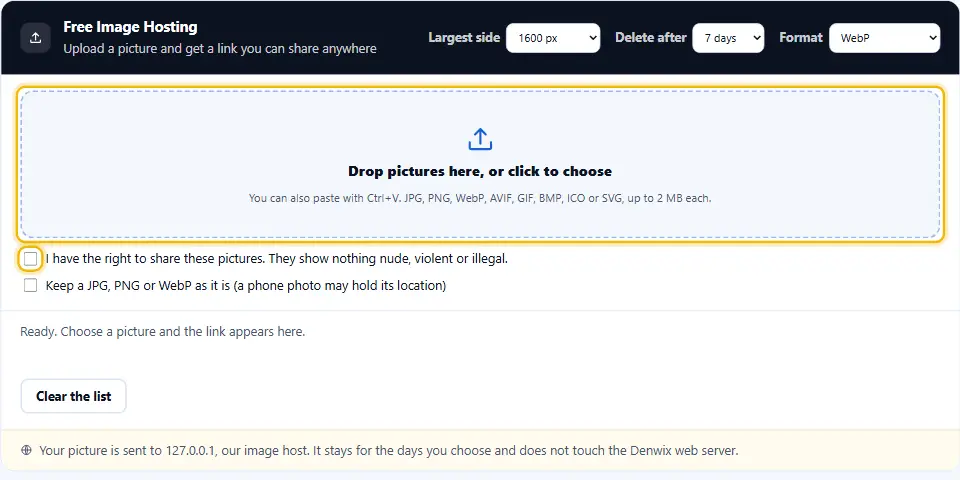
Choose how long the picture stays online, from 3 to 30 days. You can add up to five pictures at once. Each one gets its own row with a preview, a status line and its links.
Four Codes You Can Paste Anywhere
Every upload comes with four ready-made codes. The direct link is a plain web address that ends in the picture. Use it for email, chat and social posts.
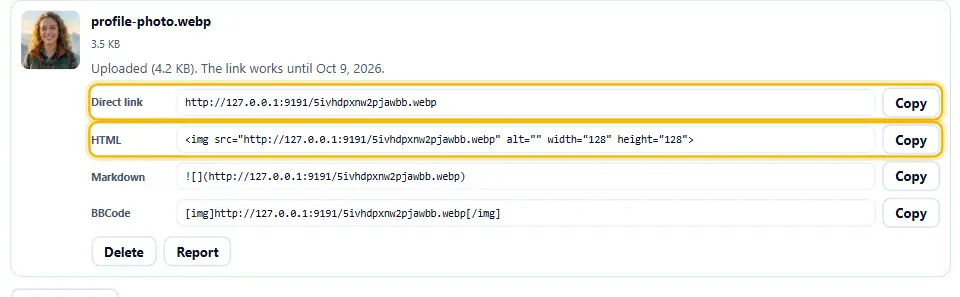
The HTML code is an img tag with the picture size already filled in. Markdown fits notes and README files, and BBCode fits many forums. Press Copy beside the one you need, and the button turns green to tell you it worked.
Shrink Your Picture Before You Upload
Phone photos often weigh 4 MB or more. That is too big for most web pages, and it is over our 2 MB limit. So the tool shrinks the picture in your browser first.
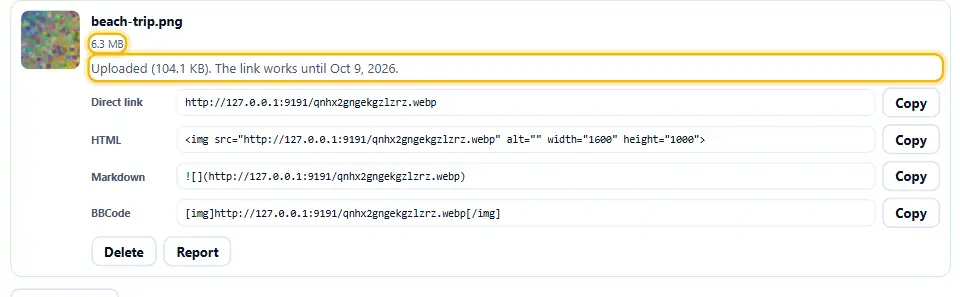
Pick the largest side from the list: 2400, 1600, 1200 or 800 pixels. Your picture keeps its shape, and only the size changes. If the result is still over 2 MB, the tool tries again with a little less quality.
Why Your Picture Becomes a WebP by Default
WebP pictures are usually much smaller than JPEG or PNG at the same look. Every modern browser and mail app shows them. If you need a different format, switch the Format menu to JPEG, or to Same as the file.
Any Picture Format, Safely Converted
Which file format you start with hardly matters, because the browser converts it. Drop a JPG, PNG, WebP, AVIF, GIF, BMP, ICO or SVG file, and your browser opens it. HEIC photos from an iPhone work too, where the browser can read them.
Then the tool draws the picture again and saves it as a plain WebP, JPEG or PNG. That makes every upload safe to check and light to load. A GIF becomes one still picture, so nothing moving can hide a bad frame.
Your Photo Location Stays Private
A photo from a phone often carries hidden data. It can hold the place where you took the picture, the time and the phone model. People call that EXIF data.
When the tool shrinks your picture, it draws it again from scratch. As a result, the hidden data does not come along. Tick Keep the original file only if you want the data to stay.
Use Your Link in an Email Signature
Gmail needs a public https link for every picture in a signature. That is precisely what the upload returns. Upload your photo, copy the direct link, and paste it into the Photo link field of the email signature generator.
Keep in mind that the link works for 30 days. So for a signature you plan to use for years, host the picture on your own website instead.
Use Your Link in Forums, Blogs and Chats
Paste the direct link into a chat, and most apps show the picture at once. On a forum, paste the BBCode version. In a blog or a README, use the Markdown or the HTML.
For a web page of your own, remember the alt text. Fill in the alt part of the HTML code with a short description, so that people who cannot see the picture still understand it.
How Long Pictures Stay Online
You choose how long a picture stays online: 3, 7, 15 or 30 days. Then we delete it for good, and the link stops working. That limit is deliberate. It keeps the service free and stops old pictures piling up.
If you need a picture for longer, upload it again before it expires, or host it on your own site. Never use one of these links for something you need next year.
Removing or Flagging a Picture
After each upload you see a Delete button. It removes the picture at once, and the link stops working. Keep the page open, because the delete key lives only in your tab.
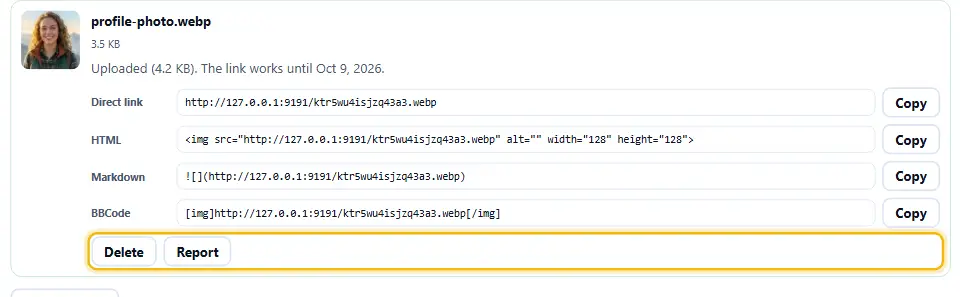
Anyone can press Report on a picture that breaks the rules. A reported picture disappears straight away, and then we look at it. A picture that breaks the rules is taken down for good.
Rules for Uploads
Upload only pictures that you own, or that you have the right to share. Do not upload anything illegal, anything that shows violence or hatred, nude or adult content, or other people's private papers and photos.
Every picture also goes through an automatic safety check before we save it. The check refuses a picture that looks nude, violent or harmful. If the check cannot answer, we save nothing. No check is perfect, so we also remove reported pictures and may block an address that keeps sending bad ones.
Upload Limits Explained, With the Reasons
Each picture can be up to 2 MB, and you can send five at once. Each visitor can upload about 30 pictures an hour. The host takes only JPG, PNG and WebP files.
The host reads every file from the inside, and not by its name. A renamed file cannot sneak through, and neither can a picture with something hidden after its end. The host stores only plain JPG, PNG and WebP pictures, and it refuses SVG files, GIFs and animated pictures, because they can carry scripts or hide frames. These limits protect the service and keep it free.
How the Check Works Without a Captcha
Many upload sites show a captcha from another company. That loads a third-party script, and it tracks you. We use a small puzzle instead. Your browser solves it in about a second, and nobody needs to click a single traffic light.
For a person, this is invisible. For a bot that sends thousands of files, the puzzle adds up quickly, and the hourly limit does the rest.
Where Your Uploaded Pictures Live
The Denwix web server stores none of your pictures. They live in object storage on Cloudflare R2, behind an image host on our own domain. That keeps the website fast and the pictures separate from it.
The image host serves each picture with safe headers. Its headers tell the browser to handle the file strictly as a picture, never as a web page. A noindex hint also keeps search engines from listing it.
Jobs This Tool Should Not Handle
Choose your own hosting for any picture that has to last for years. A logo, a product photo or a diagram for your own website belongs on your own hosting. Do not use it for private or sensitive pictures either, because anyone with the link can open them.
Use it for quick jobs: a screenshot for a forum thread, a photo for an email signature test, or a picture for a draft. For those, it is fast and free.
Hosting a Picture With Denwix
There is no sign-up form, no email box and no waiting line to join.
- 1
Tick the rights box
Confirm that the picture is yours to share.
- 2
Drop the picture
Drag it in, click to choose, or paste it.
- 3
Wait a moment
Your browser shrinks it, then it uploads.
- 4
Copy your link
Take the direct link, HTML, Markdown or BBCode.
Image Hosting Built to Be Fast and Fair
Most free image sites are slow, crowded with ads or tracking. This host keeps things plain by design.
Shrinks first
Smaller pictures upload fast and load fast.
Strips location data
Photo details do not travel with the file.
Four code formats
A plain link, plus snippets for HTML, Markdown and BBCode.
Your own domain
Links come from our host, not a stranger's site.
Delete any time
One button removes the picture at once.
No captcha, no tracker
A small puzzle replaces third-party scripts.
Smart Habits for Sharing Pictures Online
Small habits that keep your pictures light and your privacy safe.
- Use 1600 pixels. It looks sharp and stays small.
- Prefer WebP. Your eye sees no difference, while the file shrinks a lot.
- Write alt text. Describe the picture in the HTML code.
- Keep the page open. Your delete button lives in the tab.
- Mind the 30 days. Re-upload before a link expires.
- Skip private photos. Anyone you share the address with will see the picture when they open it.
Six Mistakes With Image Links
Each one leads to a broken picture or a privacy leak.
Treating it as a logo store
When 30 days have passed, this link returns nothing at all.
Uploading a huge file
Files above 2 MB are refused. Shrink it.
Sharing a private photo
Anyone you share the address with will see the picture when they open it.
Leaving out alt text
Screen readers then skip your picture.
Closing the tab before you are done
That also loses your delete key.
Uploading someone else's work
Upload only the pictures you may legally share.
Free Image Hosting Questions People Ask
Does this free image hosting cost anything?
Yes. There is no price, no account and no watermark. The limits are 2 MB per picture and 30 days online at most.
What are the steps to upload an image and receive a link?
Tick the rights box, drop your picture on the box and wait a moment. The direct link appears under the picture.
How long does my picture stay online?
For the time you choose: 3, 7, 15 or 30 days. Once the time is up, we delete it and the link stops working.
Can I turn an image to a URL for an email?
Yes. Copy the direct link, then paste it where your email tool asks for an image address. For a signature, paste it into the Photo link field of the Denwix signature generator.
What kinds of picture files does it accept?
Nearly any picture format works: JPG, PNG, WebP, AVIF, GIF, BMP, ICO or SVG. Your browser opens it and turns it into a plain WebP, JPEG or PNG before it uploads. A GIF becomes one still picture, and an SVG becomes a flat picture. Renaming another file to .jpg does not work, because the host reads the file itself and refuses anything that is not a real picture.
How large may a picture be?
Each picture can be up to 2 MB after shrinking. The tool shrinks it for you first.
Does it remove location data from my photo?
Yes, unless you tick Keep the original file. Drawing the picture again leaves the hidden data behind.
Is it possible to delete a picture after uploading?
Yes. Press Delete under the picture. Do it before you close the tab, because the delete key lives only there. Otherwise the picture disappears when its days run out.
Who gets to view my picture?
Just the people you give the link to. The link is long and tough to guess, yet it works as an address and not as a password. Keep private pictures off this service.
Is it safe?
The host checks every file by its real type, scans every picture automatically, serves it with safe headers and keeps it apart from the Denwix website. Even so, never upload anything you want to keep secret.
May I show these pictures on my own website?
Yes, although they expire. For a site that should last, host the pictures on your own hosting.
What should I do about a picture that breaks the rules?
Press Report under the picture. It disappears at once, and we check it.
More Tools for Pictures
Handy next steps once your picture is online.
Put your picture into a clean HTML signature.
Open tool →Make pictures smaller before you share them.
Open tool →Check the exact size of any picture.
Open tool →
Have a Picture You Want to Send Around?
Drop it in the box and your link appears in seconds. This free image hosting tool needs no account and keeps your picture off the Denwix web server.