.htaccess Redirect Generator
Move A Page Without Losing It
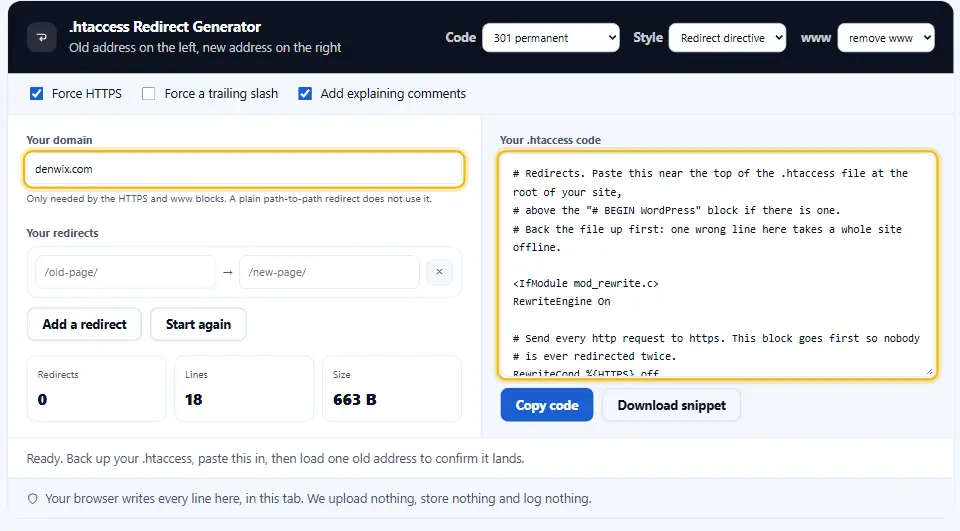
This htaccess redirect generator writes the block for you, so a moved page arrives without losing its traffic. Put the old path on the left and the new address on the right, then pick a code. The finished lines appear beside the rows, ready to paste.
- FreePrice
- 4Status codes
- 2Rule styles
- NoneUploads
.htaccess Redirect Generator
Old address on the left, new address on the right
Only needed by the HTTPS and www blocks. A plain path-to-path redirect does not use it.
Your redirects- Redirects
- 0
- Lines
- 0
- Size
- 0 B
Ready. Add a redirect and the code appears on the right.
When To Use An Htaccess Redirect Generator
A redirect keeps an old address working after the page behind it moves. Visitors land in the right place, and search engines follow along.
Without one, the old address returns 404. So every link pointing at it stops counting, and the ranking it earned goes with it.
Still, Apache is strict about the syntax. One misplaced slash can loop a whole site, therefore it pays to generate the block rather than type it.
Rewrite rules reward a careful read. the Apache mod_rewrite documentation is dense, and it is the one source that is never wrong.
Choosing the Status Code for Each Redirect
Send a 301 when the page has moved for good. Search engines update their index, then pass the old page's signals along to the new one.

A 302 means temporary. Because the engine keeps the old address on file, use it only when the page really is coming back.
Codes 307 and 308 are the strict pair. Since they promise the request method will not change, a form submission stays a submission.
Where This Code Belongs
These files work on Apache and LiteSpeed. Meanwhile nginx never reads them, so its redirects live in the server config instead.

Put the file in the folder you want to affect. One at the web root covers the whole site, while one inside /blog/ covers only that folder.

Here too, the sequence of the rules changes the outcome. Apache reads from the top down, so the first rule that matches a request is the rule that runs.
Redirect Or RewriteRule
The Redirect directive is short and reads plainly, which suits a simple move from one path to another. RewriteRule costs a few more characters, yet it accepts patterns, so one line can cover an entire folder. Pick the first style unless you need the second.
How To Write A Redirect Block
Four steps, and your server sees nothing until the final one. Because nothing uploads, the first three cost you nothing.
- 1
Add a row per move
Put the old path first, then the new address after it. Add as many rows as you have pages to move.
- 2
Pick your status code
Leave it on 301 for a permanent move. Switch to 302 only while a page is away for a while.
- 3
Turn on site-wide blocks
Force HTTPS, force www, force a trailing slash. Each switch adds a tested block above your own rows.
- 4
Paste it into .htaccess
Copy the code near the top of the file, then save. Test one old address straight away.
What This Redirect Tool Handles
Redirect syntax punishes small mistakes loudly. Instead of memorising it, let this htaccess redirect generator do the typing.
Four codes, plain English
Each of 301, 302, 307 and 308 carries a short label. So you pick the meaning rather than recalling the number.
Two styles, one switch
Redirect directives suit single pages, while RewriteRule suits patterns. Therefore both sit behind the same dropdown.
Site-wide blocks included
HTTPS, www and trailing slashes are three classic jobs. Each one arrives as a block that already works.
Notes in the file that make sense months later
Every block carries a short note above it. In a year, that note explains why the rule exists at all.
A running line count
Rows, lines and size sit under your redirects. As a result you notice when a tidy list quietly grows huge.
Nothing leaves the tab
Your browser writes the whole block by itself. Because no request goes out, your old addresses stay yours.
Habits That Keep Redirects Safe
A bad redirect breaks a site quietly, and usually at night. Still, a handful of habits prevent nearly all of it.
- Keep a dated copy of .htaccess before editing. Copy .htaccess somewhere safe before you edit. Since a syntax slip returns 500 on every page, you want a way back.
- Send visitors to the nearest equivalent page. Send an old article to a similar one, not to the homepage. Otherwise visitors bounce, and the move helps nobody.
- Send visitors directly to the final URL. A redirect to a redirect costs time on every visit. So update old rules instead of stacking new ones on top.
- Keep permanent moves running. Leave a 301 in place for at least a year. Because old links live a long time, removing it early undoes the work.
- Mind the order. Apache stops at the first matching rule. Therefore put specific paths above broad patterns, never the other way round.
- Check the redirect once before you move on. Open one old address and watch where it lands. Then try a second address that should not redirect at all.
Three Redirect Faults To Watch
Each of these has taken a real site down. Yet all three take about a minute to avoid.
Building a loop
A rule that sends /a/ back to /a/ never finishes. Browsers give up, so visitors meet an error instead of a page.
Sending everything home
A bulk move to the homepage feels tidy and helps nobody. Rather than guess, map each old page to its nearest match.
Reaching for 302 by habit
A temporary code tells engines to keep the old address. So a permanent move sent that way never fully transfers.
Redirect Questions Answered
Which file and line should hold these rules?
In the .htaccess file at the root of your site, near the top. If that file does not exist yet, create it with exactly that name, dot included. Then upload it and open an old address to check.
Will these .htaccess rules run on an nginx server?
No. Nginx never reads these files, so the rules simply do nothing there. You need matching rewrite lines inside the server block instead, which usually means asking your host to add them.
Do redirects hurt rankings?
A single 301 passes almost everything through. Chains are the real cost, because each extra hop adds delay and gives a crawler another chance to stop. In short, keep every redirect one step long.
For how long should a 301 stay in place?
At least a year, and longer while the old address still brings traffic. Since links and bookmarks outlive most site changes, an old rule costs you nothing except one line.
Can one rule move an entire folder of pages?
Yes. Choose the RewriteRule style and use a pattern, then every address under that folder follows one line. It saves writing a separate row for each page.
Does this Denwix tool send anything to a server?
No. The rows, the blocks and the download all happen inside this tab. Your old site structure never travels anywhere, which matters while a migration is still confidential.
Verify the Result With These Tools
Redirects are worth testing once they go live. So these three finish the job properly.
Redirect Chain Checker
Follow every hop an address takes before it lands.
Open tool →HTTP Status Code Checker
Confirm the code your new rule actually returns.
Open tool →Robots.txt Generator
Write the file crawlers read before anything else.
Open tool →
Write Your Redirect Block Now
Add a row, pick a code, then copy the result. It takes about a minute, and nothing about your site leaves this tab.