Redirect Chain Checker
See Every Hop Along The Way
Your browser jumps through every redirect quietly and only shows where it lands. This redirect chain checker shows every step instead, with the code on each hop and a note about anything that costs you speed or ranking.
- FreePrice
- 10Hops followed
- NonePages downloaded
- NoneSign-up
Redirect Chain Checker
Every hop between the address you typed and the page you land on
Up to ten hops are followed. Every hop is checked again before we visit it, so a redirect into a private network stops the trace instead of being followed.
Ready. Paste the old address and press the button.
What a Redirect Chain Checker Reveals
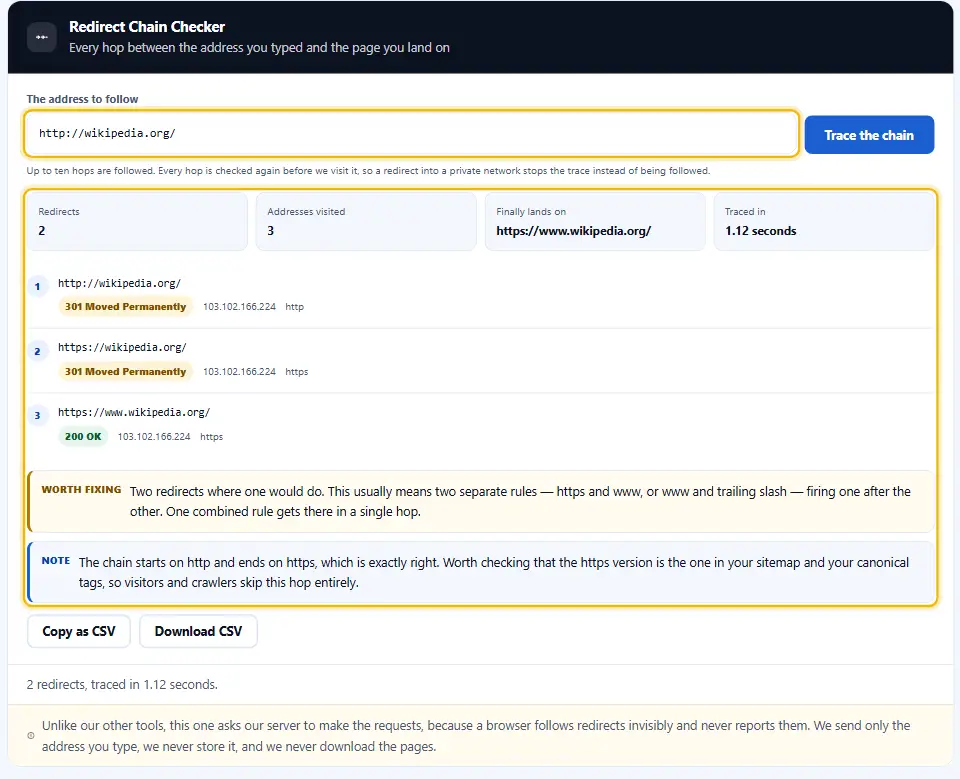
One redirect is normal and healthy. Four in a row is a page that loads slowly and loses something at every step.
Your browser hides all of it. It follows the hops quietly, then shows the final page as though nothing happened in between.
So chains grow unnoticed for years. Because each rule looked sensible on the day somebody added it, nobody ever sees the total.
A chain costs you crawl budget and patience. Google's page on redirects covers what each kind signals.
What Each Extra Hop Costs
Every hop is a fresh round trip before a single pixel appears. On a slow mobile connection, three of them add up to real waiting.

Search bots stop following hops earlier than browsers. Since they follow only a handful of hops, a long chain leaves the final page effectively unreachable.
Ranking signals thin out as well. Therefore a page sitting at the end of four redirects inherits less than one sitting at the end of a single 301.
How Chains Grow Without Anybody Noticing
Most chains are two rules stacking. The http rule sends you to https, then the www rule fires, and suddenly one address costs two hops.
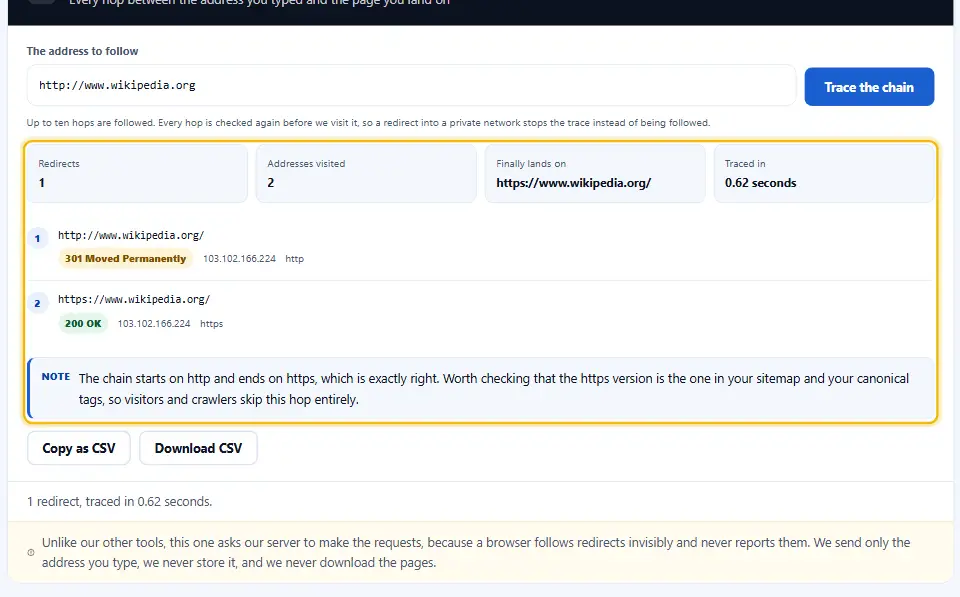
Migrations add another layer. An old address points at the 2019 structure, which points at the 2023 one, and each rule works perfectly on its own.
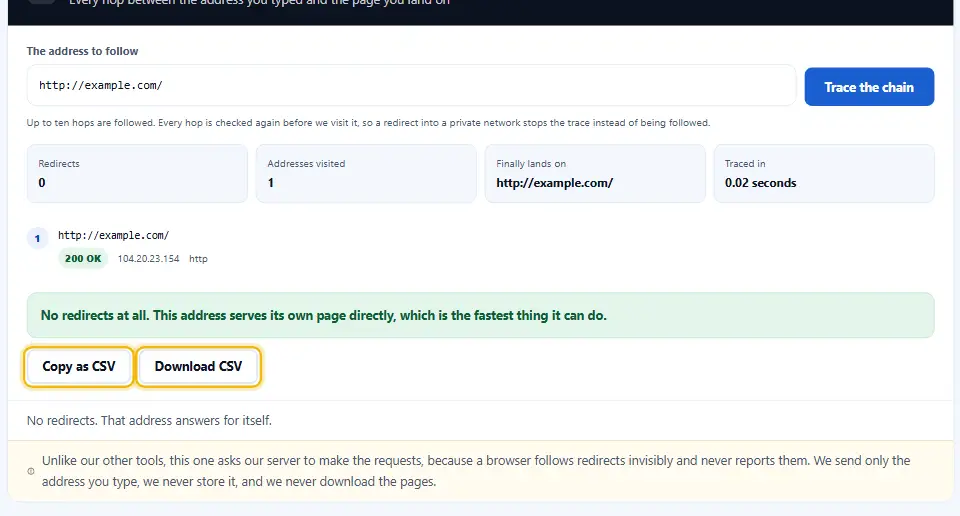
A single fix always solves it. Point the first address straight at the final one, rather than leaving the old rules to hand the visitor along.
Loops And Downgrades
A loop returns to an address it already visited, so nobody ever lands anywhere. A downgrade drops from https back to plain http part way along, which browsers flag and visitors notice. The trace here reports both by name, because the two faults look identical from the outside and need completely different fixes.
Tracing a Redirect Chain in Four Moves
Paste, trace, read. Because only headers travel, a ten-hop chain still finishes in a couple of seconds.
- 1
Paste the first address
Use the old address, the one people still click. Starting halfway through hides the hops you want to see.
- 2
Press trace
Each hop gets requested in turn, headers only. The chain builds downward as the answers come back.
- 3
Read the hop list
Every step shows its code, its address and whether it stayed encrypted. The final landing page sits at the bottom.
- 4
Act on the findings
Errors sit at the top, with warnings below them. Each one names the hop it refers to, so the fix is obvious.
What This Chain Checker Reports
Most checkers list the hops and leave you to judge them. Instead, this one says which hops are a problem and why.
Every hop, numbered
Code, address and encryption per step, in order. So a chain you thought was one redirect turns out to be three.
Loops named as loops
A repeated address ends the trace immediately. Therefore you see the loop rather than a vague timeout message.
Downgrades flagged
A chain that falls from https to http gets called out. Since everything after that point travels in the clear, it matters.
Temporary codes questioned
A 302 in the middle of a permanent move wastes the move. As a result the finding tells you to make it a 301.
Private hops refused
Each hop gets checked again before we follow it. A redirect pointing into a private network stops the trace, rather than taking us there.
No pages downloaded
We read the reply headers and move on. Because no body ever arrives, the trace stays light on everybody involved.
Keeping Redirects Short
Chains are easy to prevent and awkward to unpick later. These six habits keep them at one hop.
- Target one redirect and no more. One redirect between the old address and the new one. Anything beyond that is a rule somebody forgot to update.
- Combine your site-wide rules. Handle https and www in one block, not two. Otherwise every visitor pays for two hops before the page even starts.
- Update old rules on migration. When a page moves twice, rewrite the first rule. So the oldest address still jumps straight to the newest page.
- Make sure each step stays on https. A single plain-text step undoes the encryption for everything after it. Therefore all hops should stay on https.
- Trace after a launch. Check three old addresses once a migration goes live. Because chains form on day one, that is when to catch them.
- Point your links straight at the last URL. Fix your menus and your sitemap to point at the destination. Then most visitors never enter the chain at all.
Chain Faults Worth Fixing
These three appear constantly in traces. Each one is invisible until somebody follows the hops on purpose.
Stacking rules over years
Each migration adds a hop to the same old address. However, nobody removes the earlier ones, so the chain only grows.
Ending on a 404
A redirect pointing at a page that no longer exists is worse than none. So every link into that chain now leads nowhere.
Keeping links pointed at the retired URL
Menus and sitemaps often still name the pre-redirect address. Rather than pay the hop forever, update the links themselves.
Redirect Chain Questions
At what point do redirects become a problem?
One is fine and two is tolerable. Three or more starts costing real speed, and crawlers follow only a handful before giving up. In short, treat two as the line you do not want to cross.
Do chains actually hurt rankings?
Indirectly, yes. Each hop adds delay, and a page that loads slowly competes badly. A long chain can also stop a crawler reaching the destination at all, which matters far more than any signal loss.
Why does this tool use your server?
Because a browser follows redirects invisibly and never reports the steps. Our server makes the requests instead, reading headers only. We send just the address you typed and keep nothing afterwards.
What is a redirect loop, and why does it break the page?
Two rules are pointing at each other, so nothing ever resolves. Visitors see a browser error and crawlers index nothing. Find the pair of rules and remove one of them.
Can I trace a chain across domains?
Yes. Hops between different sites get followed the same way, which is useful after a rebrand. Each hop still gets checked before we visit it.
Does the Denwix checker fetch the full pages?
No. We ask each hop for its headers only, then move to the next. Nothing about the page content reaches us, and nothing gets stored.
Fix What The Trace Found
A chain usually points at a rule that needs rewriting. So these three handle the rest.
Write one rule that jumps straight to the final page.
Open tool →Check the destination answers 200 before you point at it.
Open tool →Confirm the https end of the chain has a valid certificate.
Open tool →
Follow Your Redirects Properly
Paste an old address and watch every hop appear. It is free, it takes seconds, and no page content ever gets downloaded.