JSON To Code Converter
Classes For Nine Languages
This JSON to code converter reads a sample and writes the classes for you. Pick C#, Java, TypeScript or six more languages. It runs in your tab.
- FreePrice
- 9Languages
- NoneSign-up
- NoneUploads
JSON to Code Converter
Turn a JSON sample into classes for nine languages
- Classes
- 0
- Fields
- 0
- Lines
- 0
Ready. Paste a JSON sample, pick a language and the code appears.
What A JSON To Code Converter Saves You
You get a JSON reply from an API. Now you need a class to hold it. Writing that class by hand is slow and dull. A typo in one field name breaks the whole thing.
This JSON to code converter does the dull part. Paste a sample, pick a language, and the classes appear. Copy them into your project and move on.
It reads the whole sample, not just the first item. So a field that is missing from some items becomes optional. A field that holds numbers and decimals becomes a double. A null makes a field nullable.
Nothing is uploaded. Your sample may hold real customer data. Because your browser does the work, none of it reaches this site.
Think about a typical day. A teammate adds a field to the API. Then your app fails in testing, because the class does not know the field. With generated models, you paste the new reply, copy the class, and the fix takes a minute. Also, you can compare the old and new code to see exactly what changed.
JSON To C# Class Online
Choose C# and you get plain classes with get; set; properties. Pick System.Text.Json or Newtonsoft.Json, and the tool adds the right attribute to every property. Keys like first-name become FirstName, and the attribute keeps the original name.

Dates in ISO format become DateTime. Optional fields become nullable types, so your code stays honest about what may be missing.
Also, the tool writes a default for required strings, so your code does not hit null by surprise. Then you can add your own logic around the class.
For more detail, see: RFC 8259, the JSON standard.
JSON To Java Class Online
Java gets private fields with getters and setters, the classic bean shape. Add Jackson, and each field carries a @JsonProperty annotation. Or choose Lombok, and the tool writes @Data instead of the long accessors.
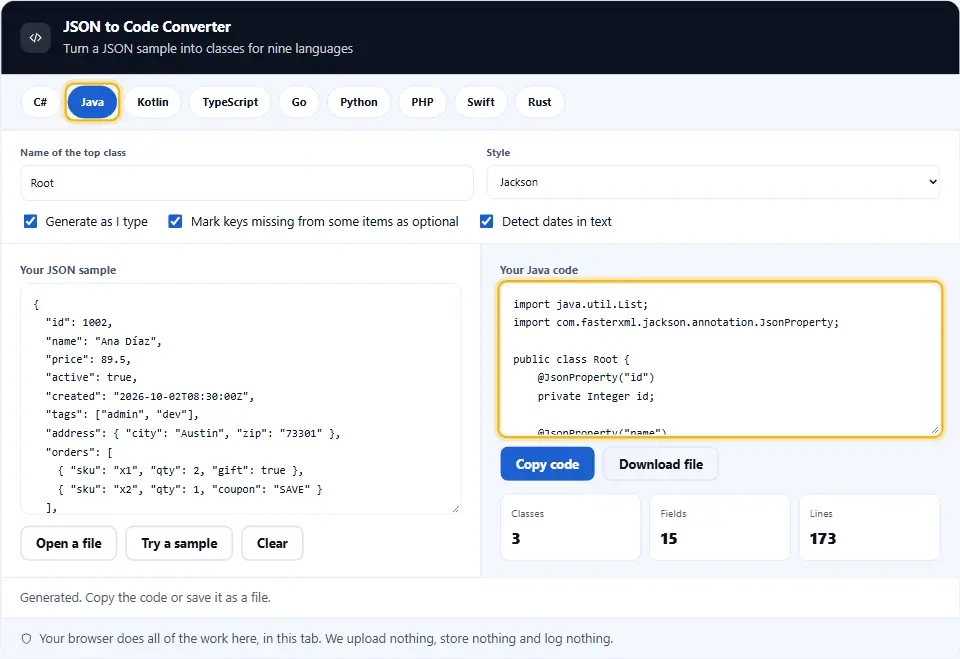
Numbers use the boxed types, such as Integer and Double. That way a missing value can be null.
Records are another option in modern Java, but beans work everywhere. That is why this tool writes the bean shape. Then you can turn it into a record by hand if you like.
TypeScript, Kotlin, Go And More
TypeScript gets interfaces, or types if you prefer. An optional field gets a question mark. Kotlin gets data classes, with kotlinx.serialization if you want it.
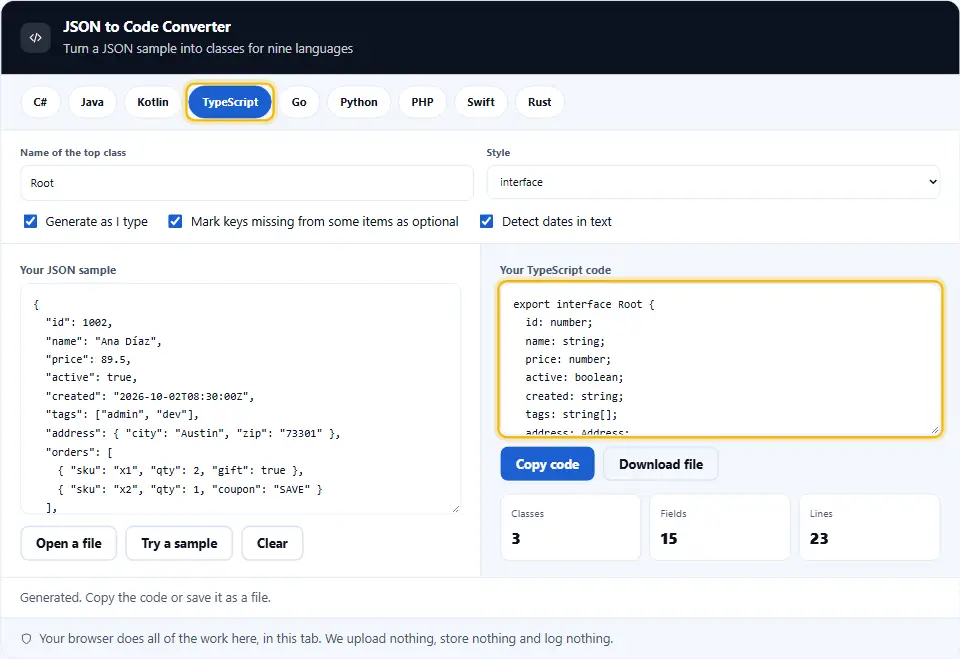
Go gets structs with JSON tags, and optional fields get omitempty. Python gets dataclasses, Pydantic models or TypedDicts. PHP gets typed classes with promoted properties. Swift gets Codable structs, and Rust gets serde structs.
Optional Fields And Nulls
Real data is messy. One order has a coupon, and the next does not. The tool compares every item in a list. If a key is missing from any of them, the field is optional.

A key that holds null in the sample becomes nullable. You can turn the optional rule off if your API always sends every field.
Why does this matter? Because a parser that sees a missing key may throw an error, or may fill a default you did not expect. So nullable types make the intent clear. Then your code must handle the empty case.
Smart Types From Real Values
Whole numbers become int. Whole numbers too big for int become long. Anything with a fraction becomes a double. Text that looks like an ISO date becomes a date type where the language has one.

Safe Names
Keys can break a language. class and new are reserved words. first-name has a dash. The tool renames these safely, and keeps a link to the real key so the data still maps.
For example, a key named 123 becomes _123 in C#, because a name cannot start with a digit.
On this page
- The tool
- What A JSON To Code Converter Saves You
- Using The JSON To Code Converter, Step By Step
- What This JSON To Code Converter Does Differently
- Habits For Generating Models Safely
- Common Model-Writing Mistakes This Tool Prevents
- JSON To Code Questions People Ask
- Handy Companions For JSON Work
Keep going
Using The JSON To Code Converter, Step By Step
Four steps turn a sample into code you can paste.
- 1
Paste a sample
Use a real reply, with several items in each list. More items give better types.
- 2
Pick a language
Click one of the nine buttons. The code changes at once.
- 3
Set the options
Name the top class, choose a style such as Jackson or Pydantic, and decide how to treat optional fields and dates.
- 4
Copy or download
Copy the code, or save it as a file with the right extension.
What This JSON To Code Converter Does Differently
Many converters guess from the first item and stop. These are the extras.
Reads every item
It merges all the items in a list, so optional fields and mixed numbers come out right.
Nine languages
C#, Java, Kotlin, TypeScript, Go, Python, PHP, Swift and Rust, each in idiomatic style.
Real-world styles
Choose Jackson or Lombok, System.Text.Json or Newtonsoft, dataclass or Pydantic.
Safe names
Reserved words and odd keys get safe names, with the original key kept in an attribute.
Exact big numbers
The reader keeps every digit, so a long id becomes a long type and not a rounded double.
Nothing leaves your tab
Samples often hold private data. Because your browser does the work, none of it reaches this site.
Habits For Generating Models Safely
Generated code is a strong start. These habits make it a safe one.
- Use a rich sample. Include items that have every field, and items that lack some. The tool learns from what it sees.
- Keep samples small but varied. A hundred identical items add nothing. Five different ones teach the tool more.
- Include a null on purpose. If a field can be null in real life, put a null in the sample. Then the type allows it.
- Check the numbers. If a price can be 9 or 9.99, include both. Then you get a double and not an int.
- Rename the top class. The name Root says little. Call it Customer or Invoice before you paste it into your project.
- Review the generated names. Rename fields if your team has a style. The attribute keeps the link to the real key.
- Split shared classes yourself. Two objects with the same shape get two classes here. Merge them if they mean the same thing.
- Add validation where it matters. The tool writes shapes, not rules. Add ranges and required checks in your own code.
- Keep the sample with the model. Save the JSON next to the class as a test fixture. It proves the model reads real data.
- Re-run after an API change. Paste the new reply and compare the code. A new field shows up as a new property.
- Test with a real parse. Run the model against the sample in your own language before you trust it.
Common Model-Writing Mistakes This Tool Prevents
Each of these breaks parsing at run time. The converter avoids them.
Typing field names by hand
One wrong letter and the field stays empty, with no error. Generated names come from the data.
Using int for big ids
An id above two billion overflows an int. The tool picks long when the sample needs it.
Forgetting optional fields
A required property fails when a key is missing. Optional fields get nullable types.
Reserved words as names
A field called class will not compile in many languages. The tool renames it safely.
Guessing from one item
The first item may lack a field that later items have. This tool reads every item.
Losing the original key
Renaming without an attribute breaks the mapping. Attributes keep the real key.
JSON To Code Questions People Ask
Is this JSON to code converter free?
Yes. It costs nothing, needs no account and has no limits. It runs in your browser, so we have no server cost to pass on.
Is my JSON uploaded anywhere?
No. Your browser reads the sample and writes the code. Nothing reaches this site, and we keep nothing. Closing the tab clears it all.
Which languages does it support?
C#, Java, Kotlin, TypeScript, Go, Python, PHP, Swift and Rust. Each has its own naming and its own style options.
How does it decide a field is optional?
If a key is missing from any object at the same place, the field is optional. You can switch this rule off.
How does it pick number types?
Whole numbers become int, or long when they are large. Numbers with a fraction or an exponent become double. A mix of int and double becomes double.
What happens to dates?
Text in ISO format, such as 2026-10-02T08:30:00Z, becomes a date type in C#, Go and Python. Elsewhere it stays a string. You can turn detection off.
Can it handle a list at the top?
Yes. A list of objects makes one class from all the items. The top-level type is then a list of that class.
Why is the top class called Root?
It is only a default. Type a better name in the field above, and every file updates.
What if a key is not a valid name?
It gets a safe name, and the real key is kept in an attribute or tag. For example, first-name becomes firstName.
Does it write serialization code?
It writes the models and the attributes that libraries read. You still call your own serializer.
Can I use the output in production?
Yes, but read it first. It is a strong draft. Add validation, rename fields to match your style, and test it against real replies.
Does it support nested lists?
Yes. A list of lists becomes a list of lists in the target language. A list of objects makes a class.
Does the tool change my JSON?
No. It only reads the sample. Your text stays exactly as you typed it.
Does it work on a phone?
Yes. The panels stack and the language buttons wrap. For long samples, a keyboard is still easier.
Handy Companions For JSON Work
Writing the model is one step. These three tools handle the steps around it.
JSON Viewer
Read JSON as a tree or a table, then edit it.
Open tool →JSONPath Tester
Run a path on your JSON and see every match.
Open tool →JSON Formatter
Beautify, minify and validate with the exact line of any error.
Open tool →
Ready To Generate Some Code?
Paste a sample, pick a language, and copy the classes. The converter is free, needs no account, and keeps every byte on your device.