Meta Tag Generator
Only The Tags That Still Work
This meta tag generator writes the head block for one page: title, description, canonical, robots and the two tags every browser needs. It measures your title in pixels while you type, so nothing gets cut later.
- FreePrice
- 9Tags
- NoneSign-up
- NoneUploads
Meta Tag Generator
The head tags every page needs, in the right order
Aim for 50 to 60 characters.
Aim for 120 to 155 characters.
- Tags
- 0
- Title
- 0 px
- Description
- 0 px
Ready. Fill in a title and the block starts building itself.
Meta Tags That Still Earn Their Place
A page needs far fewer head tags than most templates carry. Five do real work. The rest were copied from a tutorial years ago and never questioned.
The five are simple. Tags for charset, viewport, page title, meta description and canonical URL. Two of them talk to the browser, and three of them talk to search engines.
Everything else is optional. Robots matters when you want to change the default, and theme colour matters on a phone. Author and keywords change nothing at all.
So this generator writes a short block on purpose. Google keeps its own list of the tags it understands, and it is shorter than most people expect.
Why Order Matters In The Head
Charset goes first. A browser that has not been told an encoding starts guessing, and when it finds out later it has to parse the page again.

The rule is a byte count rather than a tag count. The declaration must land in the first kilobyte, which is easy to break by putting a long script tag above it.
Viewport comes next, because layout on a phone depends on it. After those two, order is a matter of taste.
Why the Title and Description Serve Separate Roles
The title is a ranking signal and the line people click. It belongs to the page, not to your brand, so lead with the subject and put the brand at the end.
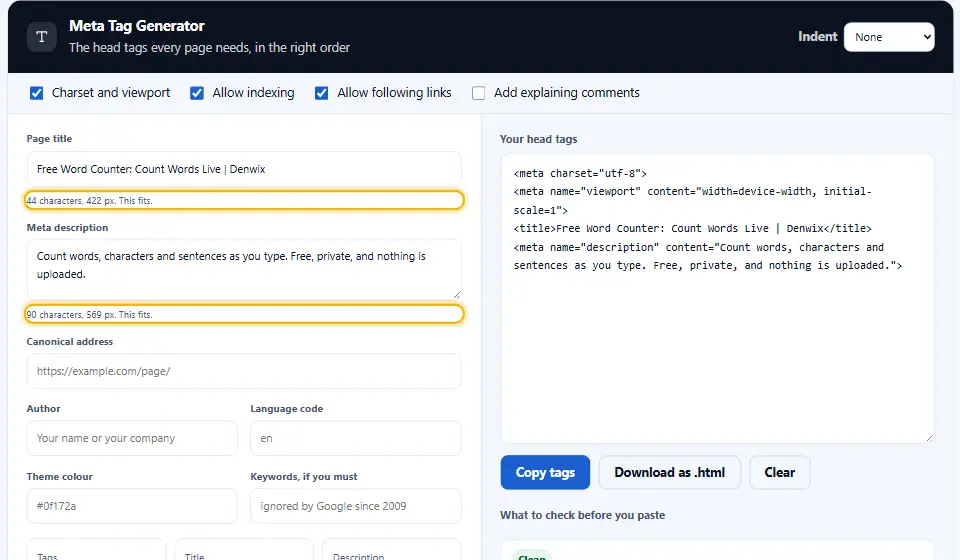
The description ranks nothing. It sells the click instead, and search engines rewrite it whenever they think another sentence answers the query better.
Both get cut by width rather than by letter count, which is why this meta tag generator html readout shows pixels first.
The Keywords Tag Is A Museum Piece
Google dropped it in 2009 and said so publicly. Bing even reads it as a hint of spam. The field is still here because people ask for it, and the note beside it is honest about what it does.
Robots, Canonical And The Two Mistakes
A robots tag that says index and follow changes nothing, since that is the default. Writing it costs a line and teaches the next person that it was needed.
A canonical tag pointing at the page itself is worth having. It settles which of the six possible addresses for that page is the real one.
The two mistakes are opposite and both common. A noindex tag forgotten after go-live, and a canonical on every page pointing at the home page.
Sorting Useful Head Tags From Clutter
The head holds instructions. Anything a reader sees belongs in the body instead, and mixing the two slows the first paint.
Keep scripts out of the top of it. A script tag above the charset line pushes that line past the first kilobyte, and the browser then reparses the page.
Stylesheets are the exception worth making. One link near the top lets the browser start fetching while it reads the rest.
Everything else can wait. Analytics, chat widgets and font loaders all belong lower down, where they cost the reader nothing before the page appears.
Sorting Useful Head Tags From Clutter
The head holds instructions. Anything a reader sees belongs in the body instead, and mixing the two slows the first paint.
Keep scripts out of the top of it. A script tag above the charset line pushes that line past the first kilobyte, and the browser then reparses the page.
Stylesheets are the exception worth making. One link near the top lets the browser start fetching while it reads the rest.
Everything else can wait. Analytics, chat widgets and font loaders all belong lower down, where they cost the reader nothing before the page appears.
Sorting Useful Head Tags From Clutter
The head holds instructions. Anything a reader sees belongs in the body instead, and mixing the two slows the first paint.
Keep scripts out of the top of it. A script tag above the charset line pushes that line past the first kilobyte, and the browser then reparses the page.
Stylesheets are the exception worth making. One link near the top lets the browser start fetching while it reads the rest.
Everything else can wait. Analytics, chat widgets and font loaders all belong lower down, where they cost the reader nothing before the page appears.
Sorting Useful Head Tags From Clutter
The head holds instructions. Anything a reader sees belongs in the body instead, and mixing the two slows the first paint.
Keep scripts out of the top of it. A script tag above the charset line pushes that line past the first kilobyte, and the browser then reparses the page.
Stylesheets are the exception worth making. One link near the top lets the browser start fetching while it reads the rest.
Everything else can wait. Analytics, chat widgets and font loaders all belong lower down, where they cost the reader nothing before the page appears.
Meta Tags For SEO Are A Floor, Not A Ceiling
Correct tags stop a page from being misread. They play no part in lifting your position. Content, links and speed decide that, and no head block substitutes for any of the three.
Using the Denwix Meta Tag Generator
Four steps, and the block builds itself as you go. Meanwhile the notes panel names anything worth fixing.
- 1
Write the title first
Lead with the topic of the page. The readout under the field gives you the width in pixels, so you can see the cut coming.
- 2
Add a description that sells the click
One or two sentences. Say what the reader gets, then stop. Anything past the box is invisible.
- 3
Set the canonical and the robots switches
Type the full https:// address of this page. Leave both switches on unless you genuinely want the page kept out of results.
- 4
Paste the finished block inside your head section
Paste it high in
<head>, above any script. Then check the notes panel once more before you ship.
What Sets This Meta Tag Generator Apart
Most generators write forty lines and let you sort it out. This one writes nine and explains each of them.
Pixels, not characters
Your title is measured the way a results page measures it. Two titles of sixty letters can differ by eighty pixels.
It refuses dead tags
No revisit-after, no rating, no distribution. Nothing reads those, so writing them only adds weight and false comfort.
Plain notes rather than a grade
The Denwix panel lists each missing tag and explains its role. A green tick would tell you less than one clear sentence.
Correct order by default
Charset first, viewport second. That order is a browser requirement rather than a preference, and the comments say so.
Comments you can keep
Tick one box and each tag arrives with a short line saying what it does. Handy when somebody else maintains the template.
Nothing leaves your tab
Unreleased titles and client addresses pass through here. Since the page writes everything locally, none of it reaches a server.
Habits for Writing Meta Tags
Every fix on this meta tag list takes seconds. Together they remove most of the problems an audit finds later.
- Give every page a single title that no other page shares. Duplicate titles across a site are the fastest way to confuse a crawler. Every page needs its own, however similar the pages are.
- Place the topic ahead of your brand name. Searchers skim only the opening words. A title that opens with your company name spends its best space on something they already know.
- Write a description for the click. It has no ranking weight, so treat it as ad copy. Say what the page gives, then stop before the box does.
- Use the full address in a canonical. Keep https:// and the domain in the URL. A relative canonical is legal, and it is also the easiest one to point at the wrong page.
- Check noindex before you launch. Staging sites carry it, and it travels with the template. So search for it once before a site goes live, every time.
- Skip the keywords tag. It tells competitors what you are targeting and tells search engines nothing. The field here exists only because people ask.
- Keep the head block short. Every tag in there is bytes before the first paint. Nine useful tags beat forty that nobody reads.
- Set lang="en" (or your language code) on the html tag. It belongs in
<html lang="en">rather than a meta tag. Screen readers read the lang value to pick a matching voice and accent.
Six Meta Tag Mistakes Audits Keep Finding
Each of these survives a code review because the page still looks fine. The damage shows up in search instead.
A noindex tag forgotten after go-live
The page works, the design is finished, and the site stays invisible for weeks. Check for it the day you go live.
Pointing every canonical at the home page
A template placeholder that nobody replaced. The result tells search engines your whole site is one page.
The same title tag on 30 product pages
Usually a category template. Add the page name to the front and the problem disappears in one edit.
Charset pushed down by a script
A long inline script above the charset line moves it past the first kilobyte, so the browser reparses the page.
A description written for a robot
Keyword lists read badly in a result. A plain sentence earns more clicks, and clicks are what the tag is for.
A page that carries two canonical tags
A plugin adds one, a theme adds another, and search engines ignore both. View the source once and count them.
Meta Tag Questions People Ask
How many meta tags does a page actually need?
Five carry the weight: charset, viewport, title, description and canonical. A robots tag joins them when you want something other than the default, which is index and follow.
Does a meta tag generator help with SEO?
It removes errors rather than adding rankings. Correct meta tags for seo stop a page being misread, while content and links decide where it sits.
How many characters should a title tag hold?
Aim for 50 to 60 characters, and check the pixel number here. Desktop results cut near 580 pixels, so a title of wide letters can be cut at 52 characters.
Why does Google display a title I never wrote?
Because it rewrites titles when it thinks another wording fits the query better. Google explains the behaviour in its documentation on title links.
Is the keywords meta tag worth adding in 2026?
No. Google announced in 2009 that it ignores the tag, and nothing has changed since. Leaving it out costs you nothing at all.
Which part of the page holds these tags?
Inside the head element, as high as you can put them. Charset and viewport belong in the first kilobyte of the document, before any script tag.
Can I use this meta tag generator html output in WordPress?
Yes, though check first. Most SEO plugins already write the title, description and canonical, so adding these by hand would give you two of each.
What does the theme colour tag do?
It tints the browser interface on Android and on installed web apps. Desktop browsers ignore it, so it is a small win rather than a requirement.
Do social networks read these tags?
Only the title, and only sometimes. Cards come from Open Graph tags, which this site has a separate generator for, so write both blocks while you are here.
Do meta tags need to appear in a set order?
For two of them, yes. Charset and viewport belong in the first kilobyte of the document. After those, order is a matter of taste rather than a rule.
Do social networks read these tags?
Only the title, and only sometimes. Cards come from Open Graph tags, which this site has a separate generator for, so write both blocks while you are here.
Do meta tags need to appear in a set order?
For two of them, yes. Charset and viewport belong in the first kilobyte of the document. After those, order is a matter of taste rather than a rule.
Do social networks read these tags?
Only the title, and only sometimes. Cards come from Open Graph tags, which this site has a separate generator for, so write both blocks while you are here.
Do meta tags need to appear in a set order?
For two of them, yes. Charset and viewport belong in the first kilobyte of the document. After those, order is a matter of taste rather than a rule.
Do social networks read these tags?
Only the title, and only sometimes. Cards come from Open Graph tags, which this site has a separate generator for, so write both blocks while you are here.
Do meta tags need to appear in a set order?
For two of them, yes. Charset and viewport belong in the first kilobyte of the document. After those, order is a matter of taste rather than a rule.
Does the Denwix generator keep the tags I build?
No. Your browser writes the tags in this tab. Nothing is sent to this site, nothing is stored, and closing the page clears it.
Tools For The Rest Of The Head
Meta tags are one part of what sits above your content. These three cover the others.
Open Graph Generator
The og: tags behind every link preview.
Open tool →SERP Snippet Preview
Spot where Google trims your title and description.
Open tool →Schema Markup Generator
Valid JSON-LD for FAQs, articles and products.
Open tool →
Ready To Write Your Head Block?
Type a title, watch the pixel count, and copy nine honest tags. The meta tag generator is free, needs no account, and keeps every word on your device.