XSLT Transformer Online
Run A Stylesheet On Your XML
This XSLT transformer online runs a stylesheet on your XML and shows the result at once. It makes HTML, XML or text. It can also turn XML into classes. Nothing is uploaded.
- FreePrice
- XSLT 1.0Version
- NoneSign-up
- NoneUploads
XSLT Transformer
Run a stylesheet on your XML, or turn the XML into classes
- Elements
- 0
- Lines
- 0
- Size
- 0 B
Ready. Add some XML and a stylesheet, or pick an example.
What An XSLT Transformer Online Does For You
XSLT is a language for turning one XML file into another shape. It can make a web page, a report or a new XML file. But a stylesheet is hard to debug when you cannot see the result. So a live view helps a lot.
This tool shows the result at once. First, paste your XML. Then paste a stylesheet, or pick an example. Also, you can open both as files. The output appears as you type, and an HTML result also gets a preview.
The engine follows XSLT 1.0. That is the version browsers and most XML tools support. So a stylesheet that works here will work in your project too. Besides, XSLT 1.0 is small enough to learn in an afternoon.
The page has a second job as well. It can read your XML and write classes for Java, C#, Kotlin, TypeScript, Go, Python, PHP, Swift and Rust.
Everything runs in your browser. Your XML and your stylesheet never leave your device. That matters, because XML often holds orders, prices and private feeds.
XML To HTML Using XSLT
This is the classic job. First, a stylesheet loops over your records and writes table rows. A sort instruction puts them in order. A test marks the ones that need attention.

Pick the first example and you see the idea in seconds. First, the XML holds three books. Then the stylesheet turns them into a table. Finally, the preview draws the table.
Next, you can change the stylesheet and watch the page change. So learning XSLT becomes a quick loop of edit and look.
For more detail, see: MDN guide to XSLT.
XSL Transform Online With Real Templates
The tester supports the parts of XSLT that people use every day. You can write templates with a match pattern, a mode and a priority. You can call named templates and pass parameters.

Also, you get for-each, if, choose, variables, sorting, copy, copy-of and number. Attribute value templates work too, so you can write class="{@lang}" and get a value.
The tool says so clearly when it does not support a feature. For example, key(), document() and include give a message and a line number.
A Preview You Can Trust
Also, when the result is HTML, a Preview tab appears. It draws headings, paragraphs, lists, links and tables.

The preview stays simple on purpose. It leaves out scripts, styles and images, so nothing in a stylesheet can run on this page. That keeps the tool safe.
XML To Java, C# And More
Next, switch to the second mode to turn XML into code. The tool reads the XML, works out the fields and writes the classes. Repeated tags become lists. Attributes become fields. Numbers keep their type.
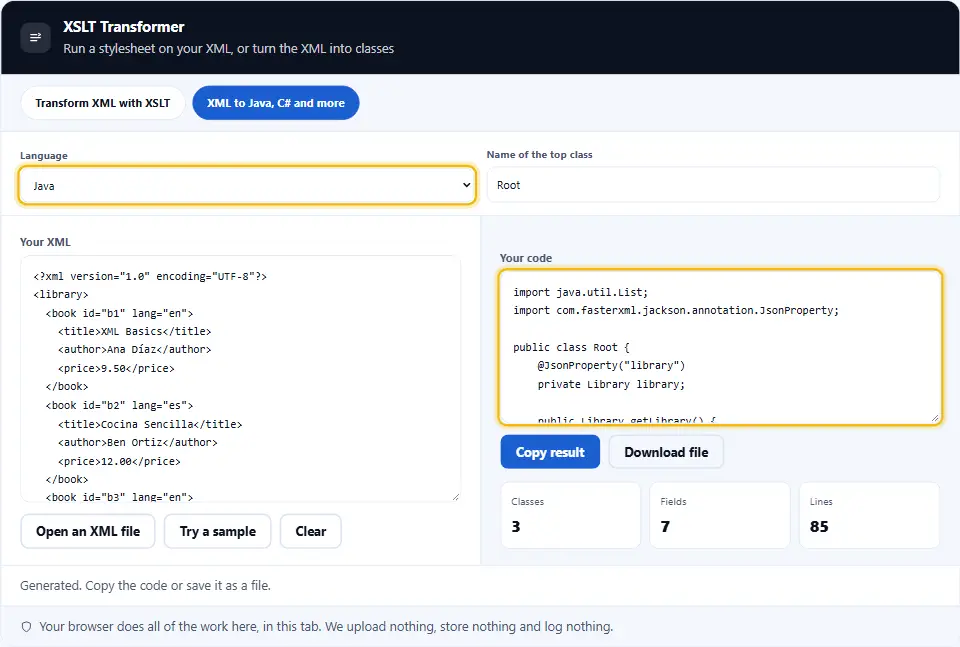
Then you pick a language. You can choose Java, C#, Kotlin, TypeScript, Go, Python, PHP, Swift or Rust. Copy the code, or save it as a file.
Parameters And Output Types
First, type parameters as name=value pairs. A stylesheet that declares a param with the same name picks them up. Also, the output tag decides if the result is HTML, XML or text.

The result saves with the right extension, so an HTML result becomes a .html file.
A Short XSLT Cheat Sheet
A template starts with xsl:template. Its match pattern says which nodes it handles. So match="book" handles every book.
Then xsl:apply-templates sends nodes to their templates. In contrast, xsl:for-each loops over a list in place. Both can sort with xsl:sort.
Also, xsl:value-of writes text, and xsl:if and xsl:choose make decisions. Finally, xsl:copy-of copies a whole branch of the source.
Curly braces inside an attribute run XPath. For example, id="{@id}" writes the id of the current node.
Safe By Design
The engine is written by hand. It never calls eval, and it never hands your XML to the browser as markup. It never expands entities from a DOCTYPE, so entity attacks cannot work.
A guard stops stylesheets that loop without end. Instead of freezing the page, the tool tells you what went wrong.
On this page
- The tool
- What An XSLT Transformer Online Does For You
- Using The XSLT Transformer Online, Step By Step
- What This XSLT Transformer Does Differently
- Habits For Writing Better Stylesheets
- Common XSLT Mistakes This Tool Helps You Spot
- XSLT Transformer Questions People Ask
- Handy Companions For XML Work
Keep going
Using The XSLT Transformer Online, Step By Step
Four steps take you from XML and a stylesheet to a finished result.
- 1
Add your XML
Paste it, open a file, or load an example. Errors show the line.
- 2
Add a stylesheet
Paste your XSLT, or pick an example and change it. The result updates as you type.
- 3
Read the result
See the code, and for HTML, open the Preview tab. Notes and messages appear below.
- 4
Copy or save
Copy the result, or save it with the right file type.
What This XSLT Transformer Does Differently
Many online tools send your files to a server. These are the extras.
Runs in your tab
Your XML and your stylesheet never leave your device.
Real XSLT 1.0
Templates, modes, sorting, parameters and attribute value templates, on top of an own XPath engine.
Safe preview
HTML results are drawn node by node, so no script or style can run.
Clear errors
Bad XML, bad XPath and unsupported tags all give a message with a line.
XML to classes
Write Java, C#, Kotlin, TypeScript, Go, Python, PHP, Swift or Rust from any XML.
Examples to learn from
Four ready stylesheets show tables, templates, identity copy and text reports.
Habits For Writing Better Stylesheets
Small habits make XSLT easier to read and to fix.
- Start with a root template. A template with match="/" sets the shape of the whole result.
- Prefer templates to loops. apply-templates keeps each rule small. Loops pile everything in one place.
- Name your output. Add xsl:output with a method. Then HTML, XML and text come out right.
- Use variables for repeats. If you type the same path twice, keep it in a variable.
- Sort with xsl:sort. Set data-type to number for numbers. Otherwise 10 sorts before 2.
- Use attribute value templates. Write class="{@lang}" instead of a long xsl:attribute block.
- Start from the identity template. Copy everything first, then override only what must change.
- Test with small XML. Three records show most bugs. Big files hide them.
- Mind the whitespace. Use xsl:text for spaces and line breaks that you need to keep.
- Check XPath separately. If a select returns nothing, test it in the XPath tester first.
- Keep stylesheets in version control. A small change can break a template. History helps you find it.
Common XSLT Mistakes This Tool Helps You Spot
Each of these gives an empty or wrong result. The tester makes them visible.
No template for the root
Without match="/", the built-in rules print only text. The tester warns when the result is empty.
Forgetting the xsl: prefix
Tags without the prefix go to the output as plain text, not as code.
Text sorted as text
Without data-type="number", the value 10 sorts before 2.
Wrong output method
An HTML page written as XML closes tags in odd ways. Set the method to html.
Endless recursion
A template that calls itself forever stops with a clear message.
Unescaped ampersands
In XML, an ampersand must be written as an entity. The tool shows the line of the error.
XSLT Transformer Questions People Ask
Is this XSLT transformer online free?
Yes. It costs nothing, needs no account and has no limits. It runs in your browser, so we have no server cost to pass on.
Are my files uploaded anywhere?
No. Your browser reads the XML and the stylesheet and writes the result. Nothing reaches this site, and we keep nothing. Closing the tab clears it all.
Which XSLT version does it support?
XSLT 1.0 with XPath 1.0. It is the version built into browsers and many tools. Newer features such as XSLT 2.0 sequences do not exist here.
How do I turn XML into HTML?
Write a root template that outputs HTML tags, and loop over your records with for-each. Set the output method to html. The first example does exactly this.
What if my stylesheet uses key() or include?
The tool does not support those. It tells you which tag is the problem and shows the line. You can often replace key() with a predicate.
Can I pass parameters?
Yes. Type name=value pairs in the Parameters box. A top-level xsl:param with the same name picks up the value.
Why is my result empty?
Usually no template matches the root, or the select finds nothing. Check match="/" and test the XPath on its own.
Why does the preview look plain?
The preview shows structure and text only. It leaves out CSS, scripts and images on purpose, to keep your browser safe.
What does the XML to code mode do?
It reads your XML and writes classes. Repeated tags become lists, attributes become fields and numbers keep their type.
Which languages can it write?
Java, C#, Kotlin, TypeScript, Go, Python, PHP, Swift and Rust.
How does it protect against XML attacks?
It never expands DOCTYPE entities, so entity bombs and external entities cannot work. It also stops very heavy transforms.
Can I save the result?
Yes. Use Download file. An HTML result saves as .html, a text result as .txt and an XML result as .xml.
How big a file can I use?
A few megabytes. Very large files or heavy templates may stop with a message instead of freezing the page.
What is the difference between apply-templates and for-each?
Apply-templates hands each node to the best matching template. For-each runs one block of code on every node in place. Templates are easier to reuse, while loops are quicker to write.
Can I use more than one stylesheet?
Not with import or include, because the tool does not support them. Put every template in one stylesheet instead.
Does it work on a phone?
Yes. The panels stack and the boxes scroll. For long stylesheets, a keyboard is still easier.
Handy Companions For XML Work
The transform is one step. These three tools handle the steps around it.
XPath Tester
Run XPath on XML and see every match.
Open tool →XML Formatter
Beautify, minify and validate XML with exact errors.
Open tool →XML to JSON Converter
Turn XML into clean, typed JSON.
Open tool →
Ready To Transform Some XML?
Paste your XML and a stylesheet, and read the result. The transformer is free, needs no account, and keeps every byte on your device.