XML Formatter
Tidy Indents, a One-Line Version and a Syntax Check
Paste messy XML into this XML formatter and get clean, indented code back, or find the exact line where your file breaks.
- FreePrice
- Line and columnChecks
- NoneSign-up
- In your browserRuns
XML Formatter
Format, minify and validate XML, with every error on its line
- Elements
- 0
- Depth
- 0
- Size
- 0 B
Ready. Paste your XML, open a file or try the sample.
| Result | Check | Details |
|---|
Jobs This XML Formatter Handles for You
This XML formatter takes XML that arrives on one long line, or indented in five different styles, and lays it out neatly, the way a pretty print of the same file would look. Each element gets its own line, children sit one step to the right, and short text stays next to its tag, so the syntax is easy to read at a glance.
It doubles as an XML well-formedness checker. Before it formats anything, it checks every tag, attribute and entity. If something is wrong, you see the line and the column, a plain explanation, and a button that puts the cursor right on the spot.
The Denwix formatter never sends the XML anywhere. Therefore, your config files, feeds and API replies never leave your computer, which matters when they contain keys, prices or customer data.
What Formatting Actually Changes
Formatting touches nothing but the spacing between tags. The names, the attributes, the text and the order of everything stay exactly as they were. A program that reads the file sees the same data before and after, so you can format with confidence.

The rules follow the W3C XML specification, the standard every XML reader is built on. That is also why the checks are strict: a file that passes here will open in any tool that follows the same rules.
Format XML Without Losing Anything
Many formatters quietly drop comments, CDATA sections or the DOCTYPE, because their parser was never built to keep them. This one keeps all of them in place. Comments stay where you wrote them, and CDATA blocks keep their content untouched.

Two cases get extra care. The formatter copies elements marked xml:space="preserve" exactly, spaces and line breaks included. Moreover, an element that mixes text with tags, such as a paragraph with a bold word inside, stays on one line as written, since adding line breaks there would change the text.
An XML Validator That Points to the Line
Knowing that a file is broken is only half the answer. The checks table lists every problem with its line and column: a closing tag that does not match, an attribute without quotes, a lone ampersand, or a second root element. Each one comes with a sentence that explains the fix.
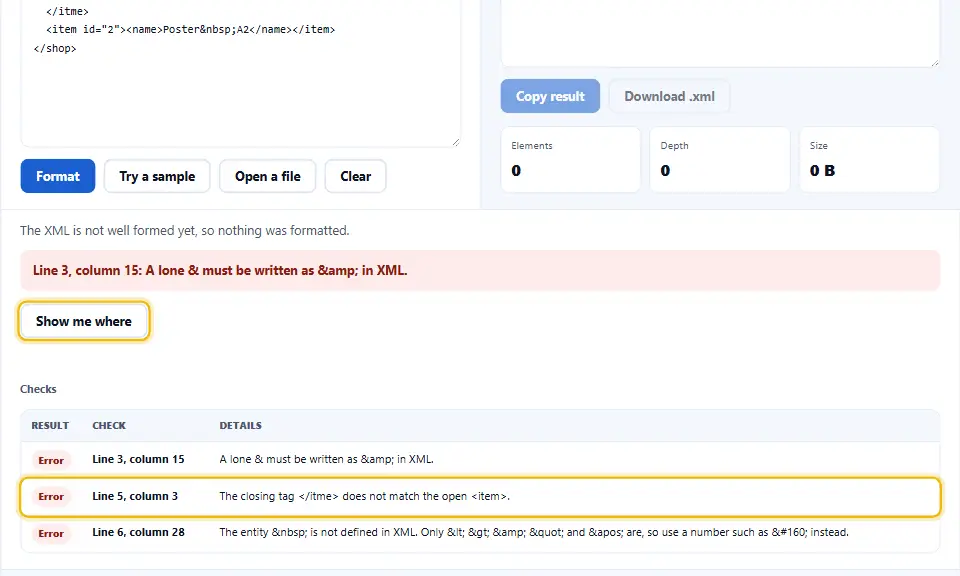
Press Show me where, and the cursor jumps to the first problem in your XML. Because one mistake often causes the next, fixing the first one and checking again usually clears several rows at once.
Shrink XML Into a Single Compact Line
Choose One line (minified) in the indent menu, and the tool squeezes the XML onto a single line. All whitespace between tags goes, while text keeps its words and a single space where it had several. One switch keeps or drops the comments.

The checks table then shows the size before and after. Smaller XML loads faster in feeds and API replies, although for readability you will usually want the formatted version while you work on it.
Why Well-Formed XML Can Still Fail Validation
XML people use two words that sound alike. Well formed means the file follows the basic rules of XML, and every reader needs that. Valid means it also matches a schema, such as an XSD, which describes which elements a particular format allows. This tool checks the first, the part every file must pass.
How the XML Validator Reads Your File
The XML validator reads your file from the first character to the last, the way a strict parser would. It checks that the declaration comes first, that every name starts with a letter, that every attribute has a quoted value, and that no attribute appears twice on one tag.
Then it follows the nesting. Each opening tag waits for its partner, and the validator notes where a tag closes in the wrong order or never closes at all. Finally, it looks at every ampersand and every entity, since those cause more broken feeds than anything else. Because it reads rather than guesses, a file that passes here will also pass in the program that needs it.
Frequent XML Errors and Their Fixes
The most frequent error is an ampersand written on its own, as in Tom & Jerry. XML reserves that sign, so you must write it as & instead. Likewise, a less-than sign inside text has to become <. XML does not define entities from HTML, such as , either, so use a number like   instead.
Next come tags that close in the wrong order and attributes without quotes. Names also matter, since XML is case sensitive and a closing tag must match its opening tag letter for letter. Namespaced names such as xs:element are fine, and the namespaces recommendation explains how those prefixes work.
Places XML Is Still Everywhere
XML is older than JSON, yet it is everywhere. Sitemaps, RSS and Atom feeds, SVG images, Office documents, Android layouts, Maven and .NET project files, SOAP services and many bank and government interfaces all use it. For a gentle overview, MDN’s introduction to XML is a good start.
When you need the data somewhere else, our XML to JSON converter turns it into JSON in one step. And when a sitemap is the file in question, the sitemap generator builds a correct one from a list of links.
How to Format XML
Most files are formatted before you finish reading this line, because the result appears as you type.
- 1
Paste the XML, or load it from a file
Paste the XML into the Denwix input box, open a file, or drop one onto the box.
- 2
Pick the indent
Two spaces, four spaces, tabs, or one line if you want it minified.
- 3
Repair each problem the checks list
Each problem shows its line and column. Show me where jumps straight to the first one.
- 4
Copy or download
Copy the tidy XML, or save it as a file ready to use.
Built for Real XML Files
A quick way to format XML is easy to build. These details make it safe to trust.
Nothing is dropped
Comments, CDATA, the DOCTYPE and instructions all stay in place.
Errors on their line
Every problem shows its line and column, with a jump button.
Whitespace respected
xml:space="preserve" and mixed text are kept exactly as written.
Format or minify
Two spaces, four, tabs, or one compact line, in the same box.
Long tags wrapped
Tags with many attributes can put each one on its own line.
Private by design
Once loaded, the page keeps working offline and uploads nothing.
Rules Every XML File Must Follow
Break any one of these, and the XML validator above, like every strict reader, will flag the file.
- One root element. Everything must sit inside a single outer element. Two elements side by side at the top are not allowed.
- Close every tag. Each opening tag needs a closing tag, or it must close itself, as in
. - Nest in order. Tags must close in the opposite order to how they opened. is broken.
- Quote every attribute. Use id="7" or id='7', never id=7.
- Escape & and <. Write & and < in text and attribute values.
- Match the case. and are two different names, so they do not close each other.
- Put the declaration first. If you include the line, nothing may come before it in the file.
- Name attributes once. The same attribute cannot appear twice on one element.
Six XML Mistakes to Avoid
Each one stops a feed, a config or an import from loading.
Pasting HTML entities
and © work in HTML but not in plain XML.
Hand-editing a long line
Format first, edit second. Mistakes hide easily in one long line.
Text before the declaration
Even one space or an invisible BOM before <?xml breaks some readers.
Formatting mixed content by hand
Line breaks inside a sentence with tags change the text itself.
Trusting a lenient reader
Browsers forgive a lot, but feed and API readers usually do not.
Mixing up the encoding
A file that says ISO-8859-1 but is saved as UTF-8 garbles accents.
XML Formatter Questions People Ask
What steps tidy my XML on Denwix?
Paste the XML into the Denwix input box. The indented XML fills the output panel as you type, ready to copy or save.
Will the formatter alter any of my values?
No. The minifier touches nothing but the gaps between tags. Names, attributes, text and order all stay the same.
Can I use it as an XML validator?
Yes. It checks that the file is well formed and lists every problem with its line and column.
Does the formatter keep comments and CDATA sections?
Yes. Comments, CDATA sections, the DOCTYPE and processing instructions all stay where they were.
What steps shrink my XML to one line on Denwix?
Choose One line (minified) in the indent menu. The checks table then shows how much smaller the file became.
Why does it say my ampersand is wrong?
XML reserves the ampersand for entities, so a plain one must be written as an entity too. The section on common errors above shows how.
Why is the non-breaking space entity an error?
HTML defines it, but XML does not. Use the numeric entity for character 160 instead, or declare the name in a DOCTYPE.
Does it check against an XSD schema?
No. It checks that the file is well formed, which every XML file needs. Schema checks need the schema file too.
Can I format SVG, RSS or sitemap files?
Yes. Underneath they are plain XML, so formatting and validation work the same.
What is the biggest XML file the Denwix formatter takes?
Files of a few megabytes go through fine. Above 400 KB, it formats when you press Format instead of on every key.
Why does the validator stop at a < sign?
A less-than sign always starts a tag in XML, so text cannot contain one on its own. Escape it as an entity, or put the text inside a CDATA block.
Can it fix my XML for me?
It points to each problem instead of guessing, since a guess could change your data. Most fixes take a second once you see the line.
Does the Denwix formatter send my XML anywhere?
No. Your browser does the formatting, so no server sees the XML.
More Tools for Data and Code
Handy next steps once your XML reads cleanly.
XML to JSON Converter
Turn XML into JSON with lists and types kept.
Open tool →JSON Formatter
Format and check JSON the same careful way.
Open tool →HTML Minifier
Shrink HTML pages before they go live.
Open tool →
Ready to Tidy Your XML?
Paste it in and the clean version appears at once. This XML formatter is free, needs no account and works in your browser.