Bulk URL Opener
A Whole List, One Press
This bulk URL opener takes a whole list of addresses and opens them as tabs in one press. It skips repeats, adds a missing https, and refuses anything that is not an http or https link.
- FreePrice
- As many as 50Per press
- NothingInstall
- NoneUploads
Bulk URL Opener
Open a list of addresses in tabs, in one press
- Lines
- 0
- Valid addresses
- 0
- Skipped
- 0
Browsers block tabs that a page opens on its own, so allow popups for this site the first time. Every tab opens from your own click and nothing is loaded here.
Ready. Paste a list and the valid addresses are counted.
Why Opening Tabs Needs A Tool At All
Opening twenty addresses by hand is twenty copies, twenty pastes and a lost place in the list. A minute of work, several times a day.
A page can do it in one press. The catch is that browsers treat a page opening tabs as a popup, and every browser has blocked popups by default for twenty years.
The rule is narrow and sensible. A tab that opens while the browser still handles your click gets through, and window.open after that moment does not.
So this opener does everything synchronously from the button press. If your browser still blocks them, the message says so rather than leaving you guessing.
Who Actually Needs This
SEO and content teams checking a list of pages after a deploy. Support staff opening a batch of tickets. Anybody comparing twenty competitor pages at once.

Researchers with a list of sources, and developers opening every environment of one app. The list is always somewhere else, in a spreadsheet or a report.
That is why this takes a plain list rather than a saved collection. The list you have is already the list you want.
Links the Opener Ignores, and the Reason
Every address that uses a scheme other than http or https. A pasted document can carry javascript: or data: lines, and opening either from a page is how a scam works.
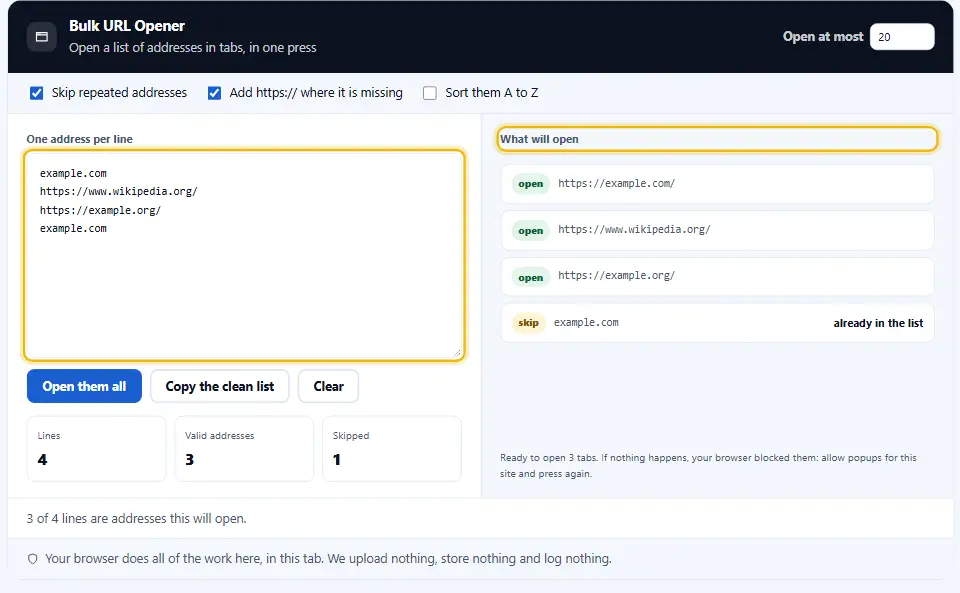
Duplicate URLs, unless you switch that off. A list exported from a crawl usually has the same address three times, and three identical tabs help nobody.
Lines that are not addresses at all. The panel counts those and shows the reason, so nothing disappears quietly.
How Many Tabs A Browser Will Take
Twenty is comfortable on a laptop. Fifty is slow. Two hundred will make most machines swap to disk and stop responding for a while.
Memory is the limit, not the browser. Each tab loads its own page, its own images and its own scripts, so a heavy site costs far more than a light one.
So work in batches. Paste twenty, check them, close the lot with one keystroke, then paste the next twenty.
On a phone, halve every number above. Mobile browsers quietly unload background tabs, and a reloaded tab loses whatever you had scrolled to.
Jobs This Actually Saves Time On
Checking a redirect list after a migration. Paste the old addresses and watch where each one lands.
Reviewing a competitor set. Ten product pages side by side tell you more in five minutes than a spreadsheet does in an hour.
Opening every page a crawl flagged. The crawler gives you a column of addresses, and this turns that column into something you can read.
Checking your own site after a deploy. Keep a saved list of the twenty pages that matter, and paste it whenever anything ships.
Each Tab Gets noopener
Denwix opens every tab with noopener, so the page that opens cannot reach back into this one. One word, and it closes a real hole.
Where the Tab Count Starts to Hurt
Twenty tabs is comfortable on most machines. Fifty is the cap here, and it is a cap rather than a suggestion for a reason.
Each tab is a process with its own memory. A hundred at once will slow any laptop to a crawl, and some of them will fail to load at all.
Work in batches instead. The limit box remembers what you set, so a long list becomes five presses rather than one bad decision.
Cleaning A List Before You Open It
Exports arrive messy. Quotes around each row, a trailing comma, a stray bracket from a JSON dump.
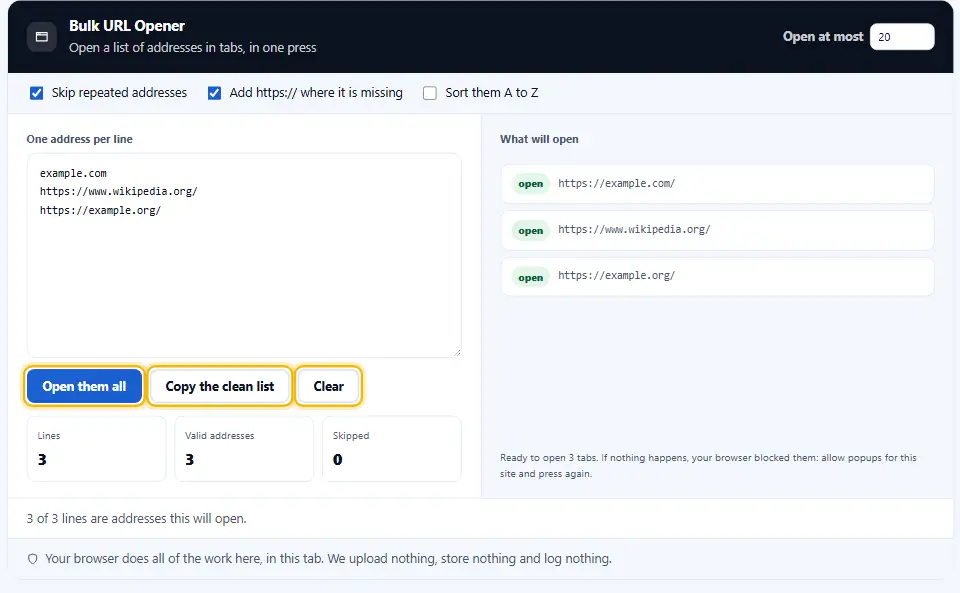
All three get trimmed here. What they cannot fix is a list with the wrong column in it, so check the first row before you press.
Repeated URLs cause the second most trouble. A crawl export repeats an address once per link to it, which can mean forty copies of one page.
The skip switch handles those. The count tells you how many it removed, which is often the more interesting number.
When A Tab Fails To Load
A tab can open and still show nothing. Usually the address is dead, or the site refuses a request that arrives without a referrer.
Check the list with a status checker first when that keeps happening. Twenty tabs of error pages is a slow way to learn a list is stale.
Some sites also block being opened in a background tab. That is their choice, and nothing on this side can change it.
Nothing Here Is Loaded By This Page
The addresses go straight to your browser. This site never fetches them, never sees the responses, and keeps no record of your list.
Opening a Batch of URLs in One Go
Three steps, and the first time you will also allow popups for this site.
- 1
One address per row, up to 50 at a time
Copied directly from a sheet or an SEO report. The tool trims quotes, brackets and trailing commas, since exports add them.
- 2
Check what it will open
The right panel lists every address that qualifies, and every line it skipped with the reason. Nothing disappears quietly.
- 3
Press once, then allow popups
The first press usually triggers the blocker. Allow popups for this site, press again, and every tab opens.
- 4
Work in batches
Twenty at a time is kind to a laptop. Raise the limit if your machine is happy, and lower it if the fan says otherwise.
What Sets This Bulk URL Opener Online Apart
Most of these are browser extensions asking for permission to read every page you visit. This is a page.
No extension to install
An extension that opens tabs needs access to your browsing. A page needs a click, and nothing else.
Honest about the blocker
It detects blocked windows and says how many. Silence would look like a broken tool rather than a browser setting.
Only http and https
It refuses other schemes and lists them. A pasted document can carry a javascript: line, and that is not a link.
Repeats skipped
Crawl exports repeat addresses constantly. The switch stays on by default, and the count says how many it removed.
A missing scheme added
A list of bare domains still works, because https:// goes in front of anything lacking a scheme.
Nothing leaves your tab
Client lists and internal addresses pass through here. Nothing uploads the list, and your browser opens the pages rather than this site.
Rules For Opening A Lot Of Tabs
Each extra tab seems free at first. Keeping thirty open costs a lot. These habits keep a batch job from becoming a restart.
- Let this site open pop-ups one time. It is a per-site setting in every browser. Once set, the button works on the first press from then on.
- Keep batches under twenty-five. Every tab runs as a separate process and holds its own memory. Past twenty-five, some tabs will simply fail to render.
- Clean the list first. Remove duplicates and dead rows before pasting. A tidy list means the skip count actually tells you something.
- Use a separate window. Open a fresh window before a batch. Closing it afterwards takes one keystroke instead of twenty.
- Check status codes before opening. If half the list is 404, a checker tells you in seconds. Opening them tells you in twenty tabs.
- Never paste a list you did not read. Addresses from an email or a document can go anywhere. Scan the panel before pressing, since that is what it is for.
- Mind the memory on a phone. Mobile browsers cap background tabs hard. Five is a realistic batch there, however well it works on a desktop.
- Close the batch before starting another. Twenty tabs from the last list plus twenty from this one is forty, and forty is where a laptop starts swapping memory to disk.
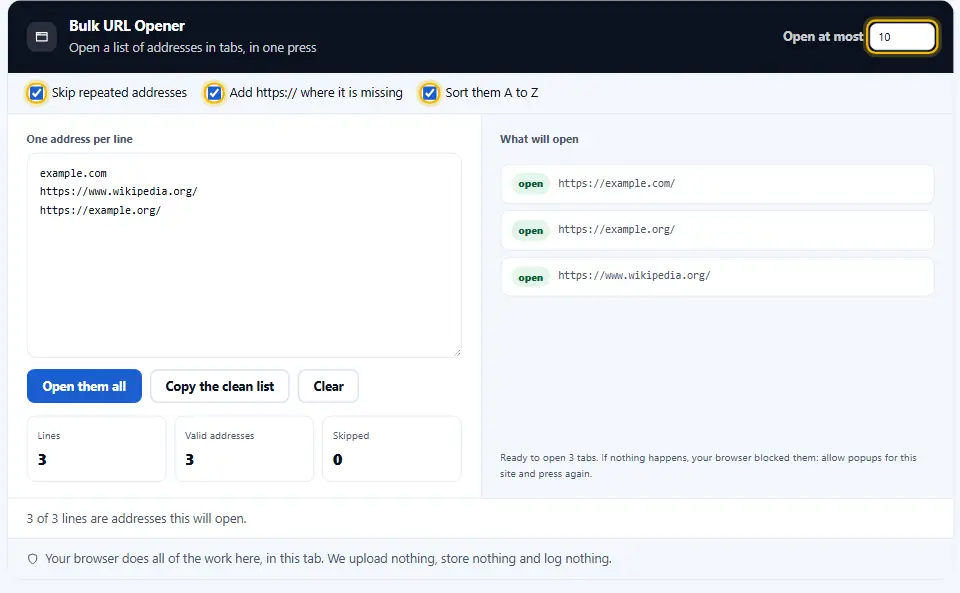
- Sort the list when the order is unimportant. An alphabetical batch is easier to work through, because the tab titles line up with the list you are reading from.
- Copy the tidied list out again. The copy button returns the de-duplicated version. That is usually the list worth keeping in the spreadsheet.
Six Ways A Batch Of Tabs Goes Wrong
Nothing here can harm your browser. All six waste an afternoon.
Blaming the tool for the blocker
Nothing opens, and the tool looks broken. It is a browser setting, and the message here says which one.
Opening a hundred at once
The machine swaps, the fan spins, and half the tabs show an error page. Batches of twenty avoid all of it.
Pasting a list that repeats URLs
Crawl exports repeat addresses. Without the skip switch, you get the same page open four times.
Trusting a list from an email
Addresses in a message can point anywhere. Read the panel before pressing, since it shows exactly what opens.
Forgetting the scheme
A bare domain with the https switch off is not an address a browser will open. The count says so before you press.
Losing the list
The page saves nothing between visits. Keep the list where it came from, and copy the clean version back when you finish.
Tab Opening Questions People Ask
Why did nothing open when I pressed the button?
The pop-up blocker stopped the new tabs. Allow popups for this site in the address bar, then press again, and every one of them opens.
What is the most URLs the Denwix opener handles per click?
Up to fifty here, and twenty is the comfortable number. Each tab is a separate process, so a large batch slows any machine.
Will the bulk opener run in a mobile browser?
It does, though mobile browsers limit background tabs aggressively. Five at a time is a realistic batch on a phone.
Does my list leave my computer?
No. The list stays in your browser, and your browser opens the tabs. This site never fetches any of them.
Can I open a list of bare domains?
Yes. Leave the https switch on and example.com becomes https://example.com before it opens.
Why does it skip some lines?
Because they repeat an earlier address, or they are not http or https links. The panel lists each skipped line with its reason.
Can I use the bulk opener with no browser add-on installed?
Yes. The Denwix opener needs no add-on at all. A bulk url opener online needs no install and no permission to read the pages you visit.
Can I control the order they open in?
They open in list order, or alphabetically if you tick sort. Browsers place the tabs in the order the calls were made.
Does the list survive a refresh?
No. The page stores nothing, so closing the tab clears it. Keep the master list wherever it came from.
Denwix Tools That Handle Lists
A list of addresses usually needs cleaning or checking first.
Pull every link off a page and start from that list.
Open tool →Strip repeats out of a list and keep your order.
Open tool →Find out where an address ends up without opening it.
Open tool →
Ready To Open A List?
Paste your addresses, check the panel, and press once. The bulk URL opener is free, needs no extension, and keeps your list on your device.