JSON Stringify Online
Escape, Encode And Undo
This JSON stringify online tool turns JSON into a safe string, and turns it back. It also escapes, URL-encodes and Base64-encodes. Everything runs in your tab.
- FreePrice
- 10Conversions
- NoneSign-up
- NoneUploads
JSON Stringify and Escape
Stringify, escape, URL-encode or Base64 your JSON, and undo each one
Turns any text, usually JSON, into one escaped string with quotes around it, the way JSON.stringify() does. Pick a language to get a line you can paste into code.
- Input size
- 0 B
- Result size
- 0 B
- Change
- 0%
Ready. Paste some text or JSON, pick a conversion and the result appears.
What JSON Stringify Online Does
Sometimes JSON has to travel inside something else. It goes into a string in your code, a field in another JSON file, a URL or a header. Then quotes and line breaks start to cause trouble.
That is where this JSON stringify online tool helps. Paste your JSON, pick a conversion, and the safe version appears. Press Reverse it, and you get the original back.
The same page covers escape, unescape, URL encoding, query strings and Base64. So one tab replaces five small tools.
The rules come from the standard. JSON.stringify defines how a value becomes text, and this tool follows it. Even so, it adds options that the built-in method lacks.
Why not use the browser console? You can, but it takes time. You open the tools, paste the text and fix the quotes by hand. Also, the console cannot undo a Base64 string or wrap a line for Java. So this page saves you steps.
Stringify And Parse
Stringify turns text into one string literal. The quotes inside get a backslash, and each line break becomes \n. The whole thing sits in double quotes.

Parse does the opposite. Paste an escaped string, and you get the text inside. It strips the outer quotes for you. It even strips a variable name, such as String json =, and the semicolon.
Some values get stringified twice by mistake. Set Levels to 2, and parse peels both layers in one go.
Wrap The Result As Code
Most people stringify JSON to paste it into source code. So pick a language under Wrap as code, and you get a full line.
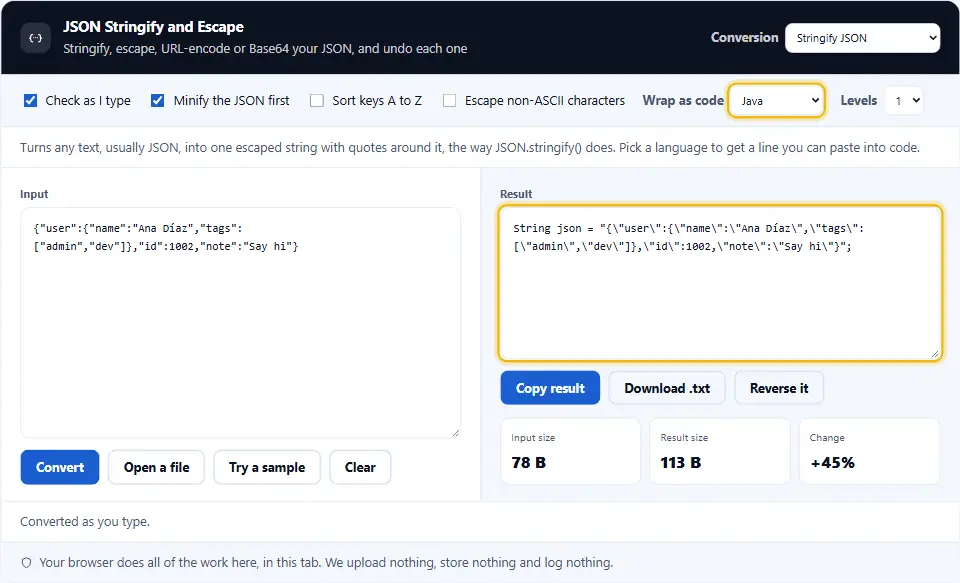
You can choose JavaScript, Java, C#, Python, Go, PHP or Shell. Each language has its own quoting rules. PHP uses single quotes, and Shell needs a special trick for an apostrophe. The tool handles both.
Go does not read surrogate pairs in escapes. If your text holds emoji, leave the non-ASCII switch off for Go.
JSON Escape And Unescape Online
Escape is stringify without the outer quotes. Use it when your JSON goes inside a string that already has quotes around it.

Unescape removes the backslashes. A backslash and an n become a real line break. A backslash and a quote become a quote. Unicode escapes, a backslash and a u with four digits, turn back into letters.
This JSON escape online tool also reads \x41 and \u{1F600}, which other tools skip.
Query Strings And Base64
Need JSON in a URL? Percent-encoding makes it safe. For forms and APIs, convert an object into a query string instead. Nested keys use brackets, such as user[name]=Ana.
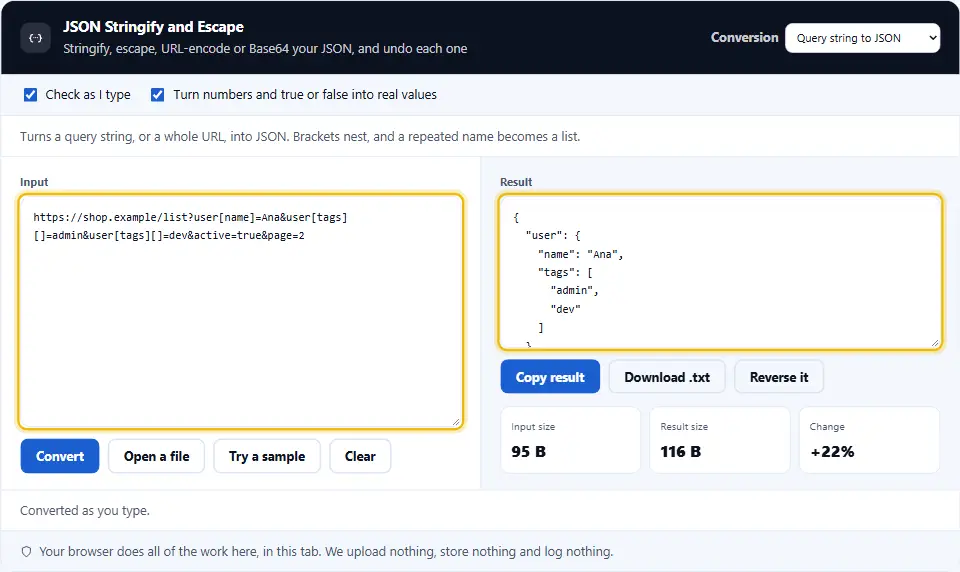
It works the other way, too. Paste a whole URL, and the query becomes JSON. Brackets nest, and a repeated name becomes a list.
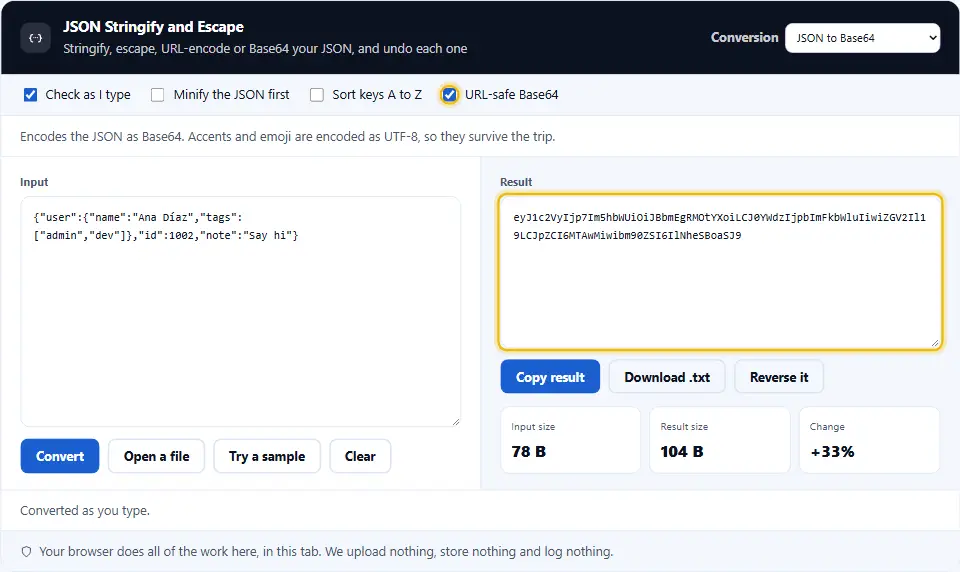
Base64 suits headers and tokens. The tool encodes accents and emoji as UTF-8, so they survive. A URL-safe option swaps two characters and drops the padding.
For example, a search page can take its filters as a query string. Then a link carries the filters, and a friend sees the same results. But keep the data flat and short, because many servers cap the length of an address.
Reverse It In One Click
Every conversion has a partner. The Reverse it button moves the result into the input and switches to the partner. Then you can check that the round trip gives you the same JSON.
Safe By Design
The tool never runs your text as code. Unescaping is a scanner, and parsing uses the same reader as our other JSON tools. Query keys such as __proto__ are refused, so they cannot change how an object behaves.
Using The JSON Stringify Tool, Step By Step
Four steps cover every conversion. The options change with the conversion you pick.
- 1
Pick a conversion
Choose stringify, escape, URL, query string or Base64. The line under the options says what it does.
- 2
Paste your text
Paste JSON or plain text, or open a file. The result updates as you type.
- 3
Set the options
Minify the JSON first, sort its keys, escape non-ASCII letters, or wrap the result as code.
- 4
Copy, save or reverse
Copy the result or save it as a file. Or press Reverse it to check the round trip.
What This JSON Stringify Tool Does Differently
Many tools stringify and stop there. These are the extras.
Ten conversions, five pairs
Stringify, escape, URL, query string and Base64, each with its own undo. You never hunt for the reverse tool.
Seven code wrappers
Get a ready line for JavaScript, Java, C#, Python, Go, PHP or Shell, with the right quoting for each.
Peels nested layers
A string that was stringified two or three times comes back in one step. It also strips a variable name around it.
Exact errors
When JSON is invalid, you see the line and column. A bad escape or bad Base64 gets a plain sentence.
Big numbers stay exact
A 20-digit ID keeps every digit. The tool never turns your numbers into rounded guesses.
Nothing leaves your tab
Tokens and customer data pass through here. Because your browser does all the work, none of it reaches this site.
Habits For Stringifying JSON Safely
A few small habits prevent most escaping bugs.
- Validate before you stringify. Broken JSON gives a broken string. Check it first, and you will find the fault while it is still easy to see.
- Minify first to save space. Indentation adds many characters and many
\nmarks. Turn on the minify switch for a short result. - Escape once, and only once. Double escaping is a common bug. If you see a doubled backslash, parse the string and start again.
- Use the right wrapper for the language. A string that works in Java can fail in PHP. The wrapper list picks the right quotes for you.
- Keep non-ASCII letters readable. Modern languages read UTF-8 fine. Turn on the escape switch only when a system cannot handle it.
- Prefer a query string for simple data. A flat object fits a query string well. Deep data is better off as Base64 or a request body.
- Never put secrets in a URL. Addresses end up in logs and history. Send tokens in a header or a body instead.
- Test the round trip. Press Reverse it. If you get the same JSON back, the conversion lost nothing.
- Sort keys when you compare. Two objects with the same keys in a different order look different as text. Sorting removes that noise.
- Check the byte size. The size boxes show how much the conversion adds. Base64 adds about a third, and escaping adds a little.
Common Stringify And Escape Mistakes
Each of these breaks a request or a config file. The tool helps you spot them.
Escaping twice
A string with
\"everywhere has been escaped two times. Parse it with Levels set to 2.Forgetting the outer quotes
Stringify adds quotes, and escape does not. Pick the one that fits where the text will go.
Single quotes in JSON
JSON needs double quotes. Single quotes work in code, but a JSON parser rejects them.
Plus signs in a URL
In a query, a plus can mean a space. Percent-encoding writes a real plus as
%2B, so nothing changes by accident.Base64 without UTF-8
Plain Base64 fails on accents and emoji. This tool encodes the UTF-8 bytes first, so it never fails there.
Trusting every query key
Keys such as
__proto__can change how code treats an object. This tool refuses them.
JSON Stringify Questions People Ask
Is this JSON stringify online tool free?
Yes. It costs nothing, needs no account and has no limits. It runs in your browser, so we have no server cost to pass on.
Does my JSON leave my device?
No. Your browser does every conversion. Nothing reaches this site, and we keep nothing. Closing the tab clears it all.
What does stringify do?
It turns text into a single string literal. Quotes get backslashes, line breaks become <code>\n</code>, and the result sits in double quotes.
How do I turn a stringified value back into JSON?
Choose Parse a string to JSON and paste it. The tool strips the quotes and the backslashes, then formats the JSON if you like.
What is the difference between escape and stringify?
Stringify adds the outer double quotes. Escape does not. Use escape when the string already has quotes around it in your code.
What does the Levels option do?
It repeats the conversion. Level 2 stringifies a string that is already stringified. On the way back, it peels each layer.
Can I paste a line of code, such as String json = "...";?
Yes. Parse mode removes the variable name, the quotes and the semicolon, then undoes the escapes.
Does it handle emoji and accents?
Yes. Text stays as it is unless you turn on the non-ASCII switch. Then it writes each character as a <code>\u</code> escape, with pairs for emoji.
How does JSON to query string work?
Each value becomes a name and a value. Nested objects use brackets, so <code>{"a":{"b":1}}</code> becomes <code>a[b]=1</code>. Lists get numbers, or repeat the name if you turn numbering off.
Why does stringify double my backslashes?
Because a backslash is also the escape mark. So each real backslash must be written as two. Then the parser reads the two as one, and parse reverses it.
Can I convert a big file?
Yes. Files up to five megabytes open from disk. However, live conversion stops above two megabytes, so press Convert instead.
Is URL-safe Base64 different?
Slightly. It swaps plus and slash for dash and underscore, and it drops the equals padding. That makes it safe in a URL.
Why does it say my JSON is not valid?
Some modes read your input as JSON first. If you see the message, fix the line it names. Stringify and escape still work on plain text.
Handy Companions For JSON Work
Stringifying is one step. These three tools handle the steps around it.
JSON Viewer
Read JSON as a tree or a table, then edit it.
Open tool →JSON Formatter
Beautify, minify and validate with the exact line of any error.
Open tool →URL Encoder and Decoder
Encode or decode any text for a web address.
Open tool →
Ready To Convert Some JSON?
Paste your JSON, pick a conversion, and copy the result. The tool is free, needs no account, and keeps every byte on your device.