Lazy Loading Checker
Right Image, Right Moment
This lazy loading checker reads every image and frame on a page in order and judges when each one loads. It catches images below the fold that load too early, hero images that wait too long, and images with no space reserved.
- FreePrice
- LCP, CLSMeasures
- NoneSign-up
- NothingStored
Lazy Loading Checker
Which images wait for the scroll, which load too early, and which hurt the largest paint
- Images and frames
- 0
- Waiting for scroll
- 0
- Loading at once
- 0
- Needs work
- 0
- Already fine
- 0
| # | Element | Loading | Verdict | What to do |
|---|---|---|---|---|
| Paste an address above and the loading order lands here. | ||||
Position is read from source order, because a page fetched on a server is never laid out. The first few images are treated as the ones a visitor sees first, which is true on almost every layout and worth checking by eye on yours.
Ready. Paste any public address and this server reads the images on it once.
Lazy Loading Cuts Both Ways
Lazy loading tells the browser to fetch an image only when it is about to scroll into view.
Used on images further down, it saves bandwidth and lets the top of the page arrive sooner. Used on the first image, however, it does the opposite.
The first large image is usually what Core Web Vitals measure as Largest Contentful Paint. If it waits for the scroll, the whole page scores as slow.
So the right answer depends on where each image sits, and on the moment it is needed. That is the question this checker asks of every one of them.
Which Images Should Wait
Anything a visitor has to scroll to reach. Galleries, images deep in an article, logos in the footer and embedded videos all belong here.

Frames deserve special attention. An embedded video or map pulls in a whole second page, so loading="lazy" on an iframe often saves more than on any image.
Which Images Must Not
The hero image, the product photo at the top, and the logo in the header should all load at once.
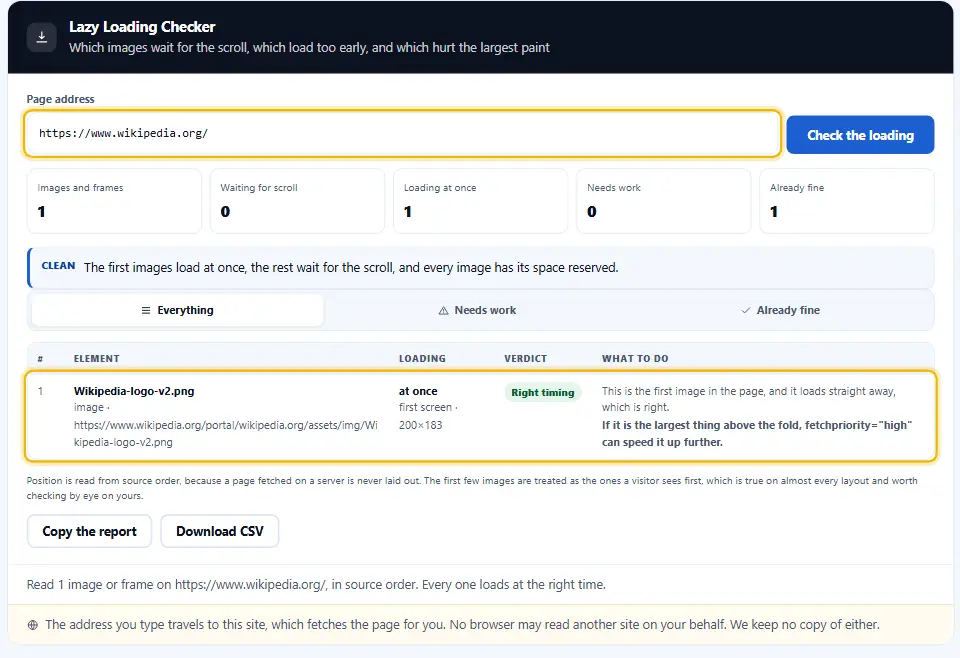
In fact, the single largest image near the top can go further. fetchpriority="high" tells the browser to fetch it before other images, which often improves Largest Contentful Paint noticeably.
Asking for high priority and lazy loading on the same image is a contradiction, and the checker flags it.
Why Width And Height Matter Here
An image without width and height has no space reserved. When it finally arrives, everything below it jumps down, which Core Web Vitals count as layout shift.

Lazy images make this worse, because they arrive while the reader is already scrolling. Consequently, the checker treats missing dimensions as a fault on every image.
Set the attributes to the image's real proportions. Responsive CSS can still resize it, since the browser only needs the ratio.
Native Or Script Lazy Loading
Older plugins hide the real address in data-src and swap it in with a script. That works for visitors, but crawlers and anybody without JavaScript see only a placeholder.

The loading="lazy" attribute needs no script at all and every current browser supports it. Therefore the checker recommends it wherever it finds the older pattern.
How Position Is Judged
A page read on a server is never laid out, so the checker uses source order. The first three images are treated as the first screen, which holds on almost every layout, although it is worth a glance on yours.
Working With the Lazy Loading Checker, Start to Finish
One address in, every image and frame out, in the order the page lists them.
- 1
Paste the page address
Use the page you care about most, usually the home page or a top landing page.
- 2
Focus on the top three rows of the report
These are the images a visitor sees first. None of them should wait for the scroll.
- 3
Then read further down
Below the first screen, every image and frame should carry loading="lazy".
- 4
Fix sizes last
Add width and height wherever they are missing, then run the check again.
What Sets This Lazy Loading Checker Apart
Counting loading="lazy" is easy. The real skill is telling where it speeds a page up and where it slows it down.
Position first
The checker judges every image by where it sits, so a lazy hero image is a fault rather than a pass.
Largest paint protected
Early images that wait, and high priority mixed with lazy, are flagged as the most urgent fixes.
Layout shift checked
Missing width and height are caught on every image, since lazy images make the jump worse.
Script loaders spotted
data-src placeholders that crawlers never see are named, with the native attribute to use instead.
Frames included
The checker looks at embedded videos and maps beside images, because they are often the heaviest thing on the page.
Export in one click
Copy the report or download it as CSV for whoever builds the page.
Rules For Lazy Loading Images
Eight habits that make lazy loading a gain rather than a penalty.
- Load the main banner image straight away. The first large image is what Largest Contentful Paint measures, so it has to start downloading at once.
- Give the hero high priority. fetchpriority="high" on that one image moves it to the front of the queue.
- Any picture a visitor must scroll to reach can carry loading="lazy". Images and frames a visitor has to scroll to reach should carry loading="lazy".
- Tell the browser each picture’s size up front with width and height. The box is held open in advance, so the layout stays still when the image loads.
- Prefer the native attribute. loading="lazy" needs no script, works in every current browser, and crawlers see the real address.
- Lazy load embeds first. One embedded video or map can outweigh all the images on a page together.
- Watch theme defaults. Many themes add loading="lazy" to every image, including the first. Switch it off for the hero.
- Test on a phone. The first screen on a phone holds fewer images than on a desktop, so check which ones really appear first.
Six Lazy Loading Mistakes That Slow Pages Down
Each of these looks like an optimisation and quietly costs speed.
Lazy loading every image
Including the first one, which delays the largest paint on every visit.
High priority on a lazy image
The two instructions cancel out, and the browser can only follow one.
No width and height
The page jumps as each image lands, which is exactly what layout shift measures.
Script-only lazy loading
Crawlers and visitors without JavaScript see a blank placeholder instead of the picture.
Forgetting the embeds
A video frame at the bottom of a post still loads its player at once without loading="lazy".
Two lazy loaders at once
A plugin and a theme both handling it can leave images waiting twice, or never loading at all.
Lazy Loading Questions People Ask
What is lazy loading?
It delays downloading an image or frame until it is about to scroll into view, so the top of the page loads sooner.
Will lazy loading lift my rankings?
Indirectly. Quicker pages earn stronger Core Web Vitals scores. However, lazy loading the wrong image makes the score worse.
Is it a mistake to lazy load the top image?
No. The first large image is usually the Largest Contentful Paint element, so it should load at once, ideally with fetchpriority="high".
Is loading="lazy" supported everywhere?
Every current browser supports it for images, and all major ones support it for iframes as well.
Does Googlebot find images that load lazily?
With loading="lazy", yes, because the real address stays in src. With script-only loaders it depends on the script, which is why the native attribute is safer.
Why does the checker want width and height?
Lacking width and height, the browser saves no room, so the layout jumps once the picture loads. Your stylesheet can still scale the picture.
How does the checker know what is above the fold?
It uses source order, since a page read on a server has no layout. The first three images are treated as the first screen.
Why do a few images not show in the Denwix report?
Images added later by a script, or set as CSS backgrounds, are not in the page the server sends, so they do not appear.
Is loading="lazy" worth adding to iframes?
Yes, whenever they sit below the first screen. A video or map frame is often the heaviest thing on the page.
Does Denwix keep the page I test?
No. The address serves one read and then goes, and nothing about it is kept.
Tools For Faster Images
Loading order is one part of image speed. These cover the rest.
Image Converter
Turn heavy images into WebP or AVIF without uploading them.
Open tool →Image Alt Text Checker
A verdict on the alt text of every image on a page.
Open tool →HTTP Header Checker
Compression, caching and the eight security headers, with the fix.
Open tool →
Ready To Check Your Loading Order?
Paste an address and see when every image loads. The lazy loading checker is free, needs no account, and keeps no record of the page.