SQL Formatter
Format, Minify And Escape SQL
This SQL formatter turns one long line of SQL into clean, readable lines. It also minifies SQL and escapes text for strings. We upload nothing.
- FreePrice
- 4Modes
- NoneSign-up
- NoneUploads
SQL Formatter
Format, minify, escape and unescape SQL in your browser
- Lines
- 0
- Statements
- 0
- Size
- 0 B
Ready. Paste SQL and pick what to do.
What An SQL Formatter Does For You
A query you copy from a log or a tool often sits on one long line. You cannot read it, and you cannot review it. So you need to break it into lines, add indents and put each clause in its place.
This tool does that in one box. First, paste your SQL. Then pick Format, and the result appears as you type. It puts SELECT, FROM and WHERE on their own lines, and it lines up joins and conditions.
It also minifies SQL, which is useful when you must paste a query into code or a config file. In addition, it escapes and unescapes text, so a quote inside a value cannot break your statement.
Everything runs in your browser. So your SQL never leaves your device. That matters, because queries often hold table names, ids and sometimes real data.
Format SQL Into Readable Lines
First, the tool reads your text and splits it into tokens. A token is a word, a number, a string, a comment or a symbol. Because it reads strings and comments first, a keyword inside quotes is never changed.

Then it lays the tokens out. Each main clause starts on a new line. The select list gets one column per line when it has more than one. Joins start a new line, and the AND and OR in a condition line up under the WHERE.
Subqueries sit inside brackets and move one level to the right. So you can see where each one starts and ends.
For more detail, see: Wikipedia article on SQL.
Indents, Keywords And Comments
You choose the indent. Two spaces, four spaces and tabs are all there. You also choose the keyword case. Uppercase is the classic style. Lowercase is popular in modern code. A third choice leaves your keywords as you typed them.
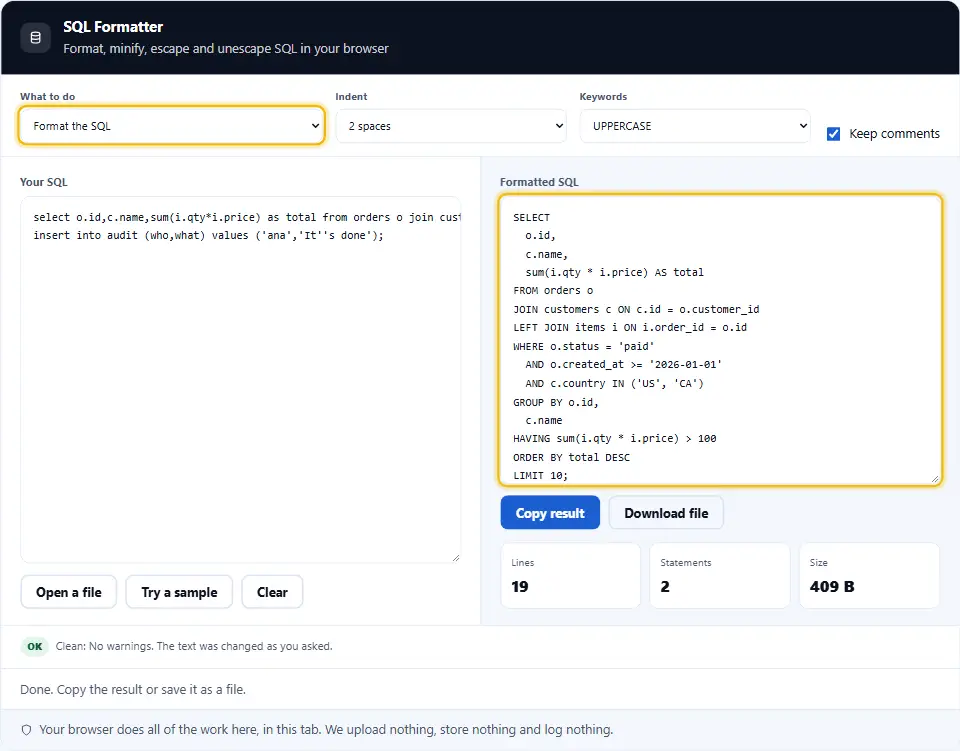
Also, comments are safe. A line comment stays at the end of its line, and a block comment stays where you put it. If you prefer a clean result, switch comments off.
So the tool does not change names, values or strings. It only moves white space and changes the case of keywords.
Minify SQL
Then there is minify, which does the reverse. It removes comments and extra white space and keeps one space only where two words would otherwise touch.
That helps when you store a query in a string. It also helps in a URL or a log. The result is the same query, only shorter. The notes under the result show how many characters you saved.
Escape And Unescape SQL Text
A quote inside a value ends a string too early. That is a bug, and it can also be a security hole. So you must escape the quote before you put the text in a statement.

Standard SQL doubles the quote, so it becomes two single quotes. MySQL also accepts a backslash before the quote. The tool does both, and it can add the outer quotes for you.
Then unescape goes the other way. It removes the outer quotes and turns each doubled quote or backslash sequence back into plain text.
Escaping Is Not A Full Defence
Escaping helps for one off text, such as a value in a script. For an app, use prepared statements with parameters instead. They keep data and code apart, so no quote can change the query.
The formatter leaves parameters such as a colon name or a question mark alone. So a prepared statement stays valid after you format it.
Which SQL Does It Understand
First, the tool works with the common core of SQL. That covers SELECT, INSERT, UPDATE, DELETE, WITH and CREATE TABLE, plus joins, unions, window functions and CASE.
Also, it reads strings in single quotes, names in double quotes, backticks and square brackets, and both kinds of comments. So it suits MySQL, PostgreSQL, SQL Server, SQLite and Oracle code.
Some engine specific syntax may look plain, but it still stays valid. The tool never rewrites a statement, so it cannot break it.
Stored procedures and long scripts work too. The tool treats each semicolon as the end of a statement, so a script with many statements stays in order.
Safe By Design
The tool never runs your SQL and never connects to a database. It only reads text and writes text, and it does so in your tab.
Using The SQL Formatter, Step By Step
Four steps take you from a messy query to a clean one.
- 1
Paste your SQL
Paste it, open a file, or try the sample.
- 2
Pick what to do
Choose Format, Minify, Escape or Unescape.
- 3
Set the options
Choose the indent, the keyword case and whether to keep comments.
- 4
Copy or save
Copy the result, or save it as a SQL file.
What This SQL Formatter Does Differently
It is quick, it is private, and it never changes what your query means.
Four tools in one
Format, minify, escape and unescape in one page.
Real tokens
Strings and comments are read first, so they are never altered.
Many dialects
Works for MySQL, PostgreSQL, SQL Server, SQLite and Oracle.
Your style
Pick the indent and the keyword case.
Clear warnings
Open quotes and unmatched brackets show a message.
Nothing leaves your tab
Your browser does the work. We never see your SQL.
Habits For Writing Readable SQL
A few habits keep queries easy to review.
- One clause per line. SELECT, FROM, WHERE and ORDER BY each start a new line.
- One column per line. A long select list reads best when each column has its own line.
- Name your aliases. Short but clear aliases such as o for orders keep joins readable.
- Write joins in full. Use JOIN with ON, not a comma list with conditions in WHERE.
- Pick one keyword case. Uppercase or lowercase works. Mixing both does not.
- Comment the odd parts. A short note on a tricky filter helps the next reader.
- Use parameters. Send values as parameters in apps, not as joined text.
- Escape values in scripts. For one off scripts, double every single quote in a value.
- Format before you review. A clean layout makes errors easy to spot in a code review.
- Minify only for storage. Keep the formatted copy in your repo and minify just for transport.
- Alias with AS. Write AS before an alias, so a missing comma cannot hide.
- Test on a copy. Run a new query on test data before it touches real tables.
Common SQL Mistakes This Tool Helps You Spot
A clean layout makes these easy to see.
Unclosed quotes
A string that never ends shows a clear message.
Unmatched brackets
The tool warns when opening and closing brackets differ.
Lost AND or OR
Each condition on its own line makes a missing one obvious.
Quotes in values
Escape mode doubles the quote so a value cannot end the string.
Hidden comments
Comments stay visible, or you can strip them with one switch.
Uploading private queries
Many formatters send your SQL to a server. This one never does.
SQL Formatter Questions People Ask
Is this SQL formatter free?
Yes. It costs nothing, needs no account and has no limits. It runs in your browser, so we have no server cost to pass on.
Is my SQL uploaded anywhere?
No. Your browser reads the SQL and writes the result. Nothing reaches this site, and we keep nothing.
Does it run my query?
No. The tool never connects to a database and never runs a statement. It only changes the layout of the text.
Which databases does it support?
It reads the common core of SQL, so it suits MySQL, PostgreSQL, SQL Server, SQLite and Oracle code.
Can it format several statements?
Yes. Separate them with semicolons. Each statement is formatted, with a blank line between them.
Does it change my keywords?
Only their case, and only if you ask. You can choose uppercase, lowercase or keep them as typed.
Does it change names or values?
No. Table names, column names, strings and numbers stay exactly as you wrote them.
What happens to comments?
They stay by default. Switch off Keep comments to remove them from the result.
How does the minifier work?
It removes comments and extra white space. It keeps a space only where two words would touch.
What is SQL escaping?
It changes a quote inside text so the text cannot end a string early. Standard SQL doubles the quote.
What is the backslash style?
MySQL also accepts a backslash before a quote and for line breaks. Pick that style if you target MySQL.
Should I escape values in my app?
No. Use prepared statements with parameters instead. They keep data apart from code.
What does unescape do?
It removes the outer quotes and turns doubled quotes or backslash sequences back into plain text.
Does it keep parameters?
Yes. Names such as :id, $1 and a question mark stay untouched.
Can it format a long file?
Yes, up to a few megabytes. Very large files may take a moment on a phone.
Why did I get an error?
A quoted string or a block comment never ends. Add the missing quote or the closing comment mark.
Can I open a SQL file?
Yes. Use Open a file. You can also save the result as a SQL file.
Does the tool change the meaning of my query?
No. It only moves white space and changes keyword case. The query means the same thing.
Is formatting the same as beautifying?
Yes. Both words mean the same thing here. The tool adds line breaks and indents so the query is easy to read.
Does it reorder my columns or tables?
No. The order stays exactly as you wrote it. Only the white space changes.
Why does a long function call stay on one line?
Short calls such as COUNT or a window function read better inline. Subqueries, joins and clauses still get their own lines.
Does it work on a phone?
Yes. The panels stack and the boxes scroll. For long queries, a keyboard is still easier.
Handy Companions For Developers
Formatting is one step. These three tools help with the data around it.
CSV Viewer and Editor
Read CSV in a table and fix it by hand.
Open tool →XML to CSV Converter
Turn XML, YAML and JSON into CSV.
Open tool →JSON Formatter
Format and check JSON.
Open tool →
Ready To Format Some SQL?
Paste your query, pick a mode, and copy the result. The formatter is free, needs no account, and keeps every byte on your device.