Word Counter
Count Words and Characters Live
This free word counter counts your words, characters, sentences and paragraphs as you type. First, paste your text. Then watch every number update instantly, because the whole count happens inside this tab.
- FreePrice
- Not neededAccount
- NoneUploads
- LiveCounting
Word Counter
Type or paste — every figure updates as you go
Live counts
- Words
- 0
- Characters
- 0
- No spaces
- 0
- Sentences
- 0
- Paragraphs
- 0
- Unique words
- 0
- Reading time
- 0s
- Speaking time
- 0s
- Longest word
- —
Readability
Type something and the reading grade appears here.
How you fit common limits
Words you use most
- Nothing counted yet.
Ready. Start typing and the counts follow.
What a Word Counter Tells You Beyond the Word Total
A word counter reads your text and reports how much of it there is. It tracks words, characters, sentences and paragraphs, refreshing each total as you type. Therefore you never press a button to find out where you stand.
Most writing carries a limit somewhere. An essay wants 1,500 words, a meta description wants 156 characters, and a post wants to fit a feed. However, guessing at those numbers wastes time, so a counter simply tells you.
This one goes further than a tally. It also estimates reading time, measures reading grade, and shows how close you sit to the limits people actually write against.
The shape of a text counts for more than its length. The Nielsen Norman Group measured how people read on the web, and people scan rather than read.
Word Counter, Character Counter and Reading Time Together
Word counts and character counts serve separate purposes. An editor asks for words, while a search snippet, a tweet and a database column all count characters. So this tool reports both at once, and it splits characters into two figures: with spaces and without them.

That gap between the two counts decides tweets and meta tags. A form that allows 280 characters counts your spaces, yet a designer checking a headline usually does not. As a result, one number alone can mislead you.
How This Tool Decides What Counts as a Word
The counter treats any unbroken stretch of letters, digits or apostrophes as one word. Therefore "don't" counts once, not twice, and an em dash between two words never glues them together.
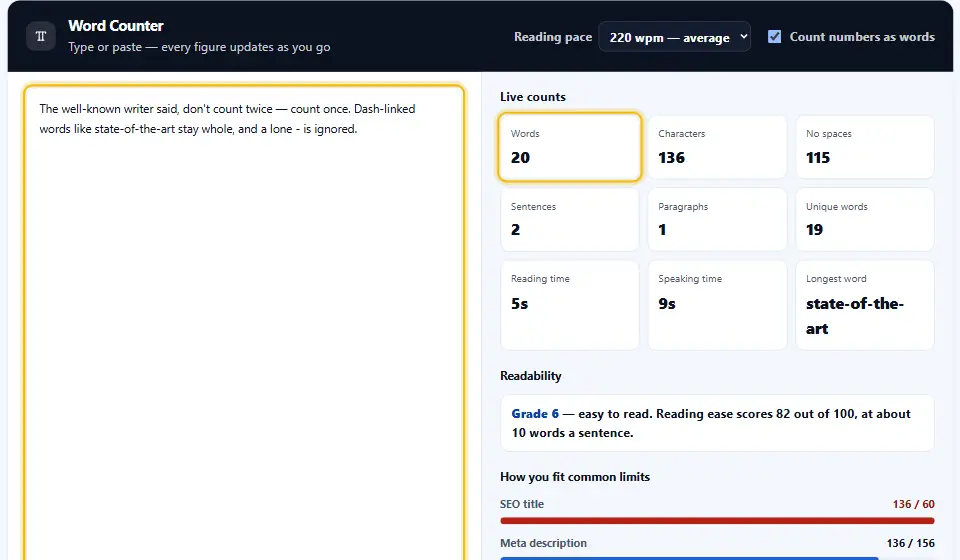
Hyphens follow the same rule you would apply yourself. "Well-known" counts as one word, because you wrote it as one. Meanwhile a stray dash surrounded by spaces counts as nothing at all.
Why Your Number May Differ From Word
Word processors disagree with each other by a per cent or two, especially around numbers, URLs and hyphens. This counter follows the plainest rule, so its figure sits within a hair of Word and Google Docs on ordinary prose.
Count Your Text in Four Steps
You skip both the installer and the Denwix sign-up. Your counts appear as you type, so the numbers are never stale.
- 1
Paste your text
Drop in a draft, an essay or a caption. The counter starts the moment your first word lands.
- 2
Read the live figures
Word, character, sentence and paragraph counts refresh with each key. Also, reading time moves with them.
- 3
Watch your limits
Each meter fills as you approach a real limit, such as a meta description or a tweet. Green means you fit.
- 4
Copy or download
Take the text back out when you finish. Meanwhile nothing you typed ever leaves this tab.
A Word Counter That Tells You More Than a Number
A raw total rarely answers the question you actually had. These figures usually do.
Every count at once
Words, characters with spaces, characters without, sentences, paragraphs and unique words all sit on one screen.
Reading and speaking time
The tool estimates how long a reader needs, and how long a speaker takes. You can change the pace to match your audience.
A readability grade
It scores your text the way Flesch did, then names the school grade that matches. Shorter sentences move the grade down.
Limits you really write against
Meters track an SEO title, a meta description, a tweet and a caption, so you see the fit rather than calculate it.
Your top words, ranked
The ten words you lean on most appear with their counts. Repetition shows up immediately, because you can see it.
Nothing leaves your tab
Your draft never travels anywhere. There is no request, no storage and no log, so unpublished work stays yours.
Writing Well Against a Word Count
A few small habits keep a target from flattening your writing.
- Draft past the target. Draft freely, then trim hard. Therefore you edit for quality rather than padding to reach a number.
- Watch sentences, not just words. The sentence count tells you about rhythm. If it barely moves while words climb, your sentences are running long.
- Look at the reading grade before you post. Most web writing reads best around grade eight. So a grade of fourteen usually means you should split something.
- Trust characters for limits. Search results and social forms count characters, never words. So the character total is what really counts.
- Read the top words list. One word dominating the list is a habit worth breaking. Instead, swap half of those for something else.
- Count the final draft. Count after your last edit, not before. Otherwise you report a number that stopped being true an hour ago.
Mistakes That Ruin a Word Count
Almost every "the count looks wrong" story is one of these three.
Counting the whole page
Headings, captions and footers inflate a total. Count the body you were actually asked to write.
Stuffing text just to reach a word count
Filler reaches the number and loses the reader. An editor spots it in a sentence or two.
Mixing up the two character counts
A form that allows 160 characters counts spaces. Quote the figure without them and you overrun every time.
Word Counter FAQ
How exact is the Denwix word counter?
Yes. It follows one simple rule: any unbroken stretch of letters, digits or apostrophes counts as one word. That keeps it within a hair of Word and Google Docs on ordinary prose, though every tool disagrees slightly around URLs and long numbers.
Does the character total include spaces?
Both, side by side. Social forms and database fields count your spaces, while a designer checking a headline usually ignores them, so the tool never makes you pick one.
How does it work out reading time?
It divides your word count by a reading pace you can change. The default sits at 220 words a minute, which matches a comfortable adult reader on screen; speaking time uses a slower pace, because people speak slower than they read.
What does the readability grade tell me about my text?
It is the Flesch reading ease score turned into a school grade. Shorter sentences and shorter words push the grade down, and most web writing lands best around grade eight.
Does the text I paste here ever reach a Denwix server?
No. The whole counter runs inside your browser tab. There is no request, no storage and no log, so you can safely paste work nobody else should see.
Can I count a file instead of pasting?
Yes. Open a .txt or .md file with the load button and the counter reads it straight from your disk. The file stays on your machine, exactly like pasted text does.
More Denwix Tools Worth Opening Next
Every Denwix tool listed here runs locally, with no login and nothing uploaded.
See which words and phrases you repeat, and how often you repeat them.
Open tool →Move text between capitals, small letters, title style and sentence style in one click.
Open tool →Strip repeated lines out of a list and keep the order you had.
Open tool →
Count your next draft in seconds
Paste your text, watch every figure move, and check the fit for yourself. Nothing travels anywhere and nothing sticks around.