Redirect www To Non www
Or Back Again, With a Single Redirect
This generator writes the rules that redirect www to non www, or non-www to www, and force https in the same step. Apache or Nginx, with a line showing what happens to each of the four addresses.
- FreePrice
- 2Servers
- 1Hops
- NoneUploads
www and Non-www Redirect Generator
One canonical host, in a single hop
Just the name. No scheme, no slash, no path.
What happens to each addressBack up the file you are editing first. A redirect rule with a mistake in it can take a whole site offline, and the fix is hard to reach once it has.
Ready. Type your domain and pick which version should win.
Why One Host Has To Win
A site usually answers on four addresses: http and https, each with and without www. All four show the same pages.
Search engines treat them as candidates for the same content and pick one, which may not be the one you would pick.
Analytics splits visits across them. Cookies set on one are not read on another. Links accumulate against whichever version people copied, and each new link starts the same argument again.
So pick one and redirect the rest. Google's guidance on 301 redirects covers the mechanics; this page covers the rules that implement it.
www Or Not: It Does Not Matter, And It Does
Neither choice ranks better. Pick either, and then never change your mind, because the change costs a redirect on every address you own.

One technical difference exists. A bare domain cannot carry a CNAME record at the apex under the original DNS rules, which matters if you front the site with a CDN.
Most hosts work around that now with their own record types. If yours does not, choose www.
Why One Hop Rather Than Two
The obvious version writes two rules: one forcing https, one settling www. A visitor arriving at http://www.example.com then travels through both.
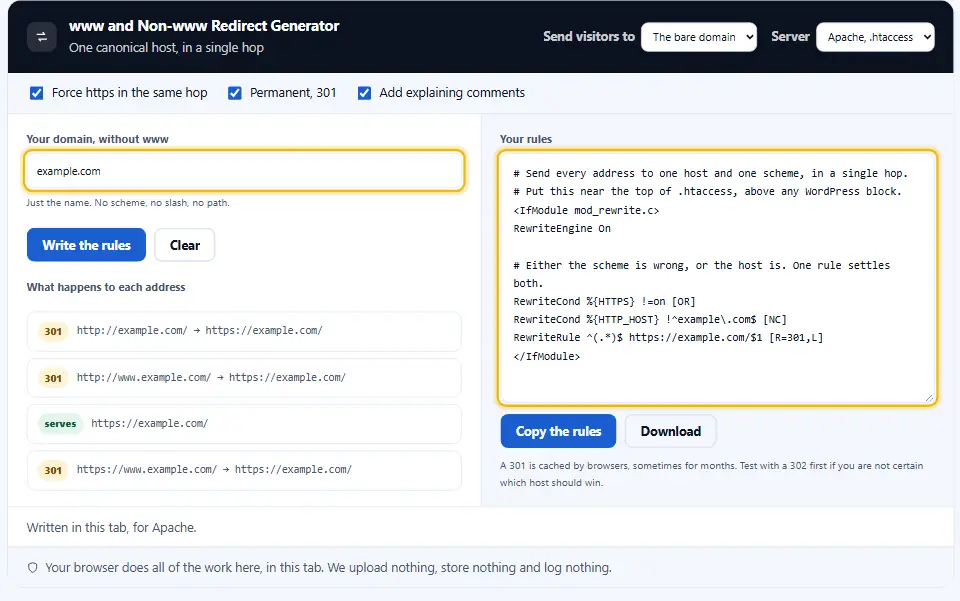
Two redirects mean two round trips before anything renders, on a connection that may be slow, and an audit that reports a redirect chain.
The rules here settle the scheme and the host in one condition, so the worst case from anywhere is a single hop. The mod_rewrite documentation explains each directive.
What To Check Once The Rule Is Live
Try all four openings by hand: with www and without, on http and on https. Each should land in one hop.
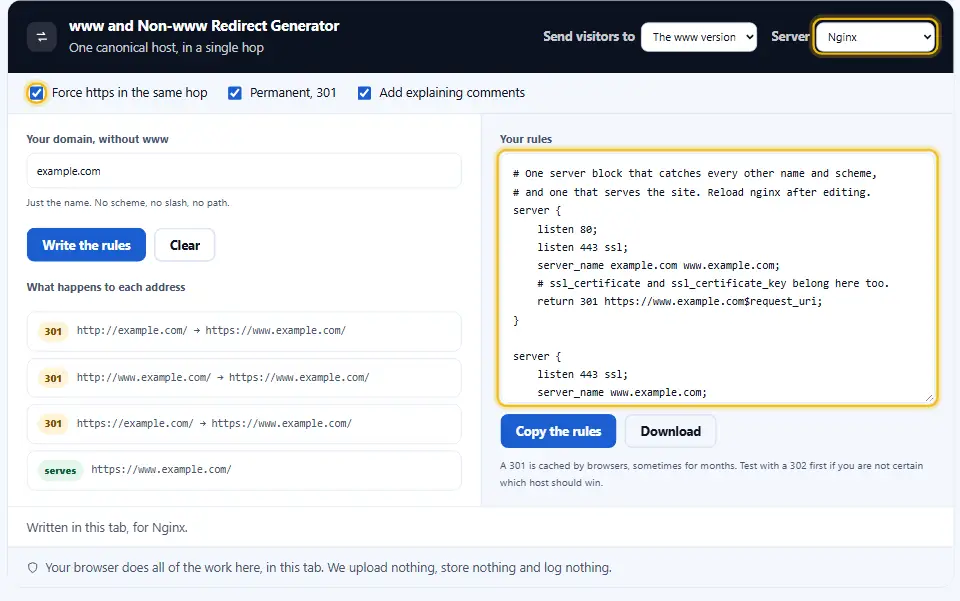
After that, test an inner page as well. A rule that drops the path sends everybody to the front door, and that quietly kills every old link.
Check a query string as well. Losing ?utm_source breaks your own campaign reporting, and nobody notices for a month.
Finally update the canonical tags, the sitemap and the property in Search Console. Adding the redirect is only one part of the work.
Test With 302 First
Browsers cache a 301, sometimes for months. Get it wrong and visitors keep following the old rule long after you fixed the file. Trial it as a 302 before making it a 301.
Where These Rules Go
On Apache, into .htaccess at the document root, above any block a CMS added. WordPress in particular rewrites everything below its own marker.
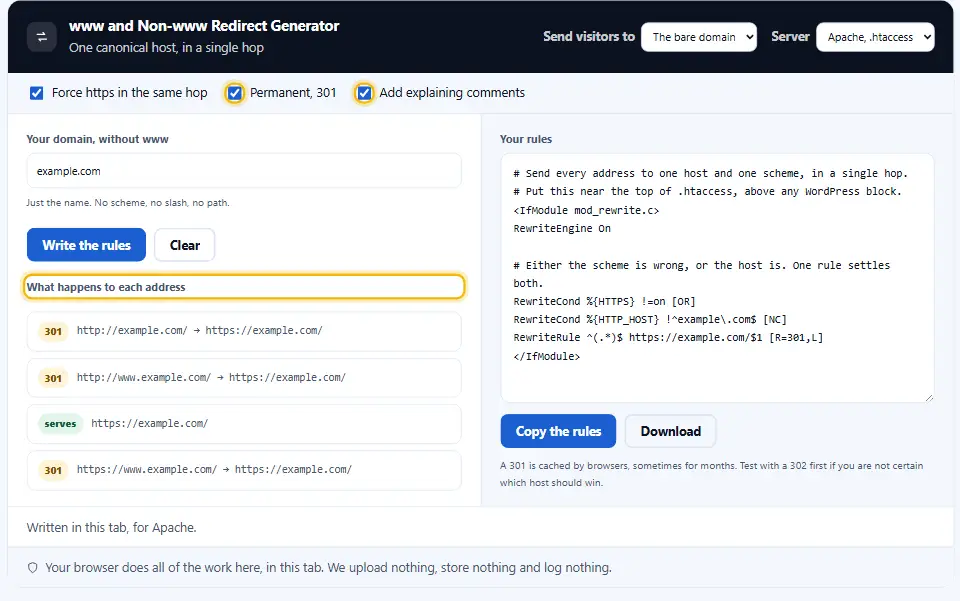
On Nginx, into the server configuration rather than a .htaccess file, since Nginx has no per-directory config. Restart the web server once you save.
On managed hosting, look for a canonical host setting in the control panel first. If one exists, it is a better place than a config file.
What To Check After You Paste
Type all four addresses into a browser, one at a time. Each should land on the winner, and the address bar should show it after a single hop.
Then run the redirect chain checker on the two that redirect. One hop is the target, and two means a rule elsewhere is competing with this one.
Test an inner page too, not only the home page. A rule that drops the path sends every deep link to the front page, which search engines read as a soft 404.
Finally, look at your internal links. Every one pointing at the old host now costs a redirect that nobody needs.
Back The File Up
One mistake in a redirect rule can take a whole site offline, including the admin page you would use to fix it. Keep a copy, and know how to reach the file without a browser.
Writing the www Redirect Rule
Four steps, and the panel on the left shows what happens to each address before you paste anything.
- 1
Type your domain
The bare name, like example.com. Leave out https://, www and any path. Anything else earns a sentence rather than a rule.
- 2
Pick the winner
Either the naked domain or the www host. Whichever you choose, the other one redirects to it from then on.
- 3
Choose your server
Apache writes a .htaccess block. Nginx writes two server blocks. Both is there for a stack that runs one in front of the other.
- 4
Back up, paste, test
Keep a dated copy of the config first. Then paste, reload, and check all four addresses reach the one you picked in a single hop.
What Sets This Redirect Generator Apart
Copying a rule off a forum takes ten seconds. These are the differences worth the extra minute.
One hop, not two
One condition settles the scheme and the host together, so nothing chains through two redirects on the way in.
Apache and Nginx
Both syntaxes from the same fields, since half the internet runs one and half the other.
The four addresses shown
Before you paste anything, the panel says what happens to each of the four versions of your domain.
Your domain escaped properly
The tool escapes the dots for the regular expression, and it refuses anything that is not a plain domain name rather than writing it into a live config.
Permanent 301 or temporary 302, whichever you need
Browsers hold on to a 301 for a long time. The switch makes testing with a temporary one a deliberate step rather than a rewrite.
Comments you can keep
Each block arrives with short lines explaining what it does, which is what the next person to open that file will want.
Rules For Canonical Host Redirects
These are the eight things that turn a redirect from a risk into a five-minute job.
- Download a copy of your config file before you change it. A broken rule can lock you out of the site, including the admin page. Keep a copy and know how to reach the file without a browser.
- Put the block above the CMS rules. WordPress rewrites everything under its own marker. A rule below that marker may never run.
- Test with 302 before 301. Browsers cache a permanent redirect for a long time, and a mistake then follows your visitors around for weeks.
- Check all four addresses. All four hosts: http, https, www and bare. Type each into a browser once and confirm it lands on the winner in one hop.
- Update the canonical tags too. A redirect settles the request. A canonical tag settles what the page says about itself, and the two should agree.
- Update Google Search Console after the switch. Verify both versions as properties, so you can watch the traffic move rather than guess at it.
- Update your internal links to the chosen version. Every internal link pointing at the old host costs a redirect. A search and replace in the database removes them all.
- Handle the redirect on the server, not in the page. A plugin or a script can do this, and both run after PHP has started. A rule in the server config answers before any of that loads.
- Watch for a second rule competing. Hosting panels add their own canonical host settings. Two rules disagreeing is how a site ends up in a redirect loop.
- Never change your mind twice. Each switch costs a redirect on every address you own. Choose one version, record the choice and never flip it.
Six Redirect Mistakes That Cost Traffic
The first two take a site offline. The rest take months to notice.
A redirect loop
A rule that sends the winner back to itself. The browser gives up, and every page on the site is unreachable.
Rules below the CMS marker
WordPress owns everything under its block. Rules pasted there look right in the file and never run.
A double redirect where one would do
Scheme in one rule, host in another. Every visitor arriving at the wrong version pays for two round trips.
Pointing all retired pages at the home page
A rule that drops the path sends every deep link to the front page, and search engines treat that as a soft 404.
Forgetting internal links
The redirect works, and every internal link still takes a detour through it. A database replace fixes the lot.
A 301 while still testing
Browsers cache it for months. Your own machine keeps following the old rule long after the file itself changed.
Redirect Questions People Ask
Is it best to redirect www to non www, or to point non www at www?
Either. Neither ranks better, so pick one and stay with it. www gives you an easier life when a CDN sits in front, because of how DNS handles the apex of a domain.
Does moving www to non-www cost me rankings?
A permanent redirect passes the signals across. Leaving four versions of a site answering hurts more, because they compete with each other.
Where does the htaccess www redirect go?
In .htaccess at the document root, above any block your CMS added. WordPress rewrites everything under its own marker, so a rule below it may never run.
Why does my redirect go through two hops?
Because the scheme and the host are handled by separate rules. The block here decides both at once, so the worst case is one hop.
Is a 301 or a 302 right for a www redirect?
A 301 once you are sure, since it is permanent and consolidates the signals. Test with a 302 first, because browsers cache a 301 for a very long time.
Do I need a canonical tag as well?
Yes. The redirect settles the request and the canonical tag settles what the page claims about itself. Keep the two pointing the same way.
What about my non www redirect on Nginx?
Nginx has no per-directory config, so it goes in the server block. This writes both blocks: one that redirects, one that serves the site.
Will this break my SSL certificate?
No, though the certificate has to cover both names. Most free certificates include the bare domain and www automatically.
Can the redirect stand in for a canonical tag?
No. A redirect settles the request before the page loads, and a canonical tag settles what the page says about itself. Sites need both, pointing the same way.
Do existing links to the other version still work?
Old links still land, via the 301. Search engines follow it and consolidate the signals onto the host you picked, which is the whole point of doing it once.
Where does the domain I type into Denwix go?
No. Your browser writes the rules, and this site never fetches your domain or writes it to a log.
Tools For Redirects
A canonical host is one rule. These three cover what comes after it.
Page-level 301s and 302s, written the same way.
Open tool →Confirm every address lands in a single hop.
Open tool →Make sure the certificate lists both host names.
Open tool →
Ready To Settle Your Host?
Type the domain, pick the winner, and check the four lines before you paste. The generator is free, needs no account, and writes everything in your browser.