What Is a Content Security Policy?
A content security policy, or CSP, is a response header that lists where a page may load scripts, styles, fonts, images and frames from. Anything not on the list is blocked.
Its main job is to stop cross-site scripting. If an attacker manages to inject a script into your page, the browser still refuses to run it, because the script is not on the list. So a good policy turns many dangerous bugs into harmless ones.

Step 1: Start Strict
Begin with the strictest useful policy. In the .htaccess file on Apache, add one line that says only files from your own site may load:
Header always set Content-Security-Policy "default-src 'self'"Then reload the page. It still opens, but some parts may break. In our demo, a free-shipping banner added by a small inline script disappeared, and the heading font changed. That is expected, because the policy now blocks them.
Step 2: Read the Console
Open the browser's developer tools and look at the console. Every blocked file shows up there with the rule that blocked it. In our demo, the policy blocked the font stylesheet from Google Fonts and the inline script.
This list is your to-do list. Work through it one line at a time, and ask for each item: do I really need this? If not, remove it from the page instead of allowing it.
Step 3: Allow Only What You Use
Now add exact exceptions. For Google Fonts, allow styles from fonts.googleapis.com and font files from fonts.gstatic.com:
Header always set Content-Security-Policy "default-src 'self'; style-src 'self' https://fonts.googleapis.com; font-src 'self' https://fonts.gstatic.com"Inline scripts: use a hash
For a small inline script, add its hash to script-src. The hash allows that exact script and nothing else. Chrome's console even prints the hash for you in the error message. Copy it into the policy:
script-src 'self' 'sha256-AbC123...='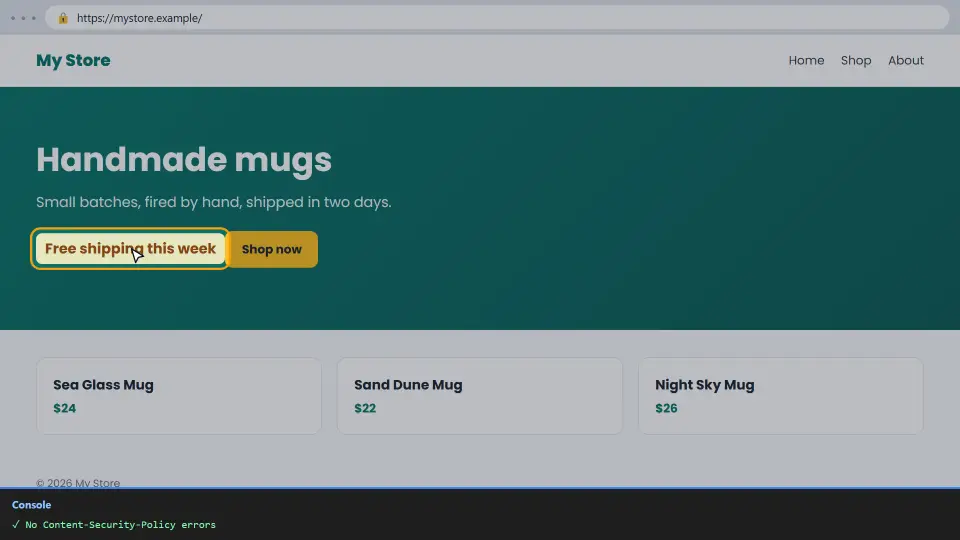
If the script changes often, a nonce is easier: the server adds a new random value to the policy and to each script tag on every request. Either way, the policy stays strict.
Test With Report-Only First
On a live site, never switch on a new policy cold. Instead, send it as Content-Security-Policy-Report-Only. The browser then reports every problem in the console but blocks nothing, so visitors never see a broken page.
Header always set Content-Security-Policy-Report-Only "default-src 'self'"Browse every type of page for a few days: home, articles, checkout and forms. When the console stays clean, rename the header to the real Content-Security-Policy.
Ready Examples
Every site is different, so treat these as starting points. Then check them with the console.
A simple static site
default-src 'self'; img-src 'self' data:; object-src 'none'; base-uri 'self'; frame-ancestors 'self'A site with Google Analytics
default-src 'self'; script-src 'self' https://www.googletagmanager.com; connect-src 'self' https://www.google-analytics.com; img-src 'self' https://www.google-analytics.comDirectives worth adding to every policy
object-src 'none' blocks old plugins, base-uri 'self' stops a fake base link, and frame-ancestors 'self' stops other sites from framing your pages. They rarely break anything.
How to Check Your Policy
First, check your live headers with our free HTTP Header Checker. It shows the exact policy visitors receive, and it flags missing or weak parts.
Next, open the most important pages with the console open. If you see no red CSP errors, the policy fits the site. Finally, recheck after every new plugin, widget or tracking code, because each one may need its own exception.
Common Mistakes
- Adding
'unsafe-inline'to make the errors go away. It also lets injected scripts run, which is exactly what the policy should stop. - Using a wildcard such as
https:in script-src, which allows scripts from any site. - Switching on a new policy without testing it in Report-Only first.
- Sending two different policies from the server and a plugin; the browser applies both, so the strictest rule wins.
- Forgetting to update the policy after adding a new service.
In short: start strict, read the console, allow exact hosts and hashes, and test in Report-Only. For every directive in detail, see the MDN guide to CSP.
Questions and Answers
What is a content security policy?
A response header that tells the browser which sources a page may load scripts, styles, fonts and other files from. Everything else is blocked.
Why does my site break after adding a CSP?
The policy blocks files that are not on its list. Open the console, read each blocked item, and allow only the ones you really need.
What is Content-Security-Policy-Report-Only?
A test version of the header. The browser reports every problem but blocks nothing, so you can tune the policy safely.
Should I use unsafe-inline?
No. It allows every inline script, including injected ones. Use a hash or a nonce for the few inline scripts you need.
How do I allow an inline script?
Add its sha256 hash to script-src. Chrome's console prints the hash in the error message, so you can copy it.
What is the difference between a hash and a nonce?
A hash matches one exact script. A nonce is a random value that changes on every request and is added to the policy and the script tag.
How do I allow Google Fonts in a CSP?
Allow fonts.googleapis.com in style-src and fonts.gstatic.com in font-src.
Does a CSP help SEO?
Not directly. It protects visitors and your site, which keeps your pages safe and trusted.
Can I add a CSP in a meta tag?
Yes, with a meta http-equiv tag, but some directives, such as frame-ancestors and report options, only work in the real header.
How do I add a CSP on Nginx?
Use add_header Content-Security-Policy "..." always; in the server block, then reload Nginx.
Does WordPress work with a strict CSP?
Often yes on the front end, but many plugins add inline scripts. Test in Report-Only and add hashes or nonces where needed.
What does default-src do?
It is the fallback for every type of file that has no own directive, such as script-src or img-src.
What is frame-ancestors?
A directive that says which sites may show your page in a frame. 'self' stops other sites from framing it, which blocks clickjacking.
Can I have two CSP headers?
The browser applies both, and a file must pass every policy. That usually makes the page stricter than you planned, so keep one.
Why does the console show CSP errors from extensions?
Some browser extensions inject scripts and trigger reports. Test in a private window to see only your own site's errors.
How do I allow images from another domain?
Add that domain to img-src, for example img-src 'self' https://images.example.com.
What does object-src 'none' do?
It blocks old plugin content such as Flash. Modern sites never need it, so blocking it is safe.
Is a CSP enough to stop XSS?
It is a strong extra layer, but you still need to escape output and validate input on the server.
How do I check my CSP?
Use our free HTTP Header Checker to see the live header, then browse your main pages with the console open.
Does the SEO checker test CSP?
Yes. Our SEO Checker shows whether the header is sent and links to this guide when it is missing.