What Is HSTS?
HSTS stands for HTTP Strict Transport Security. It is one response header, Strict-Transport-Security. It tells the browser: for this site, use only HTTPS from now on.
Once a browser has seen the header, it changes every http:// link to https:// before it sends anything. It also refuses to let the visitor click past a certificate warning. As a result, nobody can quietly push that visitor back to plain HTTP.

The Gap HSTS Closes
Most sites already redirect HTTP to HTTPS. That is good, but it leaves one gap. The very first request still goes out over plain HTTP, and only then does the server answer with the redirect.
On public Wi-Fi, that first request is the weak moment. An attacker on the same network can answer it first and keep the visitor on a fake HTTP copy of your site. This trick is called SSL stripping.
HSTS removes that moment for every visit after the first one. Because the browser already knows the rule, it never sends the HTTP request at all. In addition, the redirect hop disappears, so the page also opens a little faster.
How to Add HSTS in htaccess
First, make sure every page of your site works on HTTPS, including images, scripts and subdomains you use. Then add one line to the .htaccess file on Apache:
Header always set Strict-Transport-Security "max-age=300"Start with a short max-age of 300 seconds while you test. If something breaks, browsers forget the rule in five minutes. On Nginx, the same line goes in the HTTPS server block:
add_header Strict-Transport-Security "max-age=300" always;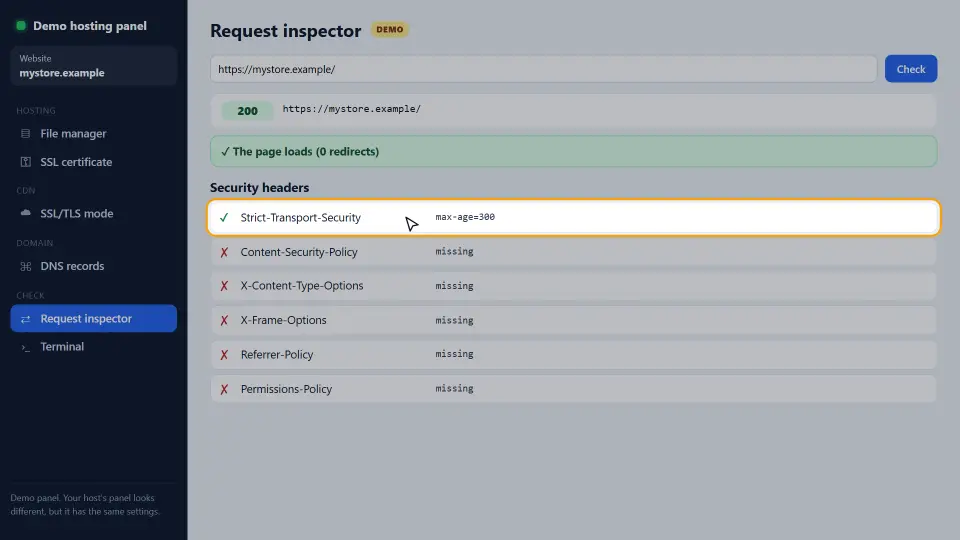
Next, check the result with our free HTTP Header Checker. It shows whether the header is sent and which max-age it uses.
How to Raise max-age Safely
The header is easy to switch on but slow to switch off. A browser keeps the rule for the full max-age, even if you remove the header. Therefore, raise it in steps:
- 300 seconds (five minutes) while you test.
- 86400 seconds (one day) once nothing broke.
- 604800 seconds (one week) after a few quiet days.
- 31536000 seconds (one year) when every page has run on HTTPS for a while.
A year is the value most guides recommend for a live site. It is also the minimum for the preload list.
includeSubDomains and Preload
The includeSubDomains flag applies the rule to every subdomain too. Add it only when every subdomain works on HTTPS, including old ones such as an internal tool or a mail panel.
The preload flag goes one step further. Browsers ship a built-in list of HSTS sites, so even the very first visit uses HTTPS. However, getting off that list takes months. So submit your domain at hstspreload.org only when you are sure.
Header always set Strict-Transport-Security "max-age=31536000; includeSubDomains; preload"How to Read the HSTS Header
The header has up to three parts. Each one is a promise you make to every browser that visits.
max-age
This is the number of seconds the browser keeps the rule. The timer starts again on every visit that sends the header. So a regular visitor never really reaches the end of it.
includeSubDomains
This flag covers every name under your domain, such as shop.example.com and mail.example.com. Therefore, a forgotten subdomain without HTTPS stops working for anyone who has seen the rule.
preload
This flag only says that you agree to be added to the browsers' built-in list. On its own it does nothing. You still have to submit the domain.
Where the header must come from
Browsers only accept the header over a valid HTTPS connection. Also, for preload, the bare domain itself must send it, not only www.
HSTS on Other Servers and CDNs
The idea is the same everywhere: send one header on every HTTPS response. Only the place where you write it changes.
Cloudflare
In the Cloudflare dashboard, open SSL/TLS, then Edge Certificates, and turn on HSTS. Choose the max-age there. Because Cloudflare sends the header itself, you do not need a line in htaccess as well.
WordPress
If you cannot edit the server, a security plugin can add the header. However, a server rule is faster, because it works before PHP even starts.
IIS
On Windows servers, add a custom header named Strict-Transport-Security in the site's HTTP Response Headers. Then check it with the header checker.
How to Test and Remove HSTS
First, test from outside with our HTTP Header Checker. It shows the exact header and max-age that visitors receive.
In Chrome, you can also open chrome://net-internals/#hsts and query your domain. It shows whether the browser stored the rule and when it ends. On the same page, you can delete the rule for your own browser while you test.
To remove the header for everyone, send max-age=0 for a while instead of deleting the header. Then each browser that visits drops the rule. After that, you can remove the line.
Common Mistakes
- Starting with a max-age of one year. If HTTPS breaks, visitors are locked out until the year is over.
- Adding includeSubDomains while one subdomain still has no certificate.
- Sending the header over HTTP. Browsers ignore it there; it only counts on HTTPS.
- Forgetting the
alwayskeyword, so error pages are sent without the header. - Submitting to the preload list as a test.
In short, HSTS is one line, but the max-age is a promise. Grow it slowly, and check every step with the HTTP Header Checker. For every directive in detail, see the MDN guide to Strict-Transport-Security.
Questions and Answers
What does HSTS do?
It tells the browser to use only HTTPS for your site for a set time. After the first visit, the browser never sends a plain HTTP request to your site.
Do I still need an HTTP to HTTPS redirect with this header?
Yes. The redirect handles the very first visit, before the browser has seen the header. The header handles every visit after that.
What max-age should I use?
Start with 300 seconds while testing, then raise it in steps. For a live site, 31536000 seconds (one year) is the usual final value.
How do I turn the header off?
Send the header with max-age=0. Browsers drop the rule the next time they visit over HTTPS. Until then, they keep the old rule.
Is HSTS good for SEO?
Not directly. However, it removes a redirect hop for returning visitors and protects them, which helps speed and trust.
Why does my header not show up?
Check that it is sent over HTTPS, that the Apache headers module is on, and that a CDN or cache is not stripping it. Our HTTP Header Checker shows what really arrives.
What is HSTS preload?
A list built into browsers, so even the first visit uses HTTPS. You need max-age of one year, includeSubDomains and preload, then you submit the domain at hstspreload.org.
Can the header lock visitors out?
Yes, if HTTPS breaks while a long max-age is active. That is why you start short and only raise it once everything works.
Does the header slow down my site?
No. It removes the HTTP to HTTPS redirect for returning visitors, so pages open slightly faster.
Where do I add HSTS on Cloudflare?
In SSL/TLS, Edge Certificates, under HTTP Strict Transport Security. Then you do not need it in htaccess too.
Can a WordPress plugin add the header?
Yes, many security plugins can send it. Still, a server rule in htaccess or Nginx is faster and also covers non-WordPress files.
Why is my header sent twice?
Both the server and the CDN or a plugin add it. Keep only one source, so the max-age is clear.
How do I check if Chrome stored the rule?
Open chrome://net-internals/#hsts and query your domain. You can also delete the rule there for your own browser.
Does it work on localhost?
Browsers ignore the rule on localhost and plain IP addresses, so you test it on a real domain.
What happens if my certificate expires while the rule is active?
Visitors who saw the rule cannot click past the warning. That is why automatic certificate renewal matters even more with the header.
Is HSTS the same as a 301 redirect?
No. The redirect is sent by the server on each HTTP request. The header makes the browser skip the HTTP request altogether.
Should every subdomain use HTTPS before includeSubDomains?
Yes. Check every subdomain, including old ones and internal tools, before you add the flag.
How long does it take to get on the preload list?
Usually a few weeks to a few months, because the list ships with new browser versions.
Does it protect against all attacks?
No. It stops downgrade to plain HTTP. You still need other headers, such as a Content-Security-Policy, for other risks.
Does the SEO checker test this header?
Yes. Our SEO Checker shows whether the header is sent and links to this guide when it is missing.