Broken Link Checker
Find Dead Links And Broken Images
This free broken link checker reads one live page and tests every link and image on it. So an outbound link that ends on a 404 shows up as broken, even after a redirect. Sites that only block robots get their own label, so you do not chase false alarms.
- FreePrice
- Links and imagesChecks
- Up to 400 addressesEach scan
- NoneSign-up
Broken Link Checker
Internal links, external links and images on one live page
- Addresses
- 0
- Broken
- 0
- Broken images
- 0
- Redirects, then works
- 0
- Could not verify
- 0
- Working
- 0
Links added by JavaScript after load are not here, because this reads what the server sends.
Ready. Paste the address of a live public page.
What This Broken Link Checker Does
A broken link sends a reader to a page that no longer exists. Usually the reader sees a 404 error and leaves. A broken image is the same problem in a different shape, because it leaves an empty box in the middle of your content.
This broken link checker finds both on one page. First, you paste the address of a live page. Then our server reads that page and lists its internal links, external links and images. After that, it asks each address for its status and draws the answer as soon as it arrives.
The tool also follows every redirect to its end. So when an old outbound link moves twice and then lands on a 404 Not Found page, it counts as broken. Many quick checks stop at the first redirect and call that link fine.
Finally, you can filter the results by type or by verdict. For example, pick External links and Broken to get your fix list. You can then copy that list or download it as a CSV file for your team.
What A Web Page Broken Link Checker Looks At
As a web page broken link checker, this tool works on the single address you give it. It reads the plain links in the page and the main address of each image. It treats the same address on the same page as one row, and it counts how often that address appears.

It also separates your own links from outbound ones. A www prefix does not make a link external, so www.example.com and example.com count as the same site. The tool skips mail and phone links, because they have no web page to test.
Dead Link Checker Results You Can Trust
A good dead link checker must not cry wolf. Some sites refuse every robot with a 403, a 429 or LinkedIn’s 999, yet the page opens fine for a person. So those rows say Could not verify, and you can open them yourself.
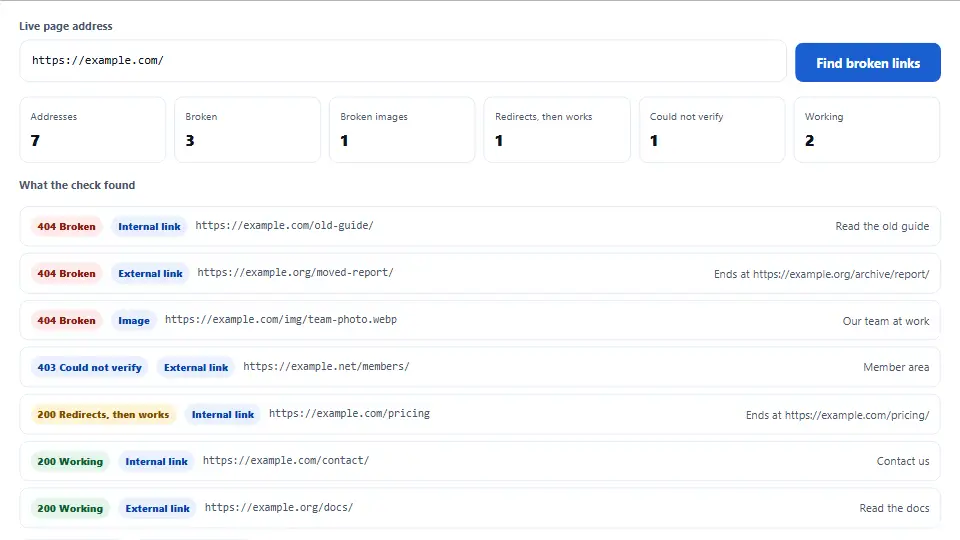
A row says Broken only when the answer proves it. That means a 404, a 410 or another plain client error. It also means a domain that no longer resolves, a connection that fails, or a redirect loop.
How A Broken Image Is Found
Each image address gets the same test as a link. However, images get one extra check. If the address answers with a web page and not a picture, the row says Broken. After all, no picture can show.
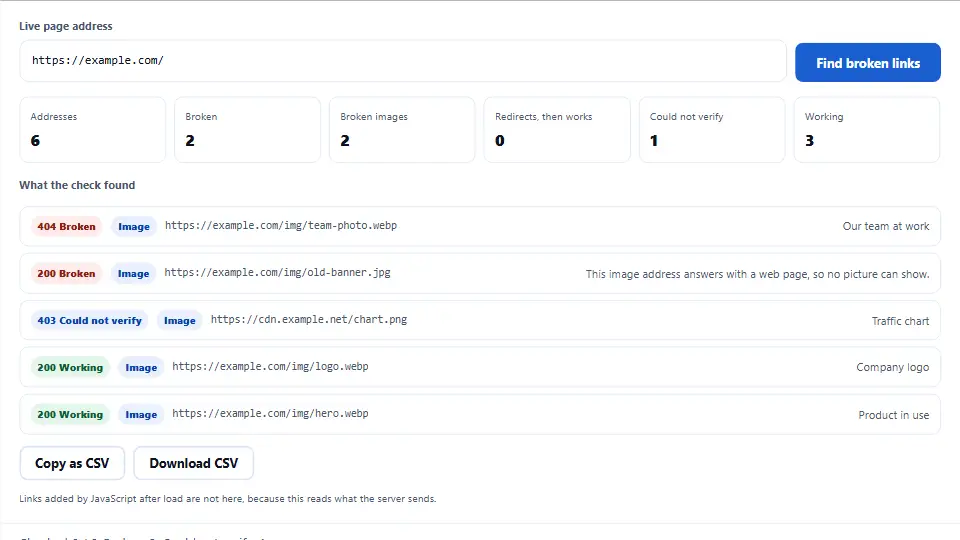
That case is common after a site moves. The old image address redirects to the home page and answers 200, so a status check alone would pass it.
Filters And The CSV Export
Two menus shape the list. Type picks links, images or both, while Result picks the verdict. The counts at the top always cover the whole page, so they do not change with the filter.
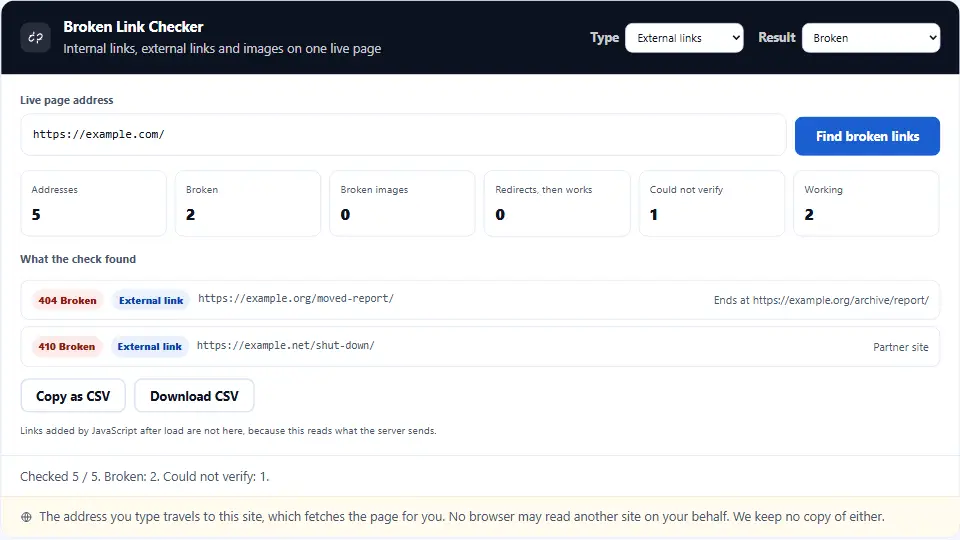
Then the CSV holds the rows you filtered, with the status code, the final address, the link text or alt text and the number of uses. As a result, you can hand one clean file to whoever edits the page.
See the Broken Link Checker at Work, Start to Finish
This brief video shows each step from start to finish. Choose your language below, and switch on captions if they help.
Using the broken link checker, step by step
Five short steps take you from one address to a clear fix list.
Paste a live address
Type or paste the full address of a public page. The tool adds https:// when you leave it out.
Start the scan
Press Find broken links. The server reads the page once, and the list fills in as each answer arrives.
Read the counts
The boxes show the total, the broken links, the broken images, the redirects and the addresses it could not verify.
Filter the list
Choose a type and a result. For instance, pick Images and Broken to see only the failed pictures.
Fix, then scan again
Replace or remove each broken link, or point it to the final address. Then run the check once more to confirm.
Why use this dead link checker
Three things set it apart from a quick status check.
It follows redirects to the end
A redirect is not an answer. So the tool follows up to five hops and judges the last one. Because of that, a link that moves and then dies still counts as broken.
It keeps false alarms apart
Bot walls and short server errors get their own label. Therefore the Broken list stays short and true, and you do not waste an hour on links that work.
It checks images as well
Internal links, outbound links and images share one report. Also, an image address that returns a web page is caught, which a plain status check misses.
How the tool picks each broken link verdict
Four simple rules decide the label on each row.
- Working The address answered with a 2xx status on the first request. So the page or image is there right now.
- Redirects, then works The address moved, but its last stop answered with a 2xx status. Readers still arrive. Even so, updating the link to the final address saves a hop, and the Google guide to status codes explains how crawlers treat each one.
- Broken The last answer was a 404, a 410 or another plain client error. The same goes for a dead domain, a failed connection, too many redirects, or an image address that returns a web page.
- Could not verify The site refused a robot, asked for a login, timed out or returned a 5xx error. None of those proves the page is gone, so open it yourself or try again later.
Common broken link mistakes to avoid
Most of these turn a small fix into a bigger one.
Treating every 403 as dead
A 403 may mean that a site blocks robots. So view the page in your browser before you delete a good link.
Fixing only internal links
Outbound links die too, and you have no warning when they do. Therefore check old posts on a regular basis.
Sending every dead link to the home page
The reader was looking for one page. Instead, point each link at the closest real page, or delete it.
Leaving redirects in place forever
A link that hops twice still works, but it is slower. So update the link to its final address when you edit the page.
Hiding a dead link with a soft 404
A missing page that answers 200 hides the problem from every tool. Instead, let a removed page return a real 404 or 410.
Forgetting the images
After a move or a new theme, old image paths often fail. Hence, check images as well as links after each big change.
Broken link checker frequently asked questions
Is this broken link checker free?
Yes. It is free to use, and there is no sign-up or card. A fair-use limit applies per visitor.
What is a broken link?
It is a link whose target no longer works. The most common sign is a 404 error page, but a dead domain counts too.
Does it check external links?
Yes. The tool tests internal and outbound links. So an outbound link that ends on a 404 shows as broken.
Does it find broken images?
Yes. It tests the main address of each image tag on the page, including common lazy-load addresses.
Can it scan a whole website?
No. It scans one page at a time, which keeps it quick. To cover more, run it on each page that matters.
How many links can one scan test?
A single scan can test up to 400 different addresses. Each visitor also has a budget of 400 addresses per ten minutes.
Why does it say Could not verify?
The site refused a robot, timed out or returned a server error. That does not prove the page is gone, so open it yourself.
Why is a working link marked as blocked by some tools?
Many big sites answer bots with a 403 or 999, yet they serve the same page to people. This tool does not call those broken.
What does Redirects, then works mean?
The address moved and its last stop works. Readers still arrive, but you can save a hop by using the final address.
How many redirects does it follow?
It follows up to five hops. A chain longer than that counts as broken, because browsers and crawlers may give up too.
Can I check a local or private site?
No, it only checks live public addresses. For safety, it refuses localhost, private networks and bare IP addresses.
Can it read pages behind a login?
No. The server sees what a logged-out visitor sees. Links inside a member area will answer as a login or a refusal.
Does it find links added by JavaScript?
No. It reads the HTML that the server sends, and it does not run scripts. Links added later are not in the list.
Does it read background images from CSS?
No. It checks image tags only. So it does not test pictures set in a stylesheet, or the extra sizes in a srcset.
Are my results saved?
No. The list lives in your browser tab and goes away when you close it. Download the CSV if you want to keep it.
Does checking links download other sites’ pages?
No. The tool asks each address for its status and reply headers only. The connection then closes, so it reads no page body.
How do I fix a broken internal link?
Change the link to the page’s current address. If you moved that page, also add a 301 redirect from the old address.
How do I fix a broken external link?
Find the new address of that page, or a good replacement. If neither exists, delete the link.
How do I fix a broken image?
Upload the file again, or update its path on the page. Then run the scan once more to make sure the issue is gone.
Do broken links hurt SEO?
A few will not sink a site. Still, they waste crawl paths and links, and they let readers down. So it pays to fix them.
What is the difference between a 404 and a 410?
A 404 says the page was not found. A 410 says it is gone on purpose. This tool marks both as broken.
What is a soft 404?
It is a “not found” page that answers with status 200. This tool reads status codes, so it cannot catch that case on its own.
Why did a result change between two scans?
Sites can go down and come back. Also, bot walls can answer differently from one moment to the next. So try again later.
How often should I check my links?
Do a quick check each time you redesign or move. For a normal site, a review of your top pages once a month is a good habit.
Is it safe to use?
Yes. The tool checks every address and redirect before the server connects. It also draws results as plain text, so no outside code runs here.
Does it scan links for viruses?
No. It tells you whether an address works, not whether it is safe. Use a security scanner for that job.
More free link tools
Use these with the broken link checker to clean up a page.
- Link Extractor
List each link with its rel value and text.
- Redirect Chain Checker
See every hop between two addresses.
- SEO Checker
Audit the whole page, not only its links.
- HTTP Header Checker
Read the full reply from any address.
Run the broken link checker now
Paste a live address and get your fix list in a minute. It is free, and you do not need to sign up.