Most popular
Premium
150USDT
Instant licence key, 1 year
- Unlimited URLs per crawl
- JavaScript rendering
- All 600+ bulk exports
- Scheduling and e-mail reports
- Crawl comparison
- PageSpeed, Search Console, GA4
- MCP and API access
- 1 seat
Cookies This site keeps only what it needs to work. There is no analytics and no advertising on it today, and nothing here follows you to other sites. Read the privacy policy
Denwix SEO Crawler is SEO spider software that runs locally on your Windows PC. It checks every page of your website for broken links, redirects, weak title tags, heading and canonical issues, and AI search problems. When the crawl ends, it lists the fixes in order of importance. The free version crawls up to 1,000 URLs, and you can run it as often as you like.
At a Glance
The installer costs nothing, and you need no account to use it. Once it is on your PC, you can crawl up to 1,000 URLs in each crawl without a licence.
Version 1.2.0 · 81.9 MB · released 2026-10-31
When SmartScreen stops the Denwix installer
The installer has no code signature yet, so Windows cannot verify its developer. To make sure you install the right file, open Command Prompt and run the line below. Then check that the result matches the SHA-256 value under it:
certutil -hashfile Denwix-SEO-Crawler-Setup-1.2.0.exe SHA256
SHA-256: 162ee39e42498f4d175bead42b89604482399b0d656ddb35707c42aaf1db9635
Premium removes the 1,000-URL limit for one user. Agency covers a whole team, with no cap on how many people use it. Both licences are valid for one full year. You can pay with USDT or Binance Pay, and your licence key arrives once the payment goes through.
Ways to Pay
TRC20 and BEP20 payments confirm on the blockchain itself, so your key arrives within minutes. For Polygon, Solana and Binance Pay, we review each payment by hand.
Most popular
150USDT
Instant licence key, 1 year
399USDT
Instant licence key, 1 year
Amount due150 USDTPremium
Watch how to pay (1-minute video)
Binance ID (UID)
21022289Pay from the Binance app with Pay, then use the Binance Pay order ID as your transaction ID below.
Wallet address
TA4mQpcgfj2amQnaToRjcGdZHmksXefnfvThis address takes USDT on TRON (TRC20) and nothing else. Any other coin or network will be lost and cannot be refunded.
Wallet address
0xe1bf9dc6a2ee8ae7d449358118046978f9570b3aThis address takes USDT on BNB Smart Chain (BEP20) and nothing else. Tokens sent on Ethereum or any other network cannot be recovered.
Wallet address
0xe1bf9dc6a2ee8ae7d449358118046978f9570b3aThis address takes USDT on Polygon (PoS) and nothing else. Tokens sent on Ethereum or any other network cannot be recovered.
Wallet address
3FPQmyQs3darusa51nmGrhHeDsRrPWKmb5ED7pT1NBcuSend only USDT (SPL) on the Solana network to this address. Any other token or network will be lost and cannot be refunded.
Still unsure which licence suits you best? Try the free version on your own site first. Questions left after that test? Write to the Denwix team first, and you get a reply before any money changes hands.
Contact usOur SEO spider software crawls your site much like a search engine bot. You enter your home page URL, and it goes through every link it finds. As it does this, it records the status code, the page title, the headings and many other details for each URL. As a result, you see your entire site the way Google sees it, in a single table.
Most SEO tools check a single page of your site. A crawler, in contrast, checks every page and shows how they link to one another. With a crawler, you can find the broken link on page 400, a redirect nobody noticed, or a page with no inbound links.
The free version and the paid plans use the same audit. Therefore, the only limit on Free is the number of URLs in each crawl. The SEO crawler checks the following:

From a List of Problems to a Fix Plan
A list of 2,000 problems is hard to manage. For this reason, the crawler also creates a fix plan. It sorts the problems into groups and ranks each one by its impact on the site and the effort the fix takes. Then it explains every problem in clear words: what it is, why it matters and how to solve it.
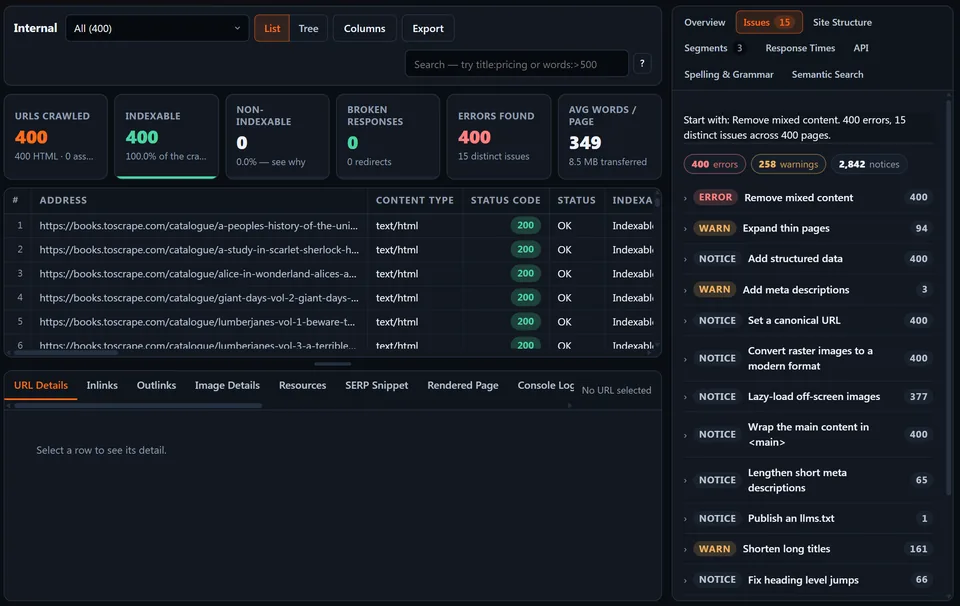
You can export the plan as an HTML report, a JSON file or a PDF audit report. However, to make the PDF, you need Chrome or Edge on your computer. If you have neither, the app creates a page that you can print.
AI search tools like ChatGPT search and Perplexity use their own bots to read the web. If your robots.txt blocks those bots, AI answers cannot quote or cite your pages. Therefore, the crawler reads your robots.txt file the way the robots.txt standard (RFC 9309) describes it. Then it reports the status of all 34 known AI bots.
Next, it checks your llms.txt, the Content-Signal lines that Cloudflare adds to robots.txt, and your structured data. In addition, it scores each page by how easy its main text is to quote. All of this is simple parsing. The crawler calls no AI service, and none of your files leave your computer.
Model-Training Crawlers and AI Answer Crawlers
Each AI crawler arrives with its own purpose. For example, some collect text to train models, while others fetch pages to answer a user's question right away. Blocking a training bot can be a fair choice. However, blocking a search bot removes your pages from AI answers. The audit lists training bots and search bots separately. So you know whether each block was on purpose and whether it may cost you visitors.
When Page Text Appears Only After Scripts Run
Many AI bots cannot run JavaScript. So if most of your content loads through a script, those bots find an empty page. The crawler compares the raw HTML of each page with what a user sees in a browser. Then it flags the pages that may have a problem. Google does run JavaScript. Even so, its JavaScript SEO basics guide explains why server-side HTML is the safest choice.
Denwix signs every licence key with an Ed25519 private key that only Denwix holds. The matching public key sits inside the app. This lets the app check your key on your computer each time it starts. It needs no login, no account and no call to a remote server.
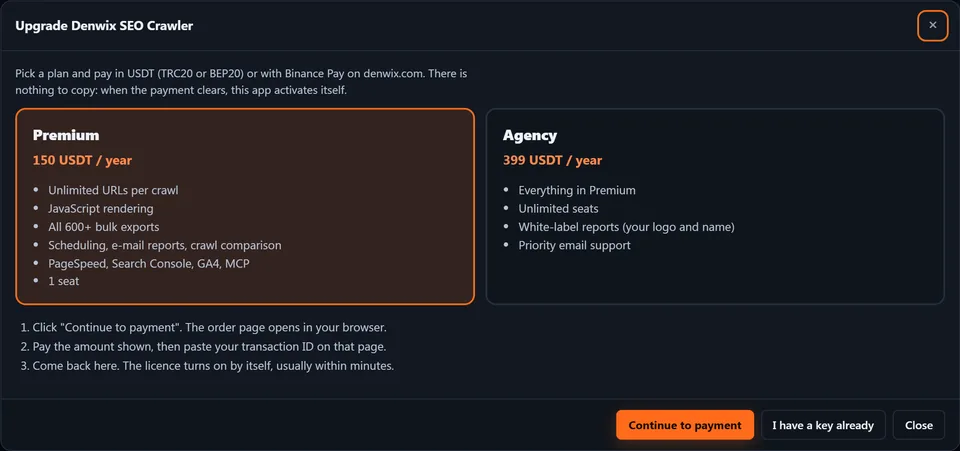
Buying also works from within Denwix SEO Crawler itself. The app opens this page with a one-time claim code. Once you check out and the payment goes through, the app collects its key by itself. We also e-mail you the key, so you can paste it on another computer later.
Outbound Requests From Denwix SEO Crawler
Apart from the sites you crawl, the app contacts denwix.com for just two reasons. First, it checks for updates once a day when it opens. Second, after a purchase, it asks whether the key for your claim code is ready. The app does not track you, and it collects no telemetry.
Some Premium features use outside services, like PageSpeed Insights or an AI model. Every request goes straight from your computer to that service, and none goes through Denwix. Nothing AI-related runs until you paste in an API key of your own.
We built the engine on Node.js without a single outside npm package. It relies only on what Node.js itself offers, such as the built-in SQLite database and fetch. Therefore, you do not need Java, Docker or third-party libraries that an attacker could replace with harmful code.
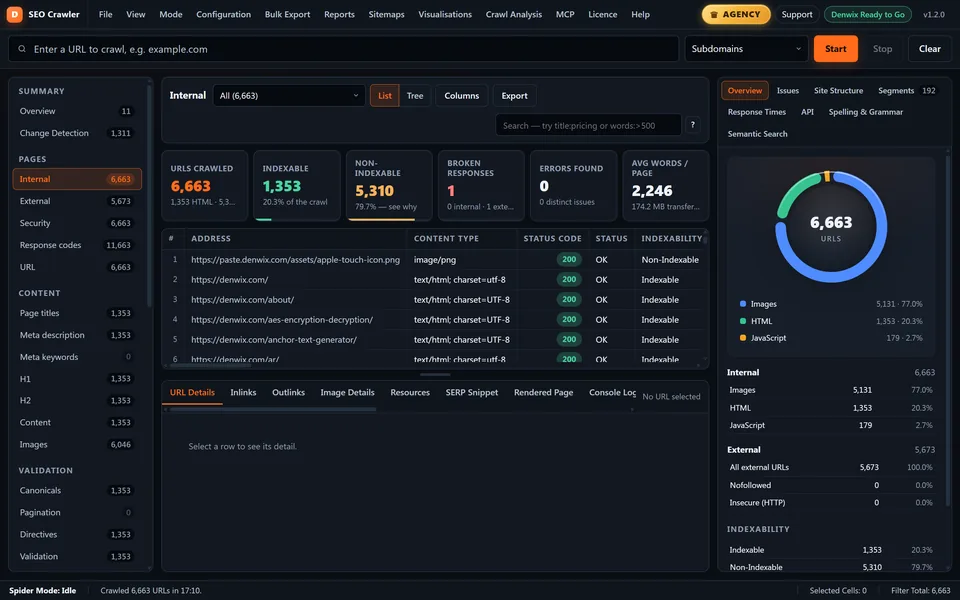
The app keeps your crawl data in a database file within your Windows user profile. So you can delete, rename, export or import your crawls whenever you need. And because this website crawler tool runs on your own computer, it can also crawl staging sites and pages behind a firewall.
The app needs a 64-bit version of Windows 10 (version 1809 or higher) or Windows 11. JavaScript rendering, screenshots and the PDF report also need Google Chrome or Microsoft Edge, and most PCs already have one. If you crawl hundreds of thousands of URLs, close other memory-heavy apps first.
The first time you start the installer, Windows SmartScreen may show the message "Windows protected your PC." That happens because the installer has no code signature yet. To go ahead, open More info on that screen and press the Run anyway button that shows up. The app installs into your own user profile, so you do not need admin rights.
Check the Installer With SHA-256
Since the file has no code signature, you can check it yourself. The download section near the top of this page shows the SHA-256 hash of the latest installer. In Command Prompt, run the certutil line given there and see whether the two hashes match. Should even one character differ, treat the installer as tampered with and delete it unopened.
Screaming Frog SEO Spider is the most popular tool of this type, but its free version stops at 500 URLs. Our free version crawls up to 1,000 URLs. Also, every plan includes the AI search audit, the llms.txt check and a fix plan.
In fairness, though, Screaming Frog has been around for a long time. It has a large user base, many guides and a Mac version. Denwix SEO Crawler, on the other hand, is new and runs on Windows only. So the best way to choose is to crawl your own site with the free version of both tools and compare the results.
Before you buy, here is what is missing today. So far the crawler runs on Windows alone, with no macOS or Linux build. Its menus and dialogs are available in English only. Also, the Search Console, GA4, Moz, Majestic and Ahrefs connections are in beta, because we tested them with sample data rather than real accounts.
Licence Terms in Short
These terms apply to every licence, so you know exactly what you get before you pay.
Rather Have Denwix Run the Audit for You?
If you would rather not crawl the site yourself, our technical SEO audit team runs the same checks and corrects the core files for you. And if you only want to look at one page, the free SEO checker is usually enough.
On this page
A first crawl takes only minutes to set up. Once it starts, the crawler does the rest.
Download and Install
Download the free installer from the link above. Should SmartScreen step in, the More info link reveals a Run anyway button.
Enter Your Website
Enter your home page address in the URL bar and press Start.
Watch the Crawl
Results fill the tabs live, and you can pause, resume or stop at any moment.
Open the Fix Plan
Then open the Issues tab or export the PDF report, sorted from the most to the least severe issue.
Upgrade When You Need It
If your site has more than 1,000 URLs, buy Premium from the Licence menu.
You should trust a crawler before you rely on it. That is why we keep prices fair, your data on your own PC and the limits clear.
1,000 Free URLs in Every Crawl
Crawl 1,000 URLs per crawl free of charge, with no time limit and no sign-up.
AI Crawler and Answer-Engine Checks Included
See which AI bots can read your site, on any plan.
Your Data Stays Local
Your crawls live in a file on your PC, not on our servers.
Checked Offline
The signed licence key works with no login and no account.
A Fix Plan, Not Just Data
Every issue comes ranked, with the reason and the fix in plain English.
A Fair Price
Premium is 150 USDT a year, and Agency covers your whole team for 399 USDT.
Every plan uses the exact same audit engine. The paid plans remove the URL limit and also add the features listed below.
| Feature | Free | Premium | Agency |
|---|---|---|---|
| Price | 0 | 150 USDT a year | 399 USDT a year |
| URLs per crawl | 1,000 | Unlimited | Unlimited |
| Number of crawls | Unlimited | Unlimited | Unlimited |
| Seats | 1 | 1 | Unlimited |
| All 33 audit tabs and 448 filters | Yes | Yes | Yes |
| Fix plan and AI search audit | Yes | Yes | Yes |
| CSV, JSON, HTML and PDF reports | Yes | Yes | Yes |
| Sitemap generation and audit | Yes | Yes | Yes |
| JavaScript rendering and screenshots | No | Yes | Yes |
| Custom search and custom extraction | No | Yes | Yes |
| All 600+ bulk exports | No | Yes | Yes |
| Crawl comparison and change detection | No | Yes | Yes |
| Scheduled crawls and e-mail reports | No | Yes | Yes |
| White-label PDF and HTML reports | No | No | Yes |
| External link checking | No | Yes | Yes |
| PageSpeed Insights data | No | Yes | Yes |
| MCP server for AI assistants | No | Yes | Yes |
| Support | Priority e-mail | Priority e-mail |
No matter which licence you buy, you get everything below.
It is software that crawls a website much like a search engine spider. It follows every link, logs data about each URL it finds and spots SEO problems such as broken links, redirects and missing title tags.
Yes. The free version never expires, and it needs no login. You can crawl up to 1,000 URLs in each crawl and run as many crawls as you want.
The crawl stops, and the app shows you a message. All your findings up to that point stay in the tabs. So you can export them and start fixing the issues right away.
Premium costs 150 USDT a year for one user. Agency costs 399 USDT a year and allows an unlimited number of users.
Not yet. Right now, the app only works on 64-bit Windows 10 (version 1809 and above) and Windows 11.
The installer has no code signature yet, so SmartScreen cannot tell who made it. Pick More info on the blue SmartScreen box, and the Run anyway button appears. As a safety step, check the SHA-256 hash before you install.
Start Command Prompt inside the folder that holds the Denwix setup file, then paste the certutil command printed in our download box. Then make sure the result matches the SHA-256 value shown there. On a mismatch, remove the download and fetch it again from this page.
No. The free edition starts crawling without any sign-up. A paid licence comes as a key that the app checks on your computer, so you never have to log in.
No. The app checks your key offline with a public key built into it. It only goes online to crawl, to look for updates once a day and to fetch a key you just bought.
The app saves your crawls in a database file within your Windows user profile, and it sends none of that data to Denwix. To move a crawl to another computer, export it as a file and then import that file there.
Yes, with Premium or Agency. The app renders each page with Chrome or Edge on your computer. It then compares the rendered page with the raw HTML of the same page.
It checks which of the 34 known AI bots your robots.txt file allows or blocks. It also separates the bots that feed search answers from those that collect training data. On top of that, it reviews llms.txt, Content-Signal lines, structured data and how easy each page is to quote.
No. The AI search audit runs as plain parsing on your computer. AI prompts are an optional Premium feature, and they only work once you add your own API key.
Yes. The crawler runs on your computer, so it can reach every site that your computer can open. That includes local sites and staging sites that need no password.
Denwix SEO Crawler leaves a pause after each request it sends. It also slows down when a server says it has too many requests (429), is unavailable (503) or keeps answering with forbidden errors (403). In addition, you can set the crawl speed and the number of threads.
On every plan, you can export CSV, JSON, an HTML report and a PDF audit report. Premium also gives you all 600+ bulk exports, including the inlinks for each filter.
Yes, with Premium or Agency. Crawl comparison shows what changed between two crawls, such as new 404 errors or edited title tags. And when you schedule a crawl, the app can e-mail you that comparison.
Choose a network tab, like TRC20 or BEP20, and send the exact amount shown to the address on that tab. After that, your wallet shows a TxID for the transfer, and you paste that ID into the order form. TRC20 and BEP20 payments confirm automatically.
Yes. Open the Binance Pay tab, send the amount from your Binance app to our Binance ID and add your order ID to the form. A Denwix team member confirms each of these transfers manually.
TRC20 and BEP20 transfers confirm on-chain, so the key normally lands within minutes. Payments we check by hand can take several hours.
Denwix SEO Crawler drops back to the free tier, capped at 1,000 URLs per crawl. All your saved crawls stay on your computer, and you can renew at any time.
Yes. Copy the key from your e-mail and paste it into the Licence dialog on your new computer. Premium is meant for one person, while Agency lets a whole team use it.
Yes, from version 1.2.0. Open the Reports menu, choose White-label Report Settings, and enter your company name, logo, colour and contact line. After that, your PDF and HTML reports carry your branding and no Denwix name. White-label branding is an Agency-only feature, so Premium leaves it out.
These tools need no install, because they run right on this site. They are most useful when you only have one URL to check.
Check one page and see its main SEO errors.
Find the dead links on a single page.
Test your robots.txt rules before a crawl.
Follow every redirect hop and spot long chains.
Create an XML sitemap listing every URL you want search engines to find.
See which URLs answer with 404 or other errors.
Ready to See Your Whole Site at Once?
Download the free version and start crawling up to 1,000 URLs. Once your site goes past that limit, you can upgrade to Premium right inside the app.