JavaScript Obfuscator
Renamed, Encoded, Still Running
This JavaScript obfuscator rewrites a program so the names stop meaning anything and the shape of the code stops pointing at the logic. Pick the transforms, keep the name prefix you like, and the obfuscator checks the output still parses. Nothing you paste leaves the browser.
- FreePrice
- 4Transforms
- NeverRuns code
- NoneUploads
JavaScript Obfuscator
Paste your code or drop your files — nothing is uploaded
Obfuscated result
- Original
- —
- Obfuscated
- —
- Size change
- —
- Names renamed
- —
- Strings hidden
- —
- Took
- —
Ready. Paste your JavaScript, then press Obfuscate.
What A JavaScript Obfuscator Does
Source code hands over two things at once: what a program does, and how it does it. Therefore a reader who receives a module gets the reasoning for free.
An obfuscator separates the two. This JavaScript obfuscator keeps the behaviour and takes away the names, the string literals and the plain numbers.
It works from the syntax tree rather than from the text. Because the tree already knows which name is a variable and which is a property, the renamer can work per scope rather than globally.
Four transforms sit behind one editor, and each one is a checkbox. So you can rename a program on its own, or run all of them for a much harder read.
Nothing runs and nothing uploads. Since the reader only parses and rewrites the module, a program under a confidentiality clause is no different from a public one here.
How A JavaScript Obfuscator Rewrites A Script
The first pass builds the syntax tree, the same way a validator does. The rulebook is ECMA-262, so the tree matches what an engine would build.

From the tree the renamer collects each scope in turn. A parameter, a local, a function name and a class name each get a new opaque name, drawn from a range that cannot collide with a name already in use.
Two things are deliberately left alone. A property of an object is not a variable, so obj.userName keeps its spelling. A name that reaches beyond the module, such as an exported name or a global the page calls, is kept too, unless you turn top-level renaming on.
Each pass produces its own tree rather than editing the text. The writer only runs at the end, so a program that fails to parse never gets half rewritten.
The last step re-parses the output. Because the obfuscator reads its own result back before showing it, a pass that produced invalid code hands your original file back instead.
The Four Transforms, In The Order They Run
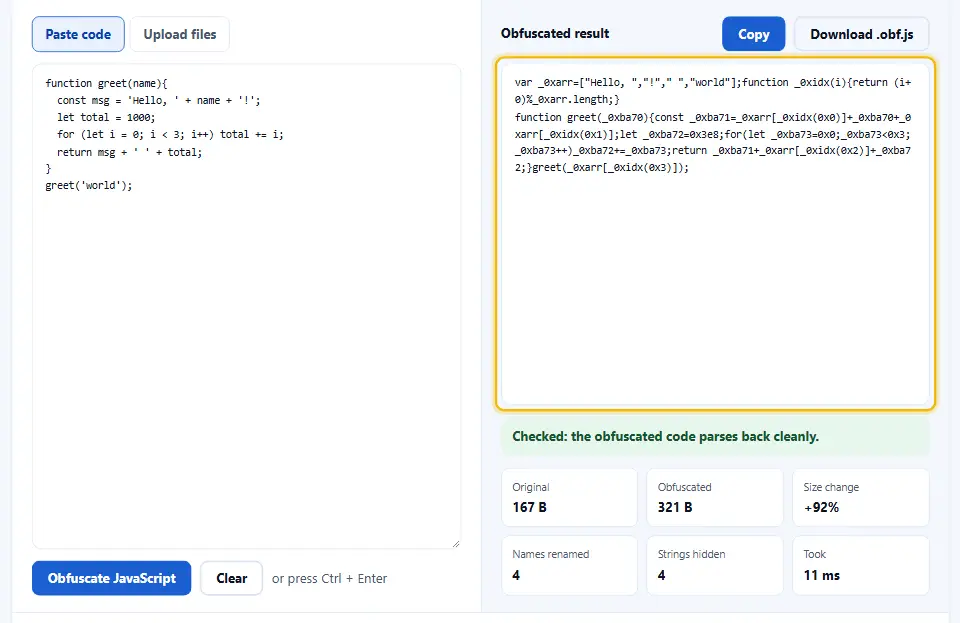
Renaming runs first. Parameters, locals, function names and class names become short opaque names such as _0x1a2b, scoped so that two functions may both use the same name safely. Exported and top-level names are kept unless you ask for them too.
The string pass runs next. Every string literal moves into one array at the top, and each use becomes a lookup by index through a small accessor that rotates the order. Because the strings are no longer beside the code that reads them, a search for a message stops finding anything useful.
Number encoding follows. Every plain integer is printed as hexadecimal, so 1000 becomes 0x3e8. The value does not change; the digits just stop reading as a familiar figure.
Compacting comes last. The whole module runs through the minifier, which drops the comments and the spacing, so the result is one dense block rather than tidy lines.
What Obfuscation Does Not Do
It does not hide your code from a determined reader. Every transform here is reversible in principle, and a tool exists for most of them.
It does not keep a secret safe. A key compiled into a browser script is a key the browser has, and anyone who can load the page can read it. Because obfuscation only raises the effort, an API key belongs on a server.
It does not stop copying. Somebody can still save a rewritten file, serve it and run it. The licence and the contract are what address that, and neither one is a build step.
It does not make a module faster, and it can make it slower. Because the string lookups cost a little work at runtime, the trade is readability for a few milliseconds.
It does not protect a script on the server either. Anyone with access to the machine has the original file, whatever the browser received.
The Name Prefix And Keeping The Output Valid
The name prefix is the one setting beyond the checkboxes, and it exists to avoid a collision. A generator that emits a helper called a or b can clash with a global on the page, so a short distinctive prefix such as _0x removes the risk.
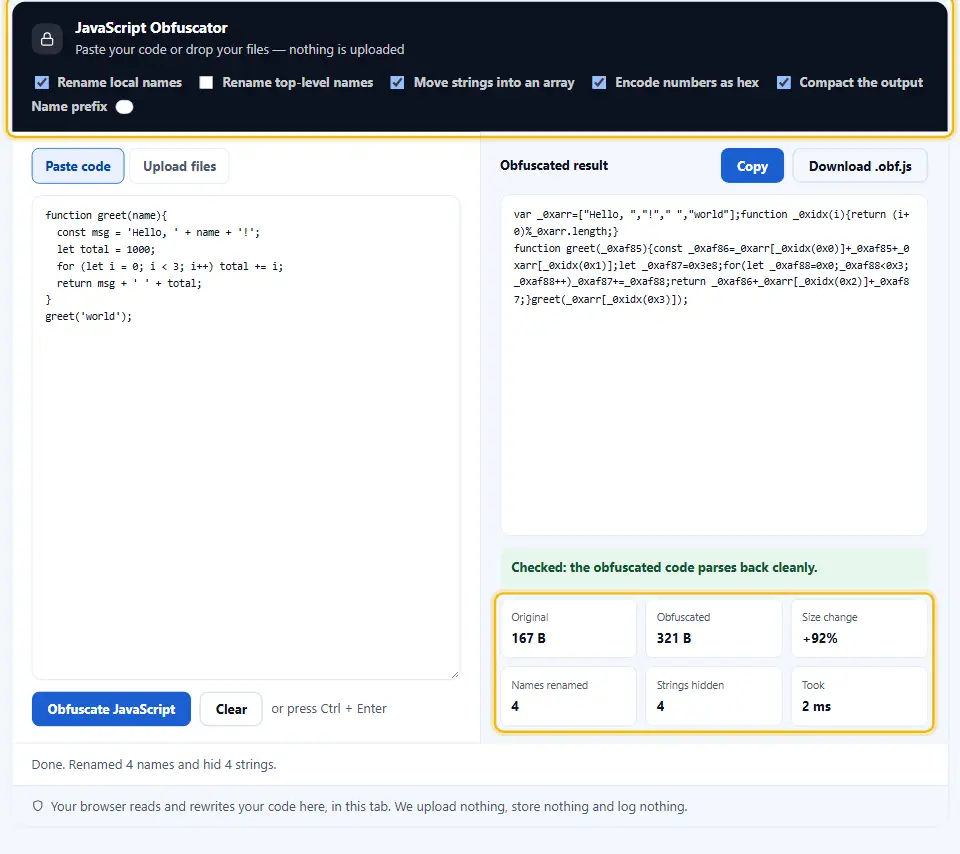
Top-level renaming stays off by default. Pasted code is often a classic module, where a top-level function becomes a property of window that another file calls by name, and renaming it there would break a caller the obfuscator cannot see.
Inside a module or an IIFE nothing outside can reach those names, so turning top-level renaming on there is safe and hides far more.
Every run ends with a parse of its own output. Because the obfuscator re-reads its own result before showing it, it reports a transform that produced invalid code rather than handing the code over.
Watch the JavaScript Obfuscator in Action
A short video walks through every step. Then pick your language below, and turn on captions if you like.
How To Use The JavaScript Obfuscator
Four steps, and none of them need an account.
- 1
Paste the module
So paste a whole file or one module. Because the reader builds a syntax tree, you have to compile an extension such as JSX or a type annotation away first.
- 2
Tick the transforms
Then choose which passes run. Renaming locals and hiding strings are the safe pair; top-level renaming is the one to leave off when another file calls your names.
- 3
Set the name prefix
Next, give the generated names a short distinctive prefix such as _0x. So a global on the page cannot collide with a generated helper.
- 4
Check the size, then test
Finally, read the size row and copy the output. After that, run it on a real page, because only the program doing its job proves a rename safe.
Why Use This JavaScript Obfuscator
Five reasons, and each one is about the read rather than the lock.
The rename works per scope
Because the renamer works from the syntax tree, two functions may both use a short name without a clash. So a large file comes out small and correct rather than broken.
Each pass is a choice
Four checkboxes rather than one button. Therefore you can rename a module on its own, which is the transform with the least risk and most of the benefit.
The obfuscator parses its own output again
Because the last step re-reads its own result, it reports a transform that produced invalid code. So a broken build is caught here rather than in a browser console.
Nothing uploads
The whole rewrite runs in this tab. So a client file under a confidentiality clause is no different from a public one here.
The size row is honest
Obfuscation usually makes a program bigger, and the row says by how much. So the trade is visible before you commit to it.
Habits That Keep Obfuscated Code Working
Six habits that keep a rewritten file working in production.
- Keep the readable file in version control So the build runs in one direction only. Because nobody should edit an obfuscated file by hand, a repository that holds only the output has lost its source.
- Never obfuscate a library you ship A consumer reaches your exports by name, so a rename breaks every caller. Hence a published package keeps its real names and its types.
- Leave top-level renaming off by default Renaming a top-level name breaks any other file that calls it, and a classic module puts its functions on window where callers reach them. Since that only shows up at runtime, keep it opt-in and reserve it for modules.
- Keep the source map out of production A source map is a perfect undo, and shipping one alongside the program cancels the whole job. So store the map for crash reporting and serve it from nowhere public.
- Test after obfuscating, not before Only the module doing the right thing proves a rename safe. Therefore the run-through belongs on the output rather than on the input.
- Say what it is in the build notes A future maintainer who meets an obfuscated file should not have to guess. So a line in the readme about which passes run saves an afternoon.
Six Ways Obfuscation Breaks A Build
Each of these passes a parse and fails in production.
Treating it as security
Watch out here. Every transform is reversible, and a determined reader will get the logic back. So obfuscation raises the cost of reading, and it protects nothing on its own.
Renaming a name somebody else reads
A global the page calls, a callback a host passes in, or a name in a server-rendered template. Because the outside world still uses the old spelling, the call lands on nothing.
Renaming names another file calls
A top-level function another file calls by name stops existing under that name. So the call fails at runtime, long after the rename looked fine.
Leaving a source map on the server
One request to the map undoes the whole build. Because a debugger reads the map, it is a complete and accurate undo.
Trusting it to hide a secret
A key or a token in the module is still in the program; the browser has to read it to use it. Hence obfuscation raises the effort to find it and nothing more, so the secret belongs on a server.
Obfuscating instead of minifying
The two are not a choice between better and worse, because they aim at different things. Run the minifier for bytes and the obfuscator for reading effort, in that order.
JavaScript Obfuscator Questions
Is this JavaScript obfuscator free?
Yes. There is no account, no limit and no paid tier. So you obfuscate as many scripts as you like.
Does obfuscation make my code secure?
No, and no tool can. It raises the effort of reading a module and it hides nothing from a determined reader. A secret belongs on a server, never in a browser program.
What does it actually change?
Four things at most: what the names become, where the strings live, how the numbers are printed, and whether the spacing is stripped. The behaviour is left exactly as it was.
Does it run my code?
Never. The obfuscator parses and rewrites the module, and calls no function. So an unfamiliar snippet cannot act while you have it open.
Will the output still work?
It parses, and the last step proves that. Behaviour is a different question, so run the output through your own tests before it ships.
Should I rename top-level names?
Only when nothing outside the script calls them. Inside a module or an IIFE that is safe; a classic script whose functions sit on window is not, because another file calls them by name.
Does it make the script smaller?
Usually not; moving strings into an array and spelling names out can add bytes. The size row reports the change either way, and compacting claws some of it back.
What does encoding numbers as hex do?
It prints every plain integer in hexadecimal, so 1000 shows as 0x3e8. The value is identical; the digits just stop reading as a familiar figure at a glance.
Why is there a name prefix field?
Because a generated helper called a can collide with a global on the page. So a short distinctive prefix removes that risk.
Can I undo the obfuscation?
Not from here. A reader can tidy a renamed file by hand, and can fold a string array back, but neither job is automatic. That is exactly why it slows a reader down.
Is my script uploaded anywhere?
No. The whole rewrite runs in this browser tab. So a client file under a confidentiality clause stays on your machine.
Can I paste a fragment rather than a whole script?
Yes. A single function works, and the rename stays inside it. So you can try a snippet before committing to the whole script.
Does it handle JSX or TypeScript?
Not directly, because both add syntax on top of JavaScript. So run the compiler first and obfuscate what it emits.
Do I need a source map?
For crash reporting, yes, and it should stay private. Because a served map is a perfect undo, keep it on your own error tracker and nowhere public.
Is it the same as minifying?
No. A minifier removes whitespace and shortens local names inside one script. An obfuscator goes further and reshapes the code, and it costs more bytes.
Which order should I run them?
Minify first, then obfuscate, then validate. Because the validator names lines, check the readable file before either transform touches it.
Can it obfuscate a whole folder?
Not in this page. One script at a time is the contract here, and a build tool is the right place for a folder.
Does it work on a phone?
Yes. The panes stack and the settings wrap into rows. So a quick run is possible away from a desk, though a long file is easier on a keyboard.
Can I download the result?
Yes. The download saves the output as a JavaScript file, so you can drop it into a build step without a copy and paste.
Do I need an account or an extension?
No. There is no sign-up, no plugin and no extension to add. So you close the tab when the build is done.
Tools That Go With This One
Four pages the same job usually leads to.
Run this one first. Because a minifier removes bytes and leaves the names alone, it is the cheaper half of the same build step.
Open tool →Then check both the input and the output parse. Because a syntax error stops the whole script, that check belongs before anything ships.
Open tool →When you meet a compacted or renamed file from somewhere else, this page lays it out again. Since a single dense line is hard to follow by eye, a reindent is the first step.
Open tool →The stylesheet half of the same build. Because a browser downloads every comment and newline, the sheet deserves the same treatment.
Open tool →
Raise The Effort Of Reading Your Script
Tick the transforms and paste the script. Nothing runs and nothing uploads, and the obfuscator checks each pass before handing the result over. Treat it as a speed bump rather than a lock, and it does its job well.