Proxy Checker
Test HTTP And SOCKS Proxies In Bulk
This free proxy checker tests your list as HTTP, HTTPS, SOCKS4 and SOCKS5. Paste the proxies or upload a text file. Live and dead proxies then land in separate tables, with speed and country beside each working one.
- FreePrice
- HTTP, HTTPS, SOCKS4, SOCKS5Types
- Up to 2,000 proxiesEach list
- NoneSign-up
Proxy Checker
HTTP, HTTPS, SOCKS4 and SOCKS5, with speed and country
A username and password are used for this test only. They are never stored or emailed.
- On the list
- 0
- Live
- 0
- Dead
- 0
- Unchecked
- 0
| Proxy | Works as | Speed | Country |
|---|
| Proxy | Result | Country |
|---|
| Proxy |
|---|
A result holds only for this server at this moment. A proxy that timed out here counts as dead, yet it may work from your own network or a minute later.
Ready. Paste proxies as host:port, one on each line.
Country data: IP Geolocation by DB-IP (CC BY 4.0).
What This Proxy Checker Shows You
A proxy is a server that passes your traffic along, so a website sees its address and not yours. Free proxy lists go stale fast, though. Many entries stop working within hours, and a dead proxy only slows your work down.
This proxy checker tells you which entries still work. First, you paste a list or pick a text file of your proxies. Then our server tries each proxy as all four common types. Finally, each one lands in the live table or the dead table.
Each live row shows the types that worked, the speed and the country. So you do not need to know the type before you test. The proxy and tunneling guide on MDN explains how these servers pass requests along, if you want the background.
Two facts matter before your first run. First, a result holds only for our server at that moment. Second, our server also emails working proxies without a login to Denwix. The note under the tool says so too, and the privacy policy has the details.
How The Test Reaches A Verdict
A web page cannot pick a proxy for its own requests, so your browser cannot run this test. So our server runs it on your behalf. It connects to the proxy and asks for one small file on denwix.com, with a random code in the address.

That file repeats the code. When the code comes back, the proxy clearly carried the request there and back. For encrypted tests, a valid denwix.com certificate gives the same proof. So a proxy that returns a fake page cannot pass, and no outside website gets any traffic from this tool.
A SOCKS Proxy Checker And An HTTP Test In One
This also works as a socks proxy checker, because SOCKS4 and SOCKS5 run beside the HTTP tests. A list often mixes types with no labels, so the tool never asks you to sort it first. A single proxy can pass more than one test, and its row then names each type.
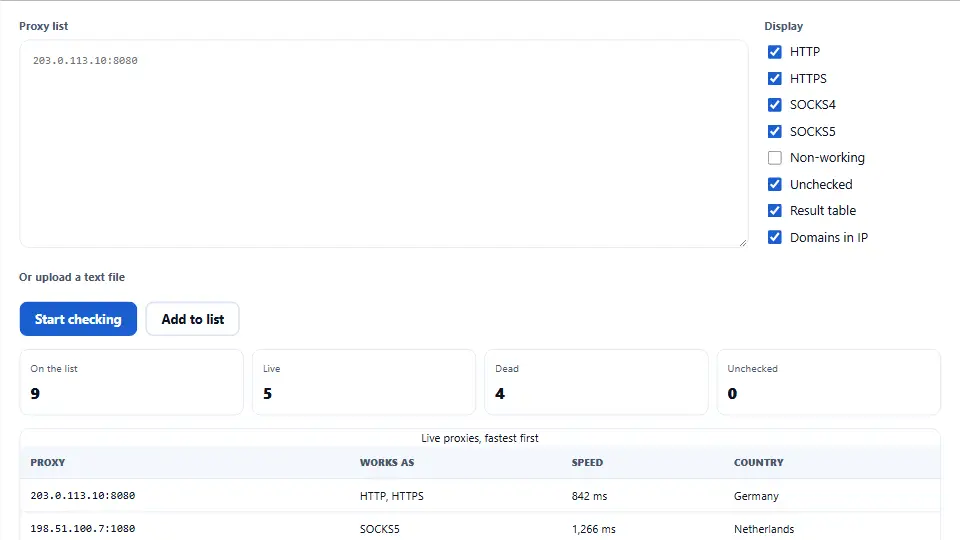
The HTTPS row means something specific here. It shows the proxy opened an encrypted tunnel to our site with the CONNECT method. RFC 1928 defines SOCKS5 itself, if you want the exact protocol.
Speed And Country Explained
Speed is the full time, in milliseconds, for one small request through the proxy to our server and back. When a proxy passes several tests, the row shows the fastest. Your own speed through that proxy will differ, because your location and your target site differ from ours.
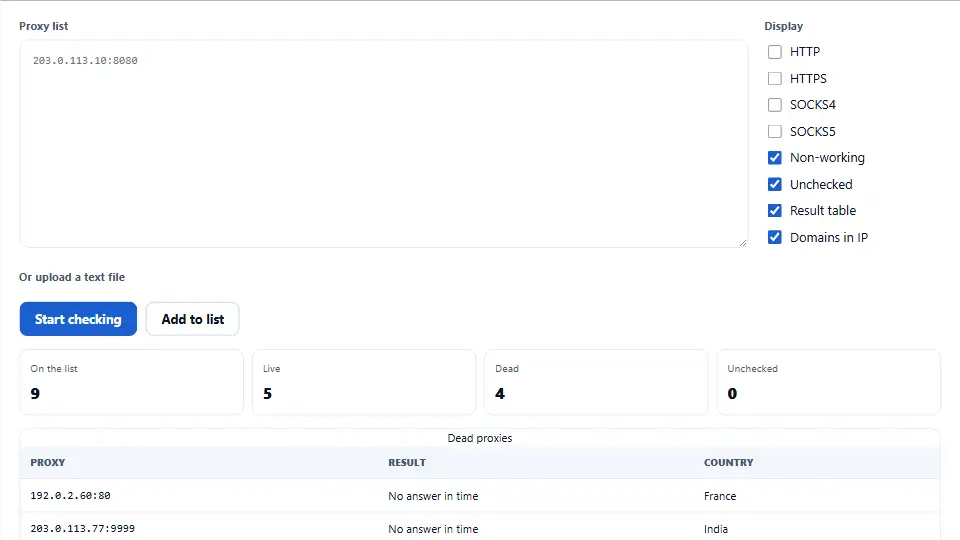
Country comes from a database stored on our server, so no outside service sees your list. It uses the address that reached our site when we know it, and the proxy address otherwise. These databases can be wrong now and then, so treat the country as a good guide. It does not prove where a machine sits.
The Display Boxes And Exports
The Display boxes choose what you see, and they never change the test. Clear SOCKS4 to hide proxies that only work as SOCKS4. Clear Non-working to hide the dead table. Clear Result table to get a plain list that you can select and copy.
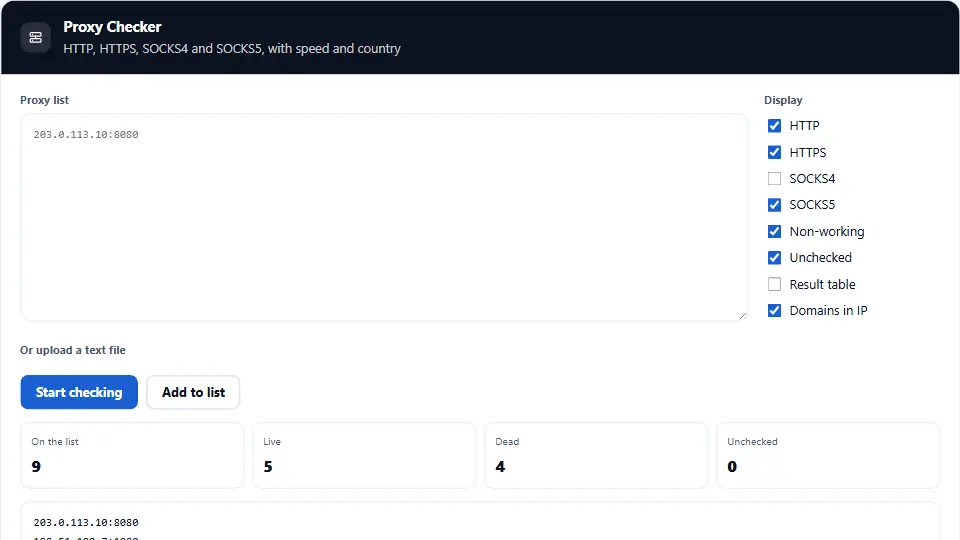
Domains in IP shows the address behind each host name. Add to list queues your entries as Unchecked without testing them, so you can build one list from several sources. Then Start checking runs everything still waiting. Finally, you can copy the live proxies or download the visible rows as a CSV file.
See the Proxy Checker at Work, Start to Finish
This brief video shows each step from start to finish. Choose your language below, and switch on captions if they help.
Using the proxy checker, step by step
Five short steps take you from a raw list to working proxies.
Add your list
Paste proxies as host:port, one on each line. A text file up to 2 MB works as well.
Start the check
Press Start checking. Or press Add to list first if you want to combine entries from several sources.
Watch the counts
The boxes show how many entries are on the list, live, dead and still unchecked. They change as answers arrive.
Read the tables
Live proxies appear fastest first, with type, speed and country. Dead proxies sit below them in a table of their own.
Copy what works
Press Copy live proxies for a clean list, or download a CSV file. Then test again before any long job.
Why pick this proxy tester over a port scan
A plain port check misses three things this one covers.
It tests a real request
An open port doesn’t prove anything, because any program can listen on it. So this proxy tester sends a request through the proxy and checks what comes back.
It tries every type
You do not need labels on your list. Each entry gets four tests, and its row names every type that passed.
It tells you its blind spot
A timeout counts as dead, yet the page reminds you that this applies to our server at that moment. Your own network may get a different answer.
How the tool labels each proxy
Three simple rules decide which table a proxy lands in.
- Live At least one test returned our random code or opened a tunnel with a valid certificate. The row then lists each type that passed.
- Dead No test passed within nine seconds. That covers refused connections, timeouts, bad replies and proxies that asked for a login. A host name that does not resolve counts here too.
- Not tested The tool refuses private addresses and ports of mail, database and login services before any connection. These rows appear in the dead table with the reason beside them.
Proxy habits that waste your time
Most of these cost time, and a few can cost you an account.
Trusting a free proxy with logins
The owner of a proxy can view and record any clear text that passes through it. So don’t send a password through a proxy you don’t trust.
Trusting last week’s test result
Free proxies can vanish within hours. So retest the list right before a long job.
Reading speed as your own speed
The number shows the route from our server. Your route will differ, so run a short trial from your own machine.
Assuming a live proxy hides you
This tool checks whether a proxy works. It is not built to measure privacy, and some proxies disclose your real address.
Dropping a timeout too quickly
A proxy can be dead on our end and still work for you. So when a paid proxy shows as dead, check it on your own network too.
Pasting a private proxy without thinking
Our server emails working proxies without a login to Denwix. So keep a private list out of the tool if that does not suit you.
Proxy checker questions people ask us
Is this proxy checker free?
Yes. You pay nothing, and no account or card stands in the way. A fair-use limit applies per visitor.
How long can my proxy list be?
A single list can hold up to 2,000 entries. The server tests no more than 500 for each visitor in any ten minutes, so a large list may need a short wait.
Which proxy types does it test?
HTTP, HTTPS through a CONNECT tunnel, SOCKS4 and SOCKS5. Each entry gets all four tests, so you do not need to label your list.
What list format does it accept?
The usual form is host:port on each line. It also reads socks5://host:port, user:pass@host:port and host:port:user:pass, and it skips text that is not a proxy.
Does it take a .txt file upload?
Yes. Choose a plain text or CSV file of up to 2 MB. The tool reads it in your browser and adds its contents to the box.
Where does my proxy list go?
It goes to our server for testing. Our server then emails working proxies without a login to Denwix, as the note under the tool states.
Why does Denwix get a copy of working proxies?
The site owner reviews the proxies that passed. The email holds the host, port, types, country and speed. Your own IP address stays out of it.
Do you keep proxy usernames and passwords?
No. We use a login only for that one test. We never store or email it, and the email leaves out any proxy with a login.
Are dead proxies emailed too?
No. Only proxies the server itself verifies as live appear in the email. Your browser cannot add others.
How long does the list stay on the server?
We do not save the tested list. Working proxies wait about ten minutes for the next email, and we delete that copy once the email goes out.
Why does a working proxy show as dead?
It could block data centre addresses like ours. It can also be very slow or busy. Test it from your own network to make sure.
How long does each proxy get to answer?
Each test gets six seconds to connect and nine seconds in total. A proxy that takes longer counts as dead for that check.
What do the milliseconds in the Speed column mean?
It is the time for one small request through the proxy to our server and back. When several types pass, you see the fastest.
How accurate is the country?
It is usually correct, but no data source is flawless. The data comes from DB-IP and sits on our own server, so no outside service sees your list.
Does it test anonymity?
No. It shows whether a proxy works, how fast it is and where it appears to be. Use our What Is My IP tool through the proxy to see what sites see.
What does Domains in IP do?
It shows the IP address behind a host name. Clear the box to see the host names you pasted, and the export follows the same choice.
When should I press Add to list?
It moves your entries onto the list as Unchecked without testing them. So you can gather several sources, and then press Start checking once.
Can I stop a check halfway?
Yes. Press Stop checking. Finished rows keep their result, and the rest stay Unchecked until you press Start checking again.
Why are some addresses refused?
The tool blocks private addresses and ports used by mail, databases and remote logins. This stops anyone using the tool to scan networks.
Does it work with proxies that need a login?
Yes. Add the username and password to your entry. A wrong login shows as dead, because the proxy rejects your request.
Does it test IPv6 proxies?
Yes, when you write the address in square brackets, such as [2001:db8::1]:3128. Results depend on the route from our server.
Does a test visit other websites?
No. Each request goes through the proxy to one small file on denwix.com. You cannot point the test at another site.
Can I save the live and dead results?
Yes. Download CSV saves the rows on screen, with each row’s result, types, speed and country. Copy live proxies gives you a clean list of addresses.
Does Denwix hand out proxies to test?
Your provider gives you a list if you pay for proxies. We do not publish one, and free lists carry real risks for private traffic.
Am I allowed to use a proxy at all?
Usually yes, although each country and each website sets its own rules. Only test proxies that you may use, and follow the terms of the sites you visit.
More free network tools
Use these with the proxy checker to see what a server reveals.
- What Is My IP
See the address that websites see for you.
- IP Address Converter
Switch an address between common formats.
- DNS Records Checker
Look up the records behind any host name.
- HTTP Header Checker
Read the full reply from any address.
Run the proxy checker now
Paste your list and see which proxies still work. No account or payment stands in the way.