What HTML Bold Means
HTML bold is text the browser draws with thicker letters. There are three ways to get it. One is the <b> tag. Another is the <strong> tag. And CSS can make any text bold with font-weight.
On the screen, all three look the same. However, they mean different things. One is just a style. Another tells the reader that the words matter. And the third belongs in your stylesheet, not in your text.
This guide shows which one to use, and when. After that, it covers what bold does for SEO, how much is too much, and how to fix a page where almost every line is bold. Our free SEO Checker flags that last problem, so we explain its rule too.

The HTML Bold Tag: b
The <b> element is the oldest HTML bold tag. Wrap words in it, and the browser shows them in bold. Here is the simplest example:
<p>Add <b>two cups</b> of flour.</p>Today, the HTML standard gives <b> a narrow role. It marks words that should stand out, yet are no more important than the rest. So it adds nothing to the meaning. It only changes how the words look.
When the b tag is the right choice
Use <b> when you want the eye to land on a word, but you are not warning anyone or stressing anything. For example:
- Key words in a summary, so a reader can skim it.
- Product names in a review.
- The first words of a short news story, which some sites set in bold.
- Words in a list that a reader needs to find again quickly.
The HTML Living Standard calls <b> a last resort. Put simply, pick a tag with real meaning first. Then reach for <b> only when nothing else fits.
The strong Tag
The <strong> tag shows text in bold too. However, it also carries a message. It says these words are important, serious or urgent.
<p><strong>Warning:</strong> unplug the device before you open it.</p>That meaning matters. Search engines and AI tools read the tag. Some screen readers can also announce it, if the user turns that option on. So <strong> tells all of them, and your readers, which words carry the weight.
When to use the strong tag
- A warning, such as a risk of data loss.
- A key condition, such as a deadline or a price.
- The one sentence in a long section that readers must not miss.
You can also put one inside another. Text in two <strong> tags counts as more important than text in one. Still, most pages never need that. If you nest tags often, the copy itself probably needs a rewrite.
Strong vs Bold in HTML
People often ask which one is "better". Actually, the real question is which one is true for your words. Here is the quick answer.
<b>means "look here". It adds style only.<strong>means "this matters". It adds meaning and style.- Both are bold by default, because the browser styles them that way.
- Both are valid HTML5. Neither one is old or banned.
So ask yourself one question. If you read the sentence aloud, would you stress these words? If yes, use <strong>. If you only want them to catch the eye, use <b>. And if the bold is part of the design, such as a button label, use CSS instead.
What about italics? They work the same way. The <em> tag adds stress, while <i> only changes the look. As a result, the pairs line up neatly: strong and em carry meaning, b and i carry style.
Bold Text with CSS
When bold is part of your design, it belongs in CSS. Headings, button labels, menu links and table headers are good examples. The property you need is font-weight.
.price {
  font-weight: 700;
}
The numbers run from 100, which is thin, to 900, which is very heavy. Normal text is 400, and bold is 700. You can also write bold instead of 700, since the two mean the same thing.
bold, bolder and the numbers
The word bolder means one step heavier than the parent text. That sounds handy. However, the result depends on the font. If a font has no 800 weight, the browser may fake it or skip it. So fixed numbers are easier to predict.
A note on fonts
A web font only looks right in bold if you load its bold file. If you don't, the browser smears the normal letters to fake it. That fake bold looks blurry. Therefore, load the 700 weight of any font you plan to set in bold.
Finally, CSS can also take bold away. For instance, strong { font-weight: 600; } makes strong text a little lighter across the whole site. The meaning stays, because the tag is still there.
Does Bold Text Help SEO?
A little, and only when it is honest. Google has said it reads bold text as a hint about what a passage covers. But it is a small hint. It will not lift a weak page, and it can never replace clear headings and good copy.
Mostly, bold helps people. A reader who skims a long page looks at the headings first, then at the bold words. So if your bold words sum up each section, readers stay longer. And readers who stay are what search engines want to see.
When bold hurts instead
Bold stops working once there is too much of it. If half the page is bold, nothing stands out. Worse, a page full of bold keywords looks like keyword stuffing. That is why audits such as Seobility, and our own checker, warn about it.
Rule of thumb: bold a few words in a section, not whole sentences, and never the same phrase twice.
How Much Bold Is Too Much
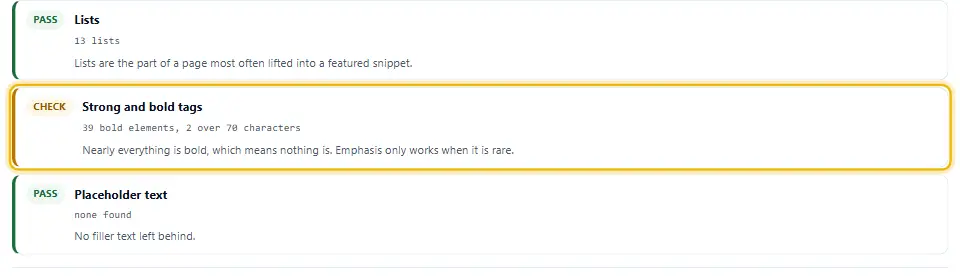
There is no official limit. Still, audit tools agree on what the problem looks like. Our SEO Checker counts every <b> and <strong> on the page. Then it shows a warning in three cases.
- Too many. The page has more than 20 bold runs, and more than one for every 40 words.
- Repeats. The same text is bold more than once, such as a keyword in every paragraph.
- Too long. A bold run is longer than 70 characters, which is a whole sentence.
The first rule grows with the page. A 4,000 word guide can carry more bold than a 300 word product page. Meanwhile, the second and third rules apply to every page, because a repeat or a bold sentence never helps the reader.
Why a whole bold sentence is a problem
A bold sentence is hard to read. Thick letters get tiring in long runs. Besides, if the sentence is that important, it may deserve a heading or a boxed note. Either one stands out more than bold does.
How to Fix Too Much Bold
The fix is mostly editing, not code. So each page takes only a few minutes. Here is the order we follow on client sites.
Step 1: Find every bold run
Scan the page with the SEO Checker. Then open the Elements tab, where the bold text is listed with its count. Or, if you prefer, search the page source for <b> and <strong>.
Step 2: Delete the repeats
Keep the first bold use of each phrase, and delete the rest. A keyword does not get stronger the third time. In fact, readers stop noticing it after the first.
Step 3: Shorten the long runs
Cut each bold sentence down to the two or three words that carry it. For example, change a bold "You must back up your files before you update" to "You must back up your files before you update".
Step 4: Move design bold into CSS
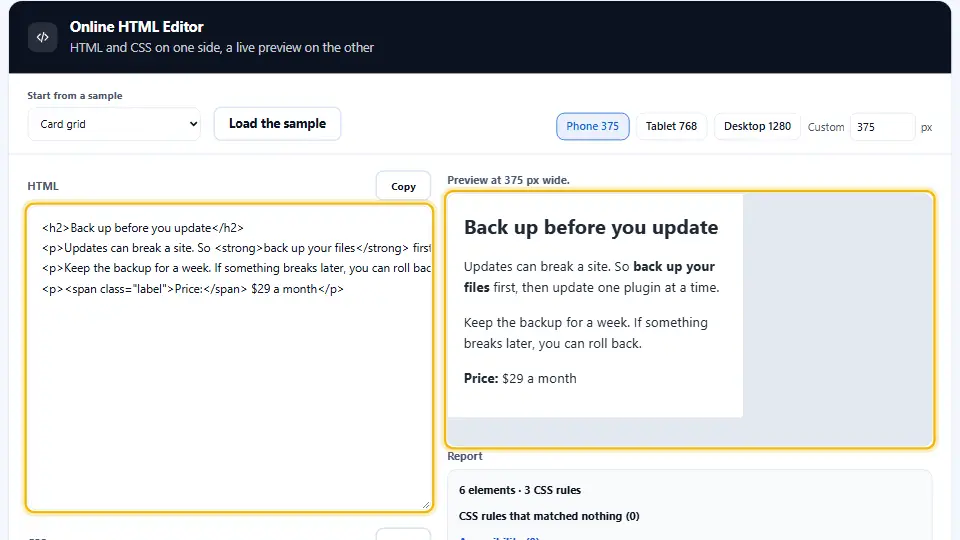
Labels, prices and table headers are design. So give them a class and a font-weight rule instead of a tag. Then they no longer count as bold text in your copy.
<!-- Before -->
<p><b>Price:</b> $29</p>

<!-- After -->
<p><span class="label">Price:</span> $29</p>

.label { font-weight: 700; }
Step 5: Check the result
Paste your new markup into the Online HTML Editor and compare it with the old one. Then scan the live page again. The warning should be gone. The video below shows the whole process on a sample page.
Bold in WordPress, Markdown and Email
Most people never type HTML bold by hand. Instead, an editor writes it for them. So it helps to know what each one produces.
WordPress
The bold button in the block editor, or Ctrl+B, writes <strong>. That is fine for real emphasis. But many writers press it just to make text look nicer. As a result, WordPress posts often end up with far too much bold. In that case, use a heading or a styled block instead.
Markdown
In Markdown, two stars on each side make text bold: **like this**. Most tools turn that into <strong>. Our Markdown to HTML Converter shows the exact HTML you get.
Email is different, because email apps strip most CSS. Therefore, <b> and <strong> are safer than a class in an email. Both work in every major inbox.
Common Mistakes
- Bolding a keyword in every paragraph to "help SEO". It reads as stuffing.
- Making a whole paragraph bold so it stands out. A heading or a note does that job better.
- Using
<strong>for design labels. Use CSS instead, so the tag keeps its meaning. - Writing
<b><strong>together. One is enough. - Loading a web font without its bold file, which gives blurry fake bold.
- Using the old
<font>tag or inline styles. Move the style into your CSS.
Each of these is easy to fix once you can see it. That is why a quick scan comes first. If you want every detail, the MDN page on the strong element is worth a read.
Questions and Answers
How do I make text bold in HTML?
Wrap the words in a b tag or a strong tag, for example <b>text</b>. Use strong when the words are important, and b when they only need to stand out.
What is the HTML bold tag?
The HTML bold tag is b. It shows text in bold without adding any extra meaning. The strong tag also looks bold, but it marks the words as important.
Is the b tag deprecated?
No. The b tag is still valid HTML5. The standard only narrowed its meaning, so it now marks text that should stand out without being more important.
What is the difference between strong and b?
Both look bold. However, strong says the words are important, and screen readers and search engines can read that. The b tag only changes the look.
Should I use strong or b for SEO?
Use the one that is true for your words. Strong is right for real emphasis. Neither tag will lift a page on its own, and too much of either one can hurt.
How do I make text bold with CSS?
Add font-weight: 700 to a rule, for example .price { font-weight: 700; }. The word bold means the same as 700.
What font-weight is bold?
Bold is 700, and normal text is 400. The scale runs from 100 to 900, but each font only has the weights it ships with.
Does bold text help SEO?
Slightly. Google reads bold as a small hint about the topic. Mostly, though, bold helps readers skim, and that is where its real value lies.
How much bold text is too much?
Our checker warns above 20 bold runs when there is more than one for every 40 words. It also warns when the same text is bold twice, or when a bold run is longer than 70 characters.
Why does my SEO checker say nearly everything is bold?
The page has a lot of bold for its length. So remove repeats, cut bold sentences down to a few words, and move design bold, such as labels, into CSS.
Is bold text bad for accessibility?
No, not in small amounts. In fact, strong can help, because some screen readers can announce it. Long bold runs are harder for everyone to read, though.
Can I nest strong tags?
Yes. Text in two strong tags counts as more important than text in one. Still, if you need nesting often, the copy probably needs a rewrite.
What does Ctrl+B write in WordPress?
In the block editor, Ctrl+B and the bold button both write a strong tag. So every word you bold counts as important text.
How do I write bold in Markdown?
Put two stars on each side, like **this**. Most Markdown tools turn it into a strong tag in the HTML.
Should I use b or strong in emails?
Either one works in every major email app. Both are also safer than CSS classes, which many inboxes strip.
Why does my bold font look blurry?
The bold file of the web font is not loaded, so the browser fakes it. To fix it, load the 700 weight of the font.
Can I remove bold from a strong tag?
Yes. A CSS rule such as strong { font-weight: 400; } removes the look. The meaning stays, because the tag is still in the HTML.
Is the font tag still allowed for bold?
No. The font tag is obsolete in HTML5. Use CSS for the look, and b or strong in the text.
What is the italic version of strong?
It is the em tag, which adds stress. The i tag is its style-only partner, in the same way that b is for bold.
How do I check bold text on my page?
Scan the page with the free Denwix SEO Checker. Its Elements tab lists every bold run, and the Checks tab tells you if there are too many.