What Is DNS Propagation?
You move your site to a new server and change its DNS record. Yet some people still see the old site, sometimes for hours. That delay is what people call DNS propagation.
The name is a little misleading, though. Your new record does not travel slowly around the world. Instead, thousands of DNS resolvers saved the old answer, and each one keeps it until its timer runs out. So DNS propagation is really DNS caching.

A resolver is the DNS server your internet provider or your phone network uses. When a visitor opens your site, their resolver asks your DNS host once. After that, it answers from memory. As a result, two visitors can see two different servers at the same time.
How TTL Decides the Wait
Every DNS record has a TTL, short for time to live. It is a number of seconds. It tells each resolver how long it may keep the answer before it must ask again.
- TTL 300: resolvers ask again after five minutes, so changes show up fast.
- TTL 3600: the old answer can stay for up to one hour.
- TTL 86400: the old answer can stay for up to a full day.
In other words, the TTL that was set before your change is what counts. If the old record had a TTL of one day, a resolver that asked just before your change may keep the old address for almost a day. Lowering the TTL after the change does not help those caches, because they already saved the old timer.
So the often-quoted figure of 24 to 48 hours is only a worst case. With a short TTL, most visitors see the change within minutes.
How to Check DNS Propagation
First, ask your own DNS host directly. It always answers with the new record straight away. If it still shows the old one, the change was not saved, and no amount of waiting will help.
Next, ask public resolvers. Our free DNS Records Checker shows the A, AAAA, MX, TXT and other records for any domain. You can also use the command line:
nslookup example.com 8.8.8.8
nslookup example.com 1.1.1.1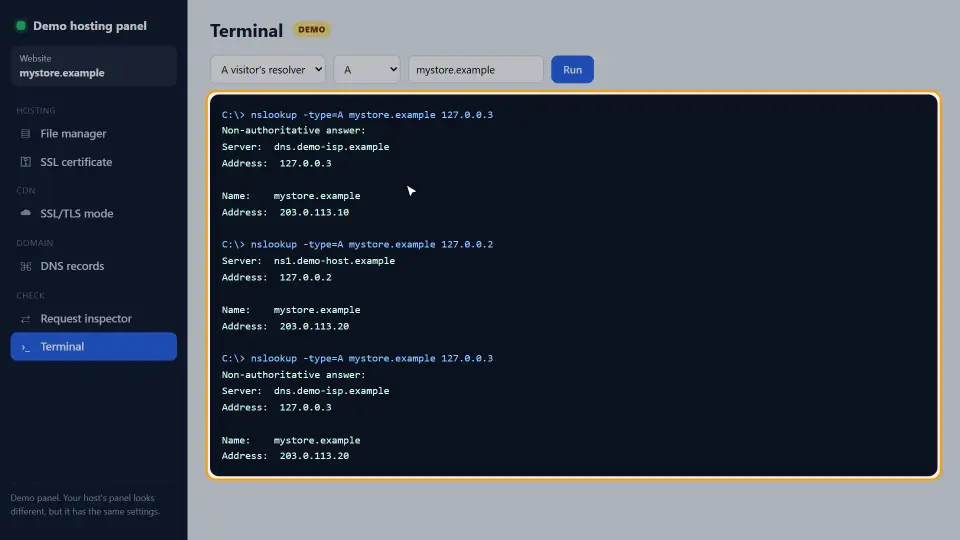
If Google and Cloudflare return the new address, most of the world will soon follow. Meanwhile, a resolver that still returns the old one is simply waiting for its TTL to run out.
How to Make a DNS Change Land Fast
The trick is to plan the change a day ahead. Therefore, follow these steps in order:
- Lower the TTL of the record you will change to 300 seconds.
- Wait at least as long as the old TTL, so every cache picks up the short timer.
- Make the change: point the A record at the new server.
- Check with the DNS host and two public resolvers.
- When everything is stable, raise the TTL again, for example to 3600.
Also keep the old server running for a day after the switch. That way, visitors whose resolvers still hold the old address see a working site instead of an error.
When the Old Site Will Not Go Away
Sometimes the DNS is correct everywhere, yet you still see the old site. In that case, the cache is closer to you.
- Your computer: on Windows, run
ipconfig /flushdns; on a Mac, runsudo dscacheutil -flushcache. - Your browser: Chrome keeps its own DNS cache. Open
chrome://net-internals/#dnsand clear it, or test in a private window. - Your router: restarting it clears its cache.
- A hosts file entry: an old line in the hosts file overrides DNS completely.
Finally, check that the nameservers are right. If you changed records at a provider that is not your active DNS host, nothing will ever change.
How Each Record Type Behaves
Every record type is cached the same way, but a change hits visitors in different ways. So it helps to know what each one does before you edit it.
A and AAAA records
These point your name at a server address. A is for IPv4 and AAAA is for IPv6. If you move hosts, change both. Otherwise, visitors on IPv6 networks keep reaching the old server, even after every A record is right.
CNAME records
A CNAME points one name at another name, for example www at your host's address. Here, two TTLs count: the one on the CNAME and the one on the name it points to. As a result, a CNAME change can take a little longer than you expect.
MX and TXT records
MX records decide where your mail goes. TXT records hold SPF, DKIM, DMARC and site checks. A mistake here does not break the website, but it can bounce mail. Therefore, test mail right after the change, not only the site.
Negative caching
If someone looked up a name before it existed, resolvers also cache the answer "not found". That timer comes from the SOA record of the zone, often one hour. So a brand-new subdomain can stay invisible for a while, even with a short TTL on the new record.
Changing Nameservers Is Different
Changing records and changing nameservers are two different jobs. A record change happens inside your DNS host. A nameserver change moves the whole zone to a new DNS host, for example from your registrar to Cloudflare.
The nameserver records live at the registry of your domain ending, such as .com. Their TTL is set by the registry, usually one to two days, and you cannot lower it. That is where the famous 48-hour figure really comes from.
How to switch nameservers safely
- Copy every record to the new DNS host first, including MX and TXT.
- Compare both zones line by line.
- Change the nameservers at the registrar.
- Keep the old zone unchanged for at least two days, because some resolvers still ask it.
In short, if both zones hold the same records, nobody notices the switch at all.
DNS Propagation With a CDN
With a CDN such as Cloudflare in proxy mode, visitors resolve your name to the CDN, not to your server. So when you move servers, you only change the origin address inside the CDN. The public DNS answer stays the same, and the switch is almost instant.
However, the CDN also caches pages. If visitors still see old content after a move, the cause may be the page cache, not DNS. In that case, purge the CDN cache instead of waiting for DNS.
Common Mistakes
- Changing the record first and lowering the TTL afterwards. The old long timer is already in the caches.
- Editing records at the registrar while the domain uses another DNS host, such as Cloudflare.
- Forgetting the www record. The bare domain moves, but www still points to the old server.
- Shutting down the old server right away, so some visitors see an error for hours.
- Leaving the TTL at 300 for good, which adds a small lookup delay for every new visitor.
In short, DNS propagation is not a mystery. It is a timer you can plan around. For the details of how caching works, see the Cloudflare guide to TTL.
Questions and Answers
How long does DNS propagation take?
As long as the TTL of the old record. With a TTL of 300 seconds, most visitors see the change in about five minutes. With a TTL of one day, some may wait up to a day.
Can I force DNS propagation?
No. You cannot clear other people's resolvers. However, you can lower the TTL a day before the change, so the wait is only a few minutes.
Why do I see the new site but my client sees the old one?
Your resolvers asked after the change, while theirs saved the old answer earlier. Each cache keeps its answer until its own TTL runs out.
How do I check DNS propagation?
Ask your DNS host first, then public resolvers such as 8.8.8.8 and 1.1.1.1. Our free DNS Records Checker shows every record type for a domain.
Does changing nameservers take longer?
Often, yes. Nameserver records at the registry usually have a TTL of one or two days, and you cannot lower it yourself.
What TTL should I use?
3600 seconds is a good everyday value. Drop it to 300 a day before a planned change, then raise it again afterwards.
Why does flushing my DNS not help?
Your browser, your router or a hosts file entry may still hold the old address. Also check that you edited the records at the DNS host your domain really uses.
Does DNS propagation affect email?
Yes. MX, SPF and DMARC records are cached the same way. So plan email changes with a short TTL too.
Why does DNS propagation take 48 hours?
It usually does not. The 48-hour figure is a worst case for nameserver changes, whose TTL is set by the registry. Record changes with a short TTL take minutes.
What is a DNS resolver?
The DNS server your internet provider, phone network or router uses to look up names. It saves each answer for the TTL of the record.
Can I see which resolvers still have the old address?
You can ask big public resolvers, such as Google 8.8.8.8 and Cloudflare 1.1.1.1. Internet providers' resolvers are private, so you cannot check them all.
Does DNS propagation affect SEO?
Only if visitors or Googlebot reach a dead server. Keep the old server running until the TTL has passed, and nothing is lost.
Why does my new subdomain not resolve yet?
Someone may have looked it up before you created it. Resolvers cache that "not found" answer for the SOA negative TTL, often one hour.
Do I need to change AAAA records too?
Yes, if your domain has them. Otherwise visitors on IPv6 networks still reach the old server.
How does a CDN change DNS propagation?
In proxy mode, the public answer points to the CDN and does not change when you move servers. You only update the origin inside the CDN.
Why does my phone show the old site but my laptop the new one?
They use different resolvers. Your phone uses the mobile network's resolver, which may still hold the old answer.
Should I lower the TTL before moving my email?
Yes. Lower the TTL of the MX record a day before, then test sending and receiving right after the change.
What is the SOA record?
The start of authority record. It holds settings for the whole zone, including the negative caching time for names that do not exist.
Can the hosts file cause DNS problems?
Yes. A line in the hosts file overrides DNS on that one computer. Remove old lines after a move.
Is a free DNS host slower to propagate?
Not really. The wait depends on TTL, not on the price of the DNS host. Some free hosts force a long minimum TTL, though, so check that.