What Are Security Headers?
Security headers are short lines your server sends with every page. They tell the browser how to protect your visitors: stay on HTTPS, do not guess file types, do not let other sites frame the page, and so on.
They cost nothing, and most of them never change how the page looks. Yet many sites send none at all. In our demo, a fresh site sent all six missing, so the browser got no rules.

Step 1: Check What Your Site Sends
First, run our free HTTP Header Checker on your live site. It grades every security header and shows what is missing.
Then it writes the fix for you. Pick your server, such as Apache or Nginx, and copy the lines. So you never have to type a header by hand.
The Five Safe Headers
These five rarely break anything, so almost every site can add them today.
Strict-Transport-Security
It keeps visitors on HTTPS, even if they type http. Start with a short max-age, as our HSTS guide explains.
X-Content-Type-Options
The value nosniff stops the browser from guessing file types. As a result, a file uploaded as an image cannot suddenly run as a script.
X-Frame-Options
The value SAMEORIGIN stops other sites from showing your pages in a frame. That blocks clickjacking, where a hidden frame tricks people into clicking.
SAMEORIGIN or DENY
Use DENY if no page of yours is ever shown in a frame. Use SAMEORIGIN if your own site frames its pages, for example in a preview or an embedded form.
Referrer-Policy
The value strict-origin-when-cross-origin limits what other sites learn about the page a visitor came from. They see your domain, but not the full path.
Permissions-Policy
It turns off features such as the camera, microphone and location for pages that do not need them. If a script tries to use them anyway, the browser refuses.
How to Add Them on Apache
Open the .htaccess file in your site's root folder and add these lines at the end:
Header always set Strict-Transport-Security "max-age=300"
Header always set X-Content-Type-Options "nosniff"
Header always set X-Frame-Options "SAMEORIGIN"
Header always set Referrer-Policy "strict-origin-when-cross-origin"
Header always set Permissions-Policy "camera=(), microphone=(), geolocation=()"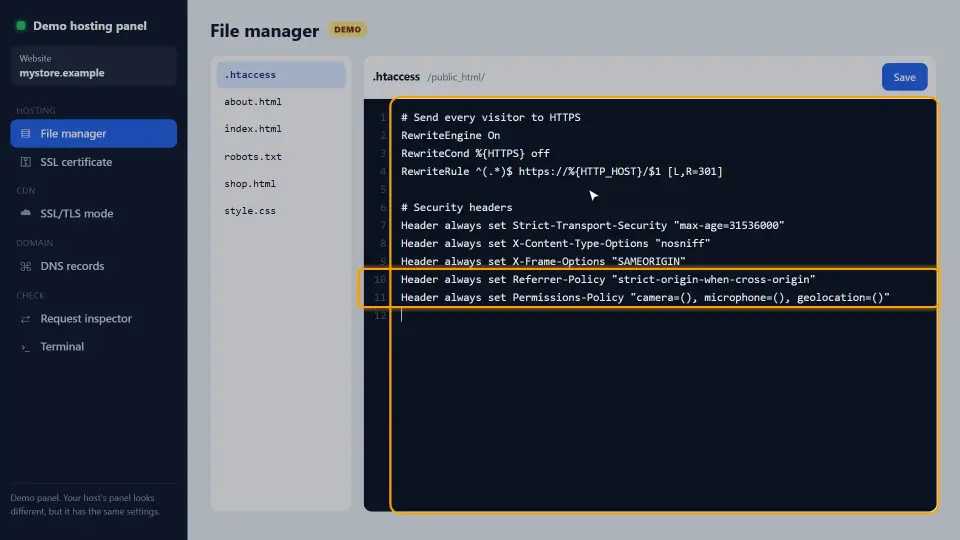
Save the file. The server reads it on the very next request, so there is nothing to restart. If your page shows a 500 error, the headers module may be off; ask your host to enable mod_headers.
How to Add Them on Nginx and Cloudflare
On Nginx, the same headers go in the HTTPS server block as add_header lines. Then reload Nginx:
add_header X-Content-Type-Options "nosniff" always;
add_header X-Frame-Options "SAMEORIGIN" always;
add_header Referrer-Policy "strict-origin-when-cross-origin" always;
add_header Permissions-Policy "camera=(), microphone=(), geolocation=()" always;
On Cloudflare, you can add them with a Transform Rule that sets response headers. However, if your server already sends them, do not add them twice, because duplicate headers confuse browsers.
Why CSP Comes Last
The sixth header, Content-Security-Policy, is left out on purpose. A wrong policy can break the page, because it blocks scripts and styles that are not on its list.
So it gets its own careful process: start in Report-Only mode, read the console, and allow only what you use. Our Content Security Policy guide walks through it step by step.
How to Test After the Change
Run the HTTP Header Checker again. In our demo, five of the six headers passed after one edit.
Next, open the site and click around. Everything should still load and look the same, now with the extra protection. Finally, repeat the check after every server move or new plugin, because both can drop headers without warning.
Common Mistakes
- Starting HSTS with a max-age of one year before HTTPS is stable.
- Sending the same header twice, from the server and a plugin or CDN.
- Forgetting
always, so error pages go out without the headers. - Adding X-Frame-Options DENY when your own site uses frames, such as an embedded booking form.
- Copying a strict Content-Security-Policy from another site without testing it.
In short: check, add the five safe headers, recheck, and handle CSP on its own. For the full list of headers and values, see the MDN reference on HTTP headers.
Questions and Answers
What are security headers?
Response headers that tell the browser how to protect visitors, for example to stay on HTTPS or to refuse framing by other sites.
Which headers should every site have?
Strict-Transport-Security, X-Content-Type-Options, X-Frame-Options, Referrer-Policy and Permissions-Policy. Add Content-Security-Policy after careful testing.
Do these headers slow down my site?
No. They are a few short lines of text, and HSTS even removes a redirect for returning visitors.
How do I check my security headers?
Run our free HTTP Header Checker on your URL. It grades each header and writes the missing lines for your server.
Where do I add security headers on Apache?
In the .htaccess file in your site's root folder, with Header always set lines.
How do I add security headers on Nginx?
Use add_header lines with the always flag in the HTTPS server block, then reload Nginx.
Can I add security headers on Cloudflare?
Yes, with a Transform Rule that sets response headers. Do not also send them from the server, or they appear twice.
What does X-Content-Type-Options nosniff do?
It stops the browser from guessing file types, so a file cannot run as a different type than the server says.
What does X-Frame-Options do?
It stops other sites from showing your pages in a frame, which blocks clickjacking.
What is a good Referrer-Policy?
strict-origin-when-cross-origin. Other sites see your domain, but not the full path of the page.
What does Permissions-Policy do?
It turns off browser features such as the camera, microphone and location for pages that do not need them.
Why is Content-Security-Policy not in the quick list?
A wrong policy can break the page, so it needs testing in Report-Only mode first. It has its own guide.
Do security headers help SEO?
Not directly. However, they protect visitors and your site, and HSTS removes a redirect hop, which helps speed.
Why do my headers not show up?
The Apache headers module may be off, a CDN may strip them, or a cached page is served. Clear caches and check again.
What is X-XSS-Protection?
An old header for a filter that modern browsers removed. You do not need it; a Content-Security-Policy does the real job.
Can WordPress plugins add these headers?
Yes, but a server rule is faster and also covers files outside WordPress. Use one source, not both.
Do these headers affect my images or fonts?
The five safe headers do not. Only Content-Security-Policy can block files, which is why it needs testing.
How often should I check my headers?
After every server move, CDN change or new security plugin, because each can drop or duplicate headers.
Does the SEO checker test security headers?
Yes. Our SEO Checker shows each header and links to this guide when one is missing.
Is X-Frame-Options still needed with CSP?
frame-ancestors in a CSP replaces it in modern browsers. Keeping both is harmless and covers older browsers.