ASCII Art Generator
Pictures And Words Made Of Characters
This ASCII art generator turns a word or an image into art made of letters and symbols. Pick the width and the characters, then copy the text or save it as a TXT or PNG file. Your picture is made into art on your computer and never leaves it.
- FreePrice
- Text + pictureSources
- Copy, TXT, PNGExport
- NoneUploads
ASCII Art Generator
Turn a picture or a word into text art
- Columns
- 80
- Rows
- 0
- Characters
- 0
The art redraws as you change anything. Copy it or save it when it looks right.
What This ASCII Art Generator Does
ASCII art is a drawing made only of plain text characters, such as @, # and dots. Dark areas use heavy characters, and light areas use thin ones or spaces. So from a little distance, the text looks like a picture.
This ASCII art generator works in two ways. First, you type a word, and the tool draws it as big letters made of characters. Second, you pick a photo or a logo, and the tool turns it into text art. In other words, it also works as an image to ASCII converter.
You choose how wide the art is, from 40 to 200 characters, and which characters it uses. Then you can change the contrast or the brightness, or invert it for a dark background. When it looks right, copy the text, or save it as a TXT file or a PNG image.
Everything happens in this browser tab. Your picture is read on your own computer and never sent to a server. So you can use private photos without worry. To learn more about this kind of art, see the ASCII art article on Wikipedia.
How A Picture Becomes Text
The picture below shows the whole idea. The tool lays a grid over your image, with one cell for each character. Then it measures how dark each cell is.

A dark cell gets a heavy character, such as @ or #. A light cell gets a dot or a blank space. As a result, the rows of text rebuild the shapes in the picture.
Big Letters From A Word
Type a short word, and the tool draws it as large letters made of characters. You can pick a bold, a serif or a typewriter letter style.
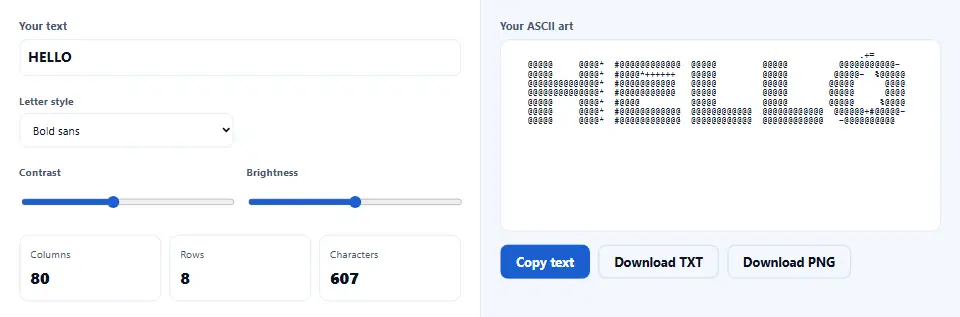
This is handy for a banner in a code comment, a README file or a chat message. Keep the word short, because each letter needs many characters.
Image To ASCII Art With More Detail
For a photo, a wider grid keeps more detail. So try 120 or 160 characters, and the detailed set of 70 characters.
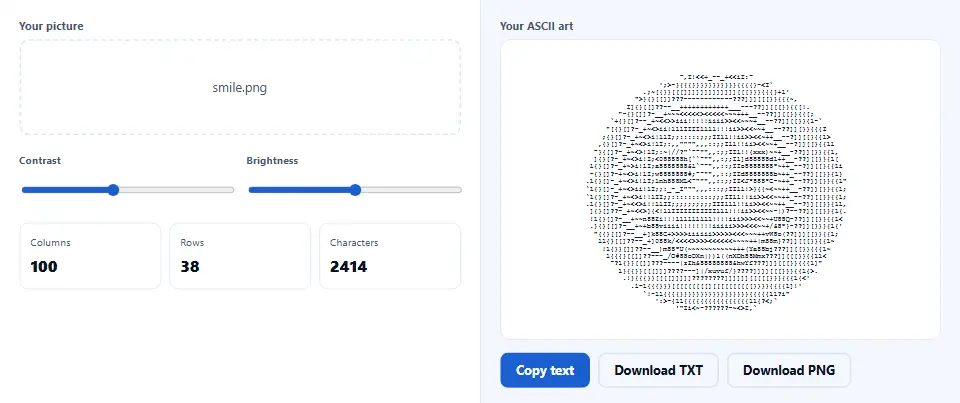
If the art looks flat, raise the contrast a little. Then the light and dark parts stand apart, and the shapes become clear.
Watch the ASCII Art Generator in Action
A short video walks through every step. Then pick your language below, and turn on captions if you like.
How to make ASCII art
Six short steps. Your picture stays in this tab the whole time.
- 1
Choose text or a picture
Use the "Make art from" menu at the top. Text gives you big letters, and a picture gives you image art.
- 2
Type a word or pick a file
Type a short word, or pick or drop a PNG, JPG, WebP or GIF. The art appears at once.
- 3
Set the width
Pick how many characters wide the art should be. More characters keep more detail, but the art gets bigger.
- 4
Pick the characters
Choose the classic set, a detailed set of 70 characters, blocks, dots or just 1 and 0.
- 5
Tune contrast and brightness
Move the sliders until the shapes stand out. Also tick Invert if the art will sit on a dark background.
- 6
Copy or save
Copy the text, or save it as a TXT file. You can also save a PNG image, in color if you like.
Why use this ASCII art generator
Three reasons it is a simple choice for quick text art.
Two tools in one
Most sites offer either text banners or image to ASCII, but rarely both. Here you switch with one menu. So the same page makes a banner for your code and art from your photo.
Your pictures stay private
Many converters send your picture to their server first. This ASCII art generator does not. Your browser reads the file and does all the work, so your photo always stays with you.
Plain text that works anywhere
The result is plain text, so it fits in code comments, README files, emails and chats. In addition, the PNG keeps the exact look on screens that use a different font.
How the image to ASCII converter reads your picture
Three rules decide what you see. Knowing them saves surprises.
- One character per cell The tool splits the picture into a grid. Each cell is one character wide and about twice as tall, because text characters are tall and narrow. That way the art keeps the shape of the picture instead of looking squashed.
- Darkness picks the character The tool works out how dark each cell is, then picks a character from the chosen set. Heavy characters stand for dark parts, and light ones for bright parts. Also, transparent parts count as white, so a logo on a clear background stays clean.
- A monospace font shows it right ASCII art only lines up when every character has the same width. So paste it where a monospace font is used, such as a code block. Otherwise, save the PNG, which keeps the look anywhere.
Common ASCII art mistakes to avoid
Each of these makes good art look broken.
Pasting into a normal font
Proportional fonts squeeze the rows out of line. So use a code block, or share the PNG.
Too wide for the screen
A 200-character piece wraps on a phone. Keep it near 60 to 80 for chats and posts.
A busy photo
Small details turn into noise. Instead, pick a picture with a clear subject and a plain background.
Forgetting to invert
Art made for white looks reversed on black. So tick Invert for dark backgrounds.
Long words in big letters
Each letter needs many characters. Therefore keep banner words short, or raise the width.
Low contrast pictures
Grey on grey gives grey art. Raise the contrast until the shapes stand out.
ASCII art generator frequently asked questions
Is this ASCII art generator free?
Yes. There is no price, no sign-up and no watermark. Because your browser does the work, there is no server cost to pass on.
Does the tool upload my picture?
No. Your browser reads the file on your own device. The picture never goes to a server, and nothing is kept after you close the tab.
What is ASCII art?
ASCII art is a picture made only of text characters. Dark areas use heavy characters, and light areas use thin ones or spaces.
How do I convert an image to ASCII?
Choose "A picture" under "Make art from", then pick or drop your file. The art appears at once, and you can tune it with the sliders.
Which picture types work?
PNG, JPG, WebP, GIF, BMP and AVIF, as long as your browser can open them. For a GIF, the first frame is used.
How big can the picture be?
Up to 30 MB. The tool scales big pictures down first, so even large photos work fast.
Can I turn text into ASCII art?
Yes. Choose "Text", type a short word, and pick a letter style. The tool draws the word as big letters made of characters.
Which width should I choose?
Use 40 to 80 for chats and code comments. Then use 120 or more when you want detail and will save a PNG.
What do the character sets do?
Classic uses ten characters, and Detailed uses 70 for smoother shades. Blocks use solid shapes, Dots stay light, and Binary uses only 1 and 0.
Why does my art look stretched?
It is probably shown in a font where characters have different widths. Paste it into a code block, or save the PNG.
What does Invert do?
It swaps dark and light. So art for a black background, such as a terminal, looks right.
Can I keep the colors of my picture?
Yes, in the PNG. Tick "Keep the colors in the PNG", and each character takes the color of its part of the picture.
Why is the text copy not in color?
Plain text cannot hold colors. So for color art, save the PNG instead.
How do I make the art sharper?
Raise the width, use the detailed character set, and add some contrast. Also start with a picture that has a clear subject.
Why are there empty lines at the edges?
White or clear areas turn into spaces. For words, the tool trims empty rows above and below the letters for you.
Can I use ASCII art in a GitHub README?
Yes. Put it inside a code block with three backticks, so the characters keep their places.
Can I paste it into Discord or Slack?
Yes. Wrap it in a code block there too, and keep it near 60 characters wide so it does not wrap.
What size is the PNG?
Each character becomes a small cell, so the PNG grows with the width and the number of rows. A 100-character piece is about 900 pixels wide.
Can I edit the art after I make it?
Yes. Copy or save the text, then change any character in a text editor.
Does it work on a phone?
Yes. On a small screen the art box sits above the options, and it scrolls if the art is wide.
Does it work offline?
Yes, once the page has loaded. The tool never needs a server to make or save the art.
Is the result really ASCII?
The classic, detailed, dots and binary sets are pure ASCII. The block set uses Unicode block characters, which most apps also show.
Can I use the art for my project?
Yes. The art is made from your own word or picture, so use it as you like. Just make sure you have the rights to the picture you start from.
Does the tool save my art?
No. Nothing is kept after you close the tab. So copy or save the art before you leave.
Why is my logo hard to see?
Thin lines can vanish in a narrow grid. So raise the width, or add contrast until the lines show.
What is the difference between ASCII art and small text?
ASCII art draws a picture with many characters. Small text only swaps each letter for a tiny Unicode letter.
More tools for text and images
A few pages that pair well with text art.
Write in tiny Unicode letters for bios and posts.
Open tool →Repeat a word or a line many times.
Open tool →Turn the PNG into a smaller WebP or JPG.
Open tool →Turn a picture into a data URL for code.
Open tool →Draw your numbers as a clean bar chart.
Open tool →
Make your ASCII art now
Type a word or pick a picture, then copy or save the art. The ASCII art generator is free, and your picture never leaves your device.