What Is a Redirect Chain?
A redirect chain happens when one page sends a reader to a second page, which sends them to a third page, and so on. Sometimes, the chain even loops back to the start. In any of these cases, the reader never reaches the page they want.
The browser tries to follow these hops. Eventually, it hits a limit. When it reaches that limit, it gives up and shows an error page. That error is ERR_TOO_MANY_REDIRECTS.
This chain is a common website mistake. It slows down the site, wastes crawl budget, and blocks visitors. This guide shows how to spot it, how to find the root cause, and how to fix your redirect rules, starting with htaccess. Therefore, you can ensure your visitors always reach your content without delay.

Our free Redirect Chain Checker flags these chains in seconds. It checks every step in the path, so you can find the first bad hop. Because every second counts for your users, fixing these chains should sit near the top of your site to-do list.
Why You Get the ERR_TOO_MANY_REDIRECTS Error
Browsers have a simple rule. They will follow a few redirects, but not too many. If they kept going, they could get stuck in an infinite loop forever. So, if the hop count gets too high, the browser stops.
The error ERR_TOO_MANY_REDIRECTS is just the browser telling you it tried enough. It has no idea which rule is wrong. It only knows that the path did not lead to a final page in a reasonable time. Consequently, you must investigate the server logs or use a tool to see the full path.
How the loop starts
- Setting a rule that points to itself: Such as "send example.com to example.com". This often happens when you try to force a trailing slash or remove one.
- Two rules that point to each other: A sends to B, and B sends back to A. For example, your server forces HTTPS, but your CMS settings use HTTP.
- A complex path: Too many small moves, like sending www.example.com to example.com, then example.com to example.com/index.php, then that to a tracking URL, then to the real page.
- Wrong server config: A CMS trying to fix an SSL issue while the server config forces HTTPS on top of it, creating a loop. Meanwhile, your CDN might also be trying to handle the same redirect.
Common triggers for redirect loops
Many redirect loops are triggered by recent changes to your site. For instance, installing a new security plugin or moving to a new host can often lead to these errors. Because these tools often write their own rules to your .htaccess file, they can conflict with what you already have in place.
Why Redirect Chains Hurt Your SEO
Redirect chains cause two problems: they waste time, and they make the path to the page fragile.
1. Wasted crawl budget
Search engines have a limited time to crawl your site. This is your crawl budget. If they spend that time following chains of redirects, they will not reach the new content you just wrote. As a result, new pages take longer to index. In short, your SEO effort is wasted on technical debt instead of new growth.
2. Ranking signals at risk
Google says a 301 redirect passes ranking signals to the new page. However, every extra hop is one more place where things can go wrong: a hop that times out, a rule that returns a 404, or a crawler that gives up. A single direct hop keeps the signal path short and safe. In short, fewer hops means fewer chances to lose the page.
3. Slower page speed
Each hop requires a new HTTP request and response cycle. On a slow connection, three hops can add several seconds to the load time. Because page speed is a ranking factor, this directly impacts your position in search results. Meanwhile, your users might bounce before the page even loads.
How to Find a Redirect Chain
To fix the chain, you must see the path the browser takes. You can do this with a few tools. Our Redirect Chain Checker is the simplest one.
Testing with the Redirect Chain Checker
Enter the URL, and it will list every hop. It will show you the status code of each page in the path, such as 301 for permanent or 302 for temporary.
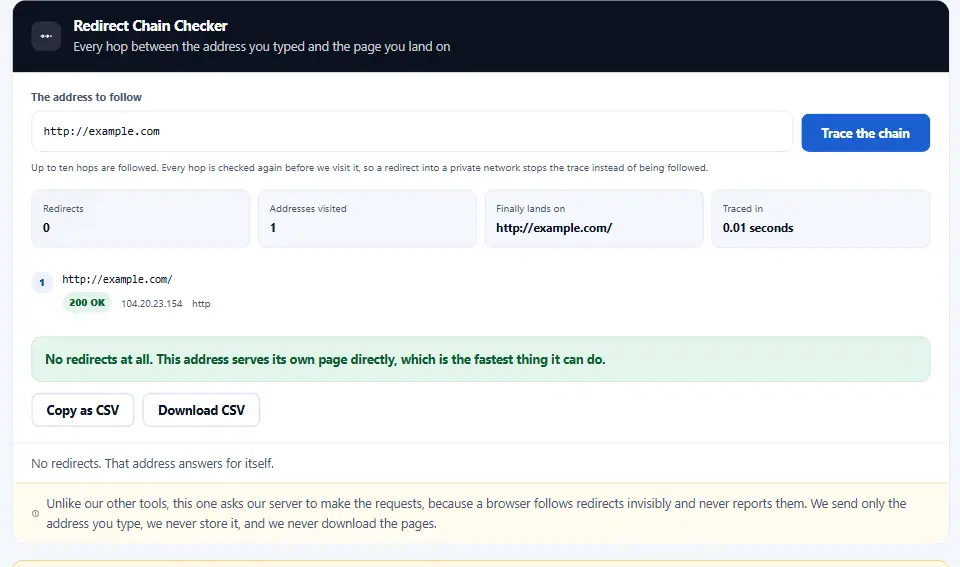
If the checker shows a loop, you will see it clearly in the result. Then you can find the rule causing it. Often, this is a rule in your server config, a plugin setting, or a conflict between your CMS and your hosting. For example, you might see that your site is bouncing between two different versions of the same URL.
Other ways to spot the problem
You can also use the browser console to watch the network tab. However, this is often harder to read than a dedicated tool. Instead, we recommend using a checker that gives you a clean list of status codes and headers. That way, you can see exactly what the server is sending back to the browser.
How to Fix a Redirect Chain in htaccess
Most redirect chains start in the .htaccess file on Apache servers. A wrong RewriteRule or Redirect command is the usual suspect. This is how to fix them.
Step 1: Get the current htaccess
Download a copy of your site’s .htaccess file via FTP. Never edit the live file directly. If you make a typo, the site will show a 500 error. Therefore, always keep a backup of the working version.
Step 2: Clean up the rules
Look for the rules that cause the chain. Often, these are older rules left behind from a past migration. They might look like this:
Redirect 301 /old-blog/ /blog/
Redirect 301 /blog/ /posts/
The fix is simple. Point the old URL directly to the new destination. So change the first line to point straight to /posts/. After that, the chain is gone. In this case, you reduce two hops to one.
Redirect 301 /old-blog/ /posts/
Redirect 301 /blog/ /posts/
Step 3: Test the rules
Upload the new file to a staging copy first. If you have no staging, test the rules on a single page, then check it with the checker. If it looks right, then upload it to the live site. Meanwhile, keep an eye on your search console for any new errors.
Fixing the www and HTTPS Redirects
A common error is a loop between HTTPS and the www subdomains. For instance, the server might force HTTPS, while your CMS forces www, and each rule is unaware of the other. The path becomes http://example.com → https://example.com → https://www.example.com.
This is a chain, not a loop. Still, it is a bad user experience. The best way is to set these rules as early as possible in your config, all in one block. For example:
RewriteEngine On
RewriteCond %{HTTPS} off [OR]
RewriteCond %{HTTP_HOST} !^www\. [NC]
RewriteRule ^ https://www.example.com%{REQUEST_URI} [L,R=301]
This rule catches both cases at once: plain HTTP and the bare domain. It sends the reader to the right address in one hop. Our www redirect generator and htaccess redirect generator can build these rules for you. As a result, your site loads faster and every visitor lands on one clean address.
Using the Redirect Chain Checker
Our Redirect Chain Checker is built to spot these chains instantly. It works as an automated tester for your redirect rules. With this in mind, you can use it every time you update your site structure.
- See the status code: A 301 means a permanent redirect, which is what you want for SEO. A 302 means temporary, so search engines will still try the old URL.
- Catch loops: If the checker hits a loop, it stops and reports the loop immediately. For example, it might show that A points to B and B points back to A.
- Verify the destination: It checks if the final destination is really the page you expect. In short, it confirms that your rules are doing exactly what you intended.
Use this tool before you publish any big change, such as a site migration or a change to your URL structure. It takes just a few seconds, but it saves your visitors from the dreaded redirect error. Because it is free, there is no reason not to check your site today.
Common Mistakes
- Using a 302 redirect when you mean 301. Always use 301 for pages that have moved forever. Otherwise, search engines won't pass the authority.
- Ignoring tracking URLs in the chain. These often add an extra hop you do not see in the browser. For instance, a marketing link might redirect through a tracker first.
- Building a chain of redirects that goes from http to https, then to www, then to the final URL. That is three hops.
- Forgetting to update internal links. Redirects are only a fix for links you cannot update, such as external links on other sites.
- A typo in the rule itself, which is the most common reason for a loop. For example, missing a slash or a dot in the regex.
Each one is easy to fix once you find it. If you want more help on redirects, the Search Console help on redirects has the full story. In conclusion, keeping your redirects clean is a vital part of technical SEO.
Questions and Answers
What causes the ERR_TOO_MANY_REDIRECTS error?
A redirect loop, or a chain longer than the browser allows. Most of the time two rules disagree: the server forces one address and the CMS, a plugin or the CDN forces another.
Is a redirect chain bad for SEO?
Yes. Chains waste crawl budget and slow the page down. Point each old URL straight at the final page so search engines reach it in one hop.
How can I check if my site has redirect chains?
Paste the URL into our free Redirect Chain Checker. It lists every hop with its status code, so a loop or a long chain shows up right away.
What is the difference between a 301 and 302 redirect?
A 301 says the page has moved for good, so Google swaps the old URL for the new one. A 302 says the move is temporary, so Google may keep the old URL in its results.
How do I fix a redirect loop in htaccess?
Look for a rule that points a page at itself, or two rules that point at each other. Merge them into one rule that sends each old URL straight to the final address.
Will a redirect chain fix itself?
No. A chain is a setup error. It stays until you change the server rules, the <code>.htaccess</code> file or the CMS settings.
How do I redirect from HTTP to HTTPS?
Use one rule at the top of your server config that sends every HTTP request to the HTTPS address. Add the www (or non-www) choice to the same rule so it stays one hop.
What is crawl budget?
It is the time and resources a search engine spends on your site. Hops that lead nowhere use up that time, so new pages get found later.
How many redirects are too many for Google?
Googlebot follows up to 10 hops, then stops. Even so, Google advises fewer than five, and one hop is best for speed.
Can a redirect loop happen on Cloudflare?
Yes. If Cloudflare uses "Flexible" SSL while your server forces HTTPS, each side keeps sending the visitor back. Switch the SSL mode to "Full" or "Full (strict)".
What is a circular redirect?
A loop where page A points to page B and page B points back to page A. The browser bounces between the two until it gives up.
How do I fix redirects in WordPress?
First check the WordPress Address and Site Address under Settings, General: both must use the same https and www form as your server rule. Then check any redirect or SSL plugin for rules that repeat the server's work.
What does ERR_TOO_MANY_REDIRECTS mean in Chrome?
It is the message Chrome shows when it detects a loop or a chain that is too long. Firefox says "The page isn't redirecting properly" for the same problem.
How do I fix a redirect loop on Nginx?
Look at the <code>return</code> and <code>rewrite</code> lines in the server block. Make sure the HTTPS server block does not send visitors back to the HTTP one.
Does clearing my browser cache fix redirect loops?
Sometimes. Browsers cache 301 redirects, so an old loop can stay after you fix the rule. Clear the cache or test in a private window to see the live state.