Markdown Cheat Sheet: The Short Version
Markdown turns plain text into formatted text with a few simple symbols. A hash makes a heading, two stars make bold text and a dash starts a list. This markdown cheat sheet puts every common symbol in one place, with the HTML each one becomes.

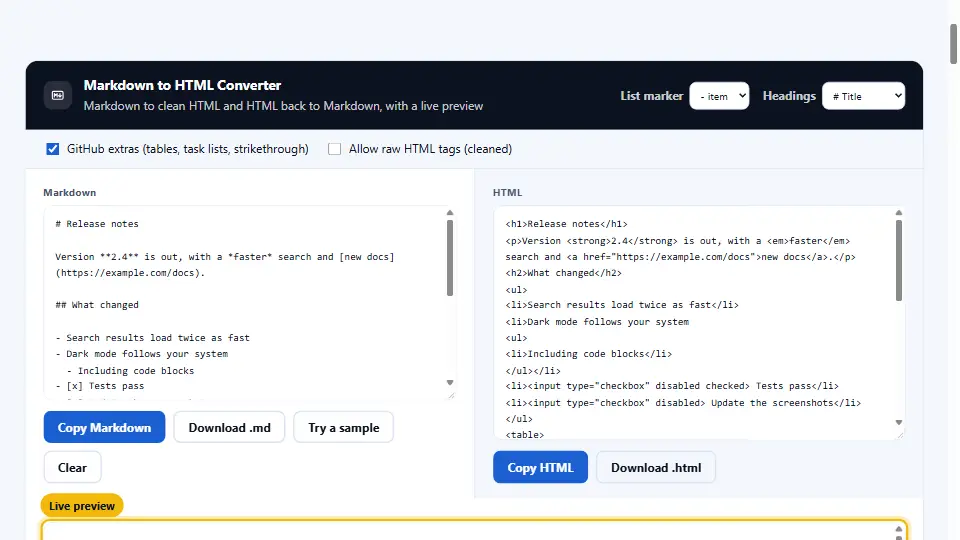
You can test every line in our free Markdown to HTML Converter. Type Markdown on one side and watch the HTML and the live preview change as you go.
To validate any of these codes come to our free online Markdown to HTML converter. Simply type your Markdown code on the left to see the HTML code and preview of the code immediately below it.
The Basic Syntax
These tags were first implemented by John Gruber in Markdown and are supported by all applications.
| You type | You get | HTML |
|---|---|---|
| # Heading 1 | Biggest heading | <h1> |
| ## Heading 2 | Section heading | <h2> |
| ### Heading 3 | Smaller heading | <h3> |
| **bold** | bold | <strong> |
| *italic* | italic | <em> |
| ***both*** | both | <strong><em> |
| `code` | code | <code> |
| Two spaces at line end | A line break | <br> |
| Blank line between text | A new paragraph | <p> |
Headings go from one hash to six. Always put a space after the hashes, because many apps ignore #Heading without it. Underscores also work for bold and italics, but stars are safer inside words.
Lists, Quotes and Lines
Lists are where Markdown saves the most time. You type them the way you would in a plain email.
- First item
- Second item
  - Indented item

1. Step one
2. Step two
3. Step three

> A quote stays indented.

---
A dash, star or plus starts a bullet list. Numbers with a dot start a numbered list, and the actual numbers do not even need to be in order. Indent by two or four spaces to nest a list inside another.
A greater-than sign makes a block quote, which is handy for quoting an email or a source. Three dashes on their own line draw a horizontal rule between sections.
Links and Images
To include an image or attachment use [text] followed by (text). To include an image use ! before the text in the parentheses.
| You type | Result |
|---|---|
| [Denwix](https://denwix.com) | A link with the text Denwix |
| [Denwix](https://denwix.com "Free tools") | A link with a hover title |
| <https://denwix.com> | A bare link that is clickable |
|  | An image with the alt text Logo |
| [](https://denwix.com) | An image that is also a link |
The alt text of the image is set by the text enclosed by the square brackets. Alt text should be descriptive of the image to assist screen readers in interpreting the image for the user.
Code in Markdown
Single backticks wrap a short piece of code inside a sentence. For longer code, use three backticks on their own lines, which is called a fenced code block.
```javascript
const total = items.reduce((sum, n) => sum + n, 0);
console.log(total);
```
The name of the programming language can be added after the initial back tick. Once again, use four back ticks to represent the code block if the code contains back ticks.
GitHub Markdown Cheat Sheet Extras
Many applications have implemented these extensions to Markdown, but they should be used with caution as not all applications will support them.
| Feature | You type | Notes |
|---|---|---|
| Table | | Name | Price | | A second line of dashes, such as |---|---|, marks the header |
| Task list | - [ ] To do / - [x] Done | Shows checkboxes on GitHub |
| Strikethrough | ~~old price~~ | Draws a line through the text |
| Auto link | https://denwix.com | Plain addresses become links |
| Footnote | Text[^1] and [^1]: Note | Supported on GitHub since 2021 |
Tables are the extra people use most. Each row sits on one line, pipes separate the cells, and colons in the dash line set the alignment. The GitHub Flavored Markdown spec lists every rule in detail.
Try Every Symbol Live
Reading a markdown cheat sheet helps, but typing the symbols is how they stick. Our converter shows the result of each one straight away.
Open the Markdown to HTML Converter and press Try a sample. It loads headings, lists, a link and a table, and the HTML appears beside the Markdown.
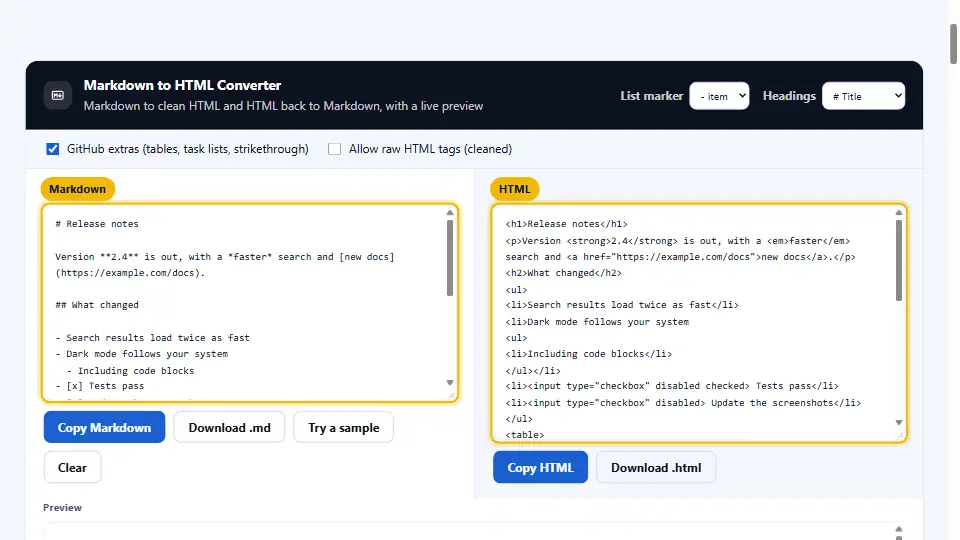
To the right is a live example of the code in use. To use this code on your site copy the generated HTML and paste it in your site or CMS.
A Real Case: The README Nobody Could Read
A small open-source project kept getting the same questions on GitHub. The answers were already in the README, but the file was one long wall of text with no headings or lists.
The maintainer spent twenty minutes adding Markdown. Install steps became a numbered list, commands went into fenced code blocks and the options became a table. A task list at the end showed what was planned next.
Within a month, repeat questions dropped by more than half, and two new contributors picked tasks straight from the list.
| Before | After | Markdown used |
|---|---|---|
| One block of text | Five clear sections | ## headings |
| Install steps in a sentence | A numbered list | 1. 2. 3. |
| Commands in plain text | Copyable code blocks | ``` fences |
| Options described in prose | An options table | | pipes | |
Common Mistakes and Fixes
No space should appear between the end of a line and the hat symbol to begin a new heading.
- No space after the hash: write
# Title, not#Title. - No blank line before a list: many apps then treat the list as part of the paragraph.
- Tabs mixed with spaces: nested lists break, so indent with spaces only.
- A table without the dash line: the rows show as plain text with pipes.
- Unclosed backticks: the rest of the page turns into code.
In general, memorize the basics of this table, include the extras on GitHub where relevant to your app, and preview any changes on this page before posting.
Questions and Answers
What is a Markdown cheat sheet?
This page has a table showing some examples of Markdown and the HTML they're rendered as.
How do I add a header in Markdown?
Start the line with one to six hashes and a space. One hash gives the biggest heading.
How do I make text bold?
To indicate bold, use like this, or use this.
How do I make text italic?
Wrap it in one star, like *italic*. One underscore also works.
How do I add a link?
Write the text in square brackets and the address in round brackets, like [Denwix](https://denwix.com).
How do I add an image?
Use the link format with an exclamation mark in front, like .
How do I make a bullet list?
Items in a list should be preceded by a dash or star. To indent a list item two spaces should be used.
How do I make a numbered list?
To create a list use a number and a period to begin each list item.
How do I add a table to Markdown?
Use a line of dashes to create a table header and use pipes to delimit the cells of the table.
How do I add a code block?
To display code, use three backticks to delineate the code and add the name of the language after the first set of ticks.
How do I make a line break?
To create a blank line to indicate the end of a paragraph, add two spaces at the end of the line.
How do I strike through text?
Surround it with two tildes, like this. This is specific to GitHub.
How do I add a checkbox?
Use '- [ ]' to create an empty box and '- [x]' to create a completed box.
How do I add a comment in Markdown?
Use an HTML comment, like <!-- note -->. It does not show in the rendered page.
Does Markdown support underline?
This is not conventional Markdown, but some applications accept ... in place of underline.
Is Markdown the same on GitHub and Discord?
The basics are the same. Extras such as tables, spoilers and footnotes differ from app to app.
What file extension does Markdown use?
They are often used to define readme files. On some systems they may be named readme.markdown.
Can I use HTML inside Markdown?
Yes, in most apps. Some, like GitHub, strip unsafe tags such as scripts.
How do I convert Markdown to HTML?
Paste it into our Markdown to HTML Converter and copy the clean HTML. It works in your browser.
Is the converter free?
Yes. It needs no sign-up, and your text never leaves your browser.