SSL Certificate Expired: What Happens Next
Your visitors see a full-page warning: your connection is not private, or the certificate has expired. Most visitors leave right there. When an SSL certificate expired, browsers no longer trust it, so they block the page until you fix it.
Every certificate has an end date. Free Let's Encrypt certificates last 90 days, and paid ones usually last about a year. After that date, the certificate is worthless, even if nothing else changed.

Step 1: Check What Is Wrong
First, check the site with our free SSL Checker. It tells you exactly what is wrong: the end date, the chain and the names the certificate covers.
In our demo, the checker reported that the certificate had expired and showed the date. So the fix was clear before we even opened the hosting panel.
Error 1: The Certificate Expired
In your hosting panel, open the SSL certificate page. It shows the same thing: expired, with the date it ran out. Click renew, and browsers trust the new certificate again.
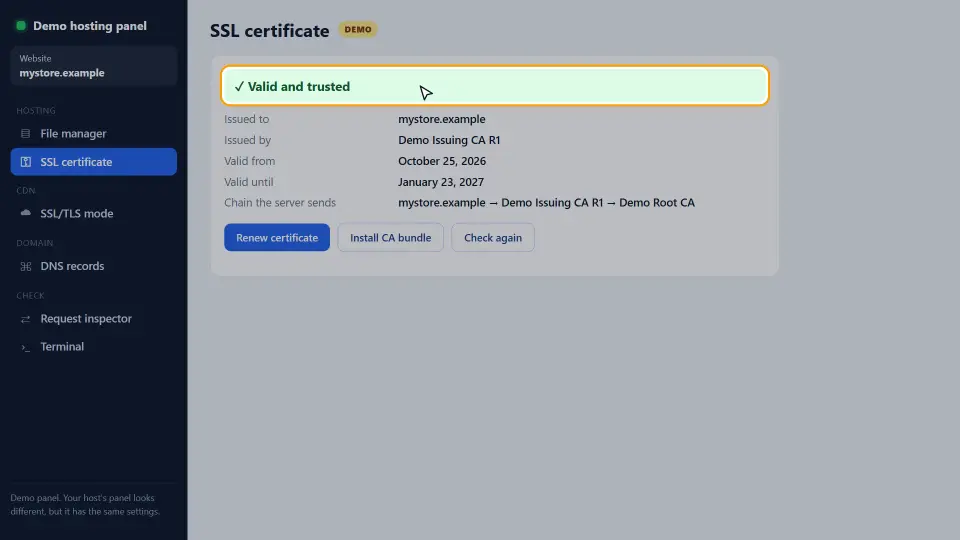
Why automatic renewal failed
Most hosts renew free Let's Encrypt certificates on their own. If yours expired, the automatic renewal failed. Often the domain no longer points to this host, so the check could not pass. Therefore, also check your DNS records with our DNS Records Checker.
Error 2: The Chain Is Incomplete
Browsers trust a certificate through a chain: your certificate, one or more intermediate certificates, and a root that browsers already know. If the server sends only its own certificate, it breaks the chain.
Desktop browsers often fill the gap themselves, so the site may look fine on your computer. However, many phones and apps refuse the connection. The fix is to install the CA bundle, the intermediate file your host or certificate seller gives you.
How to install the CA bundle
In most panels, there is a field called CA bundle or intermediate certificate next to the certificate itself. Paste the file there and save. Then run the SSL Checker again; it should report the full chain.
Error 3: The Name Does Not Match
A certificate lists the names it covers. If it covers example.com but a visitor opens www.example.com, the browser shows a name mismatch warning.
So get a certificate that lists every address you use, with and without www, and any subdomains such as shop or blog. Then redirect every other form to your main address, so visitors always land on a covered name.
Other Certificate Warnings
Mixed content
The certificate is fine, but the page loads images or scripts over plain http. Browsers then show a warning or block those files. Change every link to https, or use relative links.
Wrong computer clock
If only one visitor sees an expired warning, their device clock may be wrong. A date far in the past or future makes every certificate look invalid. In that case, the fix is on their side.
Self-signed certificates
Browsers do not trust a certificate you made yourself. Use it only for testing; for a public site, use a free certificate from a trusted authority.
How to Stop It Happening Again
- Keep automatic renewal on, and make sure the domain points to the host that renews it.
- Set a calendar reminder two weeks before the end date of any paid certificate.
- Check the site with the SSL Checker every few weeks.
- After a server move, check the chain and the names at once.
In short, an expired certificate is a missed date, not a hack. With renewal working and a quick monthly check, visitors should never see the warning again.
Common Mistakes
- Renewing the certificate but forgetting to install it on the server.
- Installing the certificate without the CA bundle.
- Covering only example.com and not www.example.com.
- Moving DNS to a new host and leaving auto-renewal on the old one.
- Fixing the certificate but leaving mixed content on the pages.
In short: renew, send the full chain, cover every name, and check regularly. For how certificates work, see MDN's guide to TLS.
Questions and Answers
What happens when an SSL certificate expires?
Browsers stop trusting it and show a full-page warning. Most visitors leave, and some apps refuse to connect at all.
How do I renew an expired SSL certificate?
Open the SSL page in your hosting panel and click renew, or buy a renewal from your certificate seller and install it.
Why did my free SSL certificate not renew?
Usually the domain no longer points to the host, so the renewal check failed. Check your DNS records, then renew.
How long does an SSL certificate last?
Free Let's Encrypt certificates last 90 days and renew automatically. Paid certificates usually last about a year.
How do I check when my SSL certificate expires?
Run our free SSL Checker on your domain. It shows the end date, the chain and the names covered.
What is an incomplete certificate chain?
The server sends its own certificate but not the intermediate one that links it to a trusted root. Many phones then refuse the connection.
What is a CA bundle?
The file with the intermediate certificates. Your host or certificate seller gives it to you, and you install it next to the certificate.
Why does my site work on desktop but not on mobile?
Often the chain is incomplete. Desktop browsers can fill the gap, but many phones cannot. Install the CA bundle.
What is a certificate name mismatch?
The certificate does not list the address in the bar, for example it covers example.com but not www.example.com.
Do I need separate certificates for www and non-www?
No. One certificate can list both names. Make sure both are on it.
What is mixed content?
A secure page that loads images or scripts over plain http. Browsers warn about it or block those files.
Can a wrong computer clock cause SSL errors?
Yes. If the device date is far off, every certificate looks expired or not yet valid.
Does an expired certificate hurt SEO?
Yes, indirectly. Visitors and crawlers hit a warning page, so traffic drops until you fix it.
Is a free SSL certificate as secure as a paid one?
For encryption, yes. Paid certificates add things like warranties or company checks, not stronger encryption.
What is a wildcard certificate?
A certificate for every subdomain of one domain, such as *.example.com. It does not cover the bare domain unless listed too.
How do I fix NET::ERR_CERT_DATE_INVALID?
Renew the certificate if it expired. If it is valid, check the visitor's device clock.
Can I use a self-signed certificate?
Only for testing. Browsers do not trust it, so public visitors see a warning.
Does Cloudflare fix an expired certificate?
Cloudflare's edge certificate covers visitors, but your origin certificate must still be valid for Full (strict) mode.
How often should I check my SSL certificate?
Every few weeks, and always after a server move or DNS change.
Does the SEO checker test SSL?
Yes. Our SEO Checker checks HTTPS and links to the SSL Checker for full certificate details.