What Is an SPF Record?
Your emails land in spam, or Gmail says it cannot verify the sender. Very often, the domain has no SPF record. An SPF record is one TXT record in your DNS. It lists the servers that may send mail for your domain.
When a message arrives, the receiving server looks up that record. Then it checks whether the server that sent the message is on the list. If it is not, receivers are more likely to mark the message as spam or refuse it.

Since 2024, Gmail and Yahoo expect SPF or DKIM from every sender, and both plus DMARC from bulk senders. So an SPF record is no longer optional.
How to Read the Record
A typical record for a domain that sends through Google Workspace looks like this:
v=spf1 include:_spf.google.com ~all- v=spf1 marks the record as SPF. It must come first.
- include: adds the servers of a mail service, here Google.
- ip4: or ip6: adds a single server address, for example your own mail server.
- ~all means: everything else is suspicious (soft fail). -all means: reject everything else (hard fail).
Start with ~all. Once you are sure the record lists every service that sends your mail, you can move to -all.
How to Create and Add an SPF Record
First, list every service that sends mail as your domain: your mailbox provider, your newsletter tool, your shop or your CRM. Each one documents its own include value.
Next, build the record with our free DMARC and SPF Generator. Type your domain, tick the services, and copy the result.
Then, in your DNS panel, add a TXT record. The name is @, which means the domain itself, and the content is the record you copied. Save it.
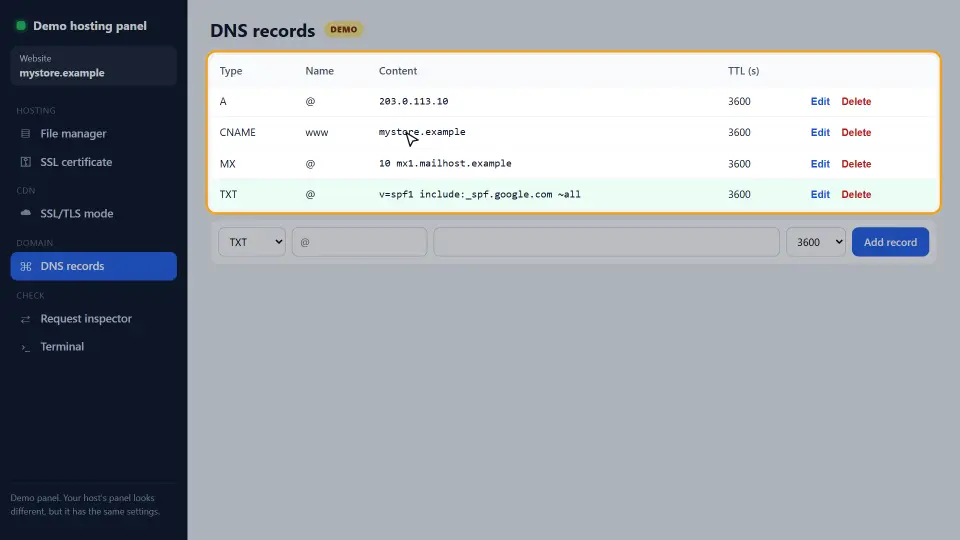
Finally, check it. Run nslookup -type=txt example.com, or look it up in our DNS Records Checker. Because resolvers cache DNS, a new record can take up to the TTL to show everywhere.
Adding a Second Mail Service
Months later, a newsletter tool asks you to add its SPF line. Do not add a second TXT record that starts with v=spf1. A domain may have only one. With two, SPF fails for every message, including the ones from Google.
Instead, merge them. Add the new include to the existing record, before ~all:
v=spf1 include:_spf.google.com include:servers.mcsv.net ~allThe 10-Lookup Limit
Every include, a, mx and redirect costs a DNS lookup, and some includes contain more includes. SPF allows at most 10 lookups. Above that, the check returns an error, and receivers treat it as a fail.
So remove services you no longer use. Where possible, use ip4: for your own servers, because IP ranges cost no lookup.
SPF Examples for Common Services
Each mail service publishes its own include value. So copy it from the service's help page, then merge it into your one record. Here are the most common ones.
Google Workspace
v=spf1 include:_spf.google.com ~allMicrosoft 365
v=spf1 include:spf.protection.outlook.com ~allYour own server plus a newsletter tool
v=spf1 ip4:203.0.113.25 include:servers.mcsv.net ~allIn the last example, the ip4: part covers your own mail server and costs no DNS lookup. Meanwhile, the include adds the newsletter tool.
A domain that never sends mail
If a domain sends no mail at all, publish v=spf1 -all. Then nobody can send mail as that domain and pass SPF.
SPF, DKIM and DMARC Together
SPF is one of three records that work as a team. Each one checks something different, so you want all three.
- SPF checks the server that sent the message.
- DKIM checks a digital signature on the message itself, so it still passes when someone forwards the mail.
- DMARC tells receivers what to do when both fail, and sends you reports.
Forwarding is where SPF alone breaks. When a mailing list or a forwarder resends your message, the new server is not in your record. Therefore, DKIM is what keeps forwarded mail passing. After SPF works, set up DKIM in your mail service, then add a DMARC record.
How to Check That It Works
First, look the record up and read it. There must be exactly one line that starts with v=spf1.
nslookup -type=txt example.comNext, send a test mail to a Gmail address. Open it, choose Show original, and look for SPF: PASS. If it says FAIL or SOFTFAIL, the sending server is missing from your record.
Finally, count the lookups if you use many includes. Our DNS Records Checker shows the TXT record, so you can see every include at a glance.
Common Mistakes
- Two SPF lines on one domain instead of one merged line.
- Putting the record at the wrong name, for example at www instead of @.
- Forgetting a service, so its mail fails after you switch to -all.
- Using +all, which allows anyone in the world to send as you.
- Going over 10 DNS lookups with too many includes.
In short, one record, every sender listed, and fewer than 10 lookups. Next, add a DMARC record so receivers know what to do when SPF fails. For the full rules, see Google's SPF help.
Questions and Answers
What is an SPF record?
A TXT record in your DNS that lists the servers allowed to send mail for your domain. Receiving servers check it to decide whether a message is genuine.
Where do I add SPF in my DNS?
In your DNS panel, as a TXT record at the name @ (the domain itself). Not at www and not at a subdomain, unless that subdomain sends mail.
Can a domain have two SPF lines?
No. A domain may have only one record that starts with v=spf1. Two records make SPF fail, so merge all includes into one record.
Should I use ~all or -all?
Start with ~all (soft fail). Move to -all only when you are sure every service that sends your mail is in the record.
How long until new SPF settings work?
Usually a few minutes, but DNS caching can delay it up to the record's TTL.
Why does my SPF check say too many DNS lookups?
Your record needs more than 10 lookups. Remove services you no longer use, or replace includes with ip4 ranges for your own servers.
Is SPF enough to stop spoofing?
No. SPF checks the hidden sender address, not the From address people see. Add DKIM and a DMARC record for full protection.
Do I need SPF if I only use Gmail?
If you send from your own domain through Google Workspace, yes. Add include:_spf.google.com to your record.
Which SPF value does Google Workspace need?
v=spf1 include:_spf.google.com ~all. Add other services to the same record, before ~all.
Which SPF value does Microsoft 365 need?
v=spf1 include:spf.protection.outlook.com ~all. Merge it with other includes if more services send your mail.
Does SPF work when someone forwards an email?
Often not, because the forwarding server is not in your record. DKIM fixes that, since its signature travels with the message.
How do I see if an email passed SPF?
In Gmail, open the message, choose Show original, and look for SPF: PASS. Other mail apps show the same line in the message headers.
What does SOFTFAIL mean?
The sending server is not in your record, and your record ends with ~all. Receivers mark the message as suspicious but usually still deliver it.
Should a domain that sends no email have SPF?
Yes. Publish v=spf1 -all, so nobody can send mail that passes SPF as that domain.
Can SPF text be longer than 255 characters?
A single text string holds at most 255 characters, but a TXT record can hold several strings. Most DNS panels split long records for you.
Is ptr allowed in SPF?
The rules allow it, but experts advise against it, because it is slow and unreliable. Use ip4, ip6 or include instead.
What is the redirect modifier?
redirect= hands the whole SPF check to another domain's record. It is useful when many domains share one policy.
Do subdomains need their own SPF entry?
Only if they send mail. SPF does not inherit, so a sending subdomain needs its own TXT record.
Why does my SPF still fail after adding it?
Check for a second v=spf1 record, a typo in the include, the record placed at the wrong name, or DNS caching that has not expired yet.
Does SPF affect my website?
No. SPF only matters for email. A mistake in it never breaks your web pages.