What Video SEO Optimization Means
Video SEO optimization is the work that helps search engines find, understand and show the videos on your own pages. It is not only about YouTube. A tutorial on your product page or a clip in a blog post can also appear in Google's video results.
The catch is simple. A search engine cannot watch your video the way a person does. Instead, it reads the text around the video: the title, the page, the captions and the structured data. So every step below gives it more words to work with.

This guide walks through each part in order. At the end, it fixes the "Video and audio titles" warning that our free SEO Checker and tools such as Seobility show.
How Google Finds a Video
Google looks for videos in standard HTML. That means a <video>, <embed>, <iframe> or <object> element in the page. A player drawn only by a script, after a click, is much harder for it to see.
Then Google needs three things. First, a page it can index. Second, a thumbnail it can fetch. And third, enough text to know what the video shows. Its guide to video SEO best practices lists the details.
Where videos show up
- The Videos tab in Google Search.
- Video results mixed into the main search page.
- Google Images and Discover, when a page has a strong video.
- Key moments, which link straight to a point inside a longer video.
So video SEO is not a separate trick. It is ordinary on-page SEO, applied to one more kind of content.
Give Every Player a Title
An image has an alt attribute. A video does not. Instead, a <video> or <audio> player is named by its title attribute, or by an aria-label.
<video src="/media/share-a-paste.mp4"
  title="How to share a paste in two minutes"
  poster="/media/share-a-paste.webp"
  controls preload="none"></video>
Without a title, crawlers and screen readers get no words for the player. That is why audit tools flag it. Seobility, for example, lists such a video in its Media files table with alt and title marked "Missing".
How to write a good video title
- Say what the video shows, in a few words, like a heading.
- Use the words people search for, but write for people first.
- Keep it unique on the page. Two players with the same title confuse everyone.
- Match the visible heading or caption, so the page tells one story.
The same rule applies to an embedded player. A YouTube or Vimeo embed is an <iframe>, and it needs its own title. The default "YouTube video player" says nothing, so replace it with the video's real name.
One Video, One Page, Real Text
Google prefers a page where the video is the main thing, a so-called watch page. In addition, the page needs text that explains the video. A heading, a short summary and a few paragraphs are enough.
Put the video near the top, so it is visible without scrolling. Besides, give it a clear heading just above it. When a page holds ten videos in a grid, none of them is the main topic. As a result, few of them get a video result.
Rule of thumb: one important video per page, with words around it that would make sense even if the video failed to load.
Posters and Thumbnails
A video result always shows a thumbnail. So Google must be able to fetch one. On your own player, the poster attribute does that job. It also shows visitors a clean frame before they press play.
Use a sharp image at least 60 pixels wide, ideally much larger, such as 1280 by 720. WebP and JPEG both work. Moreover, keep the poster file public: a thumbnail behind a login or blocked in robots.txt cannot appear in results.
A good poster also helps clicks. Pick a frame that shows the result, not a blank intro slide. Our image converter turns a screenshot into a small WebP in a few seconds.
Captions and Transcripts
Captions help people who watch with the sound off, and people who cannot hear. They also give search engines the spoken words. In HTML, captions come from a <track> element with a WebVTT file.
<video src="/media/guide.mp4" title="Guide to custom links" controls>
  <track kind="captions" src="/media/guide-en.vtt"
    srclang="en" label="English" default>
</video>
A transcript goes one step further. It is the full text of the video, printed on the page. Crawlers read it like any other paragraph. So a transcript often brings the single biggest win for video SEO on your own site.
The MDN reference for the video element shows every attribute, including tracks in several languages.
VideoObject Schema
Structured data tells search engines the facts about a video in a fixed format. For a video, the type is VideoObject. Google requires a name, a thumbnail URL and an upload date. Google also recommends a description, the duration and the file or embed URL.
{
  "@context": "https://schema.org",
  "@type": "VideoObject",
  "name": "How to share a paste in two minutes",
  "description": "A walk-through of custom links, expiry and passwords.",
  "thumbnailUrl": "https://example.com/media/share-a-paste.webp",
  "uploadDate": "2026-10-24",
  "duration": "PT2M",
  "contentUrl": "https://example.com/media/share-a-paste.mp4"
}
Keep the schema in step with the page. The name should match the player's title, and the thumbnail should match the poster. Our schema markup generator builds the JSON-LD for you, and you paste it into the page head.
Which fields matter most
Start with the three required fields. Then add the description and duration, because they show up in the result. Finally, add contentUrl or embedUrl, so Google can fetch the video itself.
Key moments
For a long video, you can mark chapters with Clip items, each with a start time and a name. Google may then link to those moments right from the results.
Video Sitemaps
A video sitemap lists your videos for search engines, with their thumbnails, titles and files. You can skip it when the schema is in place. Still, it helps on large sites where some videos sit deep in the structure.
<url>
  <loc>https://example.com/guides/share-a-paste/</loc>
  <video:video>
    <video:thumbnail_loc>https://example.com/media/share-a-paste.webp</video:thumbnail_loc>
    <video:title>How to share a paste in two minutes</video:title>
    <video:description>Custom links, expiry and passwords.</video:description>
    <video:content_loc>https://example.com/media/share-a-paste.mp4</video:content_loc>
  </video:video>
</url>
Add the video namespace to the <urlset> tag, then submit the file in Search Console. Our XML sitemap generator handles the regular page list.
Keep the Page Fast
A video file is heavy. Therefore, never let it slow down the first paint of the page. A few attributes keep it light.
preload="none"stops the browser from downloading the video before anyone presses play.- A
postergives the box a picture straight away, so the layout does not jump. widthandheight, or a CSS aspect ratio, reserve the space.- For embeds,
loading="lazy"on the iframe delays the whole player until it comes near the screen.
Our lazy loading checker shows which frames and images load early. In short, the video should wait, while the text around it loads at once.
How to Fix the Missing Title Warning
Our SEO Checker warns when a page has a video or audio player with no title and no ARIA label. Here is how to clear it, step by step.
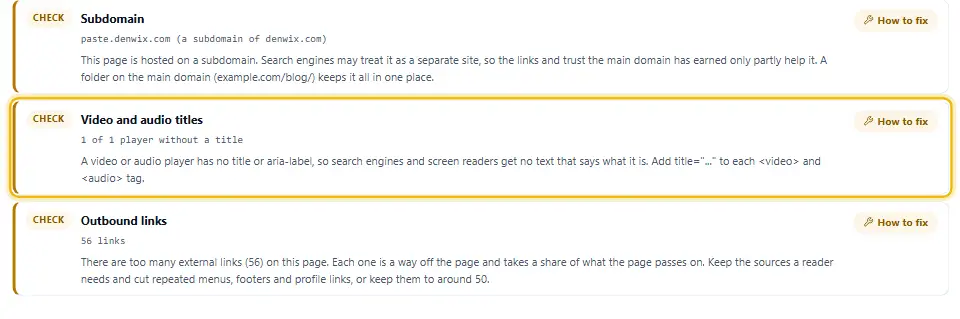
Step 1: Find the players
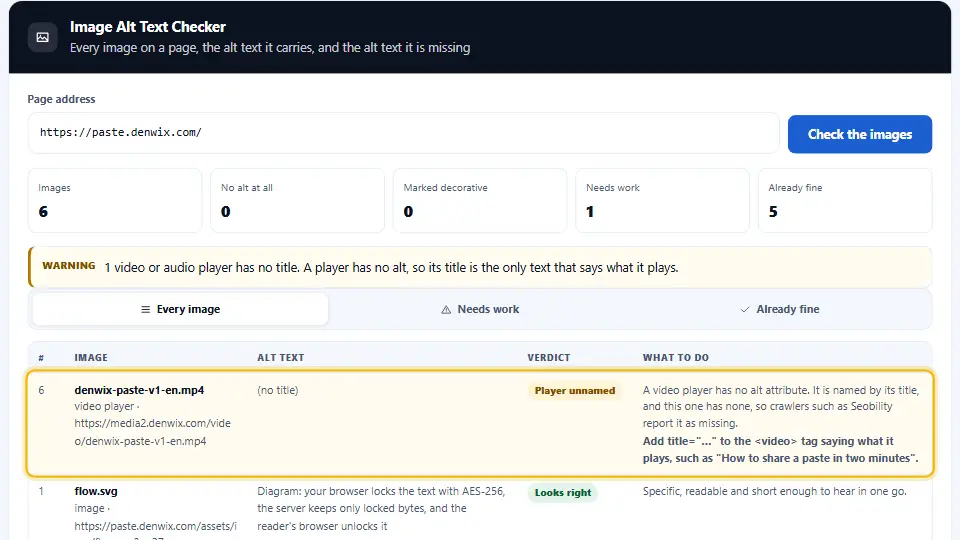
Scan the page with the SEO Checker and open the Elements tab. Under Media files, each video or audio player shows a red "Title missing" tag. Or run the Image Alt Text Checker, which now lists players next to images.
Step 2: Write the title
Use the heading or caption that sits next to the video. If there is none, write one short line that says what the video shows.
Step 3: Add it to the tag
Put title="…" on the <video> or <audio> tag itself, not on a wrapper.
<!-- Before -->
<video src="/media/demo.mp4" controls></video>

<!-- After -->
<video src="/media/demo.mp4" title="Demo of the custom link option" controls></video>
In WordPress
Select the video block, open its menu and choose Edit as HTML. Then add the title to the video tag and update the post.
Step 4: Check the result
Scan the page again. The row should now pass, and the player in the Elements tab should show its title. The video below shows the whole process.
Common Mistakes
- Leaving every player untitled, or titling them all "video".
- Keeping the default "YouTube video player" title on an embed.
- Putting ten videos on one page and none of them as the main topic.
- Blocking the poster or the video file in robots.txt.
- Writing schema that names one video while the page shows another.
- Autoplaying a heavy video with preload="auto", which slows the whole page.
Each of these takes minutes to fix. The rest of video SEO optimization is steady work: good videos, clear pages and honest titles. Moreover, the same steps help people who use screen readers, so the effort pays twice.
Questions and Answers
What is video SEO optimization?
It is the work that helps search engines find, understand and show the videos on your pages: titles, text, thumbnails, captions, schema and sitemaps.
Does a video tag have an alt attribute?
No. Alt only works on images. A video or audio player is named by its title attribute or an aria-label instead.
Why does my SEO checker say a video has no title?
The video or audio tag has no title and no aria-label. Add title="…" to the tag, describing what the video shows.
Why does Seobility show Missing for my video?
Its Media files table checks alt and title for every media file. A video has no valid alt, so Seobility keeps showing the alt as Missing even with a title. The title is what counts; our checker flags both, just as Seobility does.
Can Google index a video on my own site?
Yes. It needs a standard video, iframe or embed tag, an indexable page, a thumbnail it can fetch, and text that explains the video.
Is YouTube better than self-hosting for SEO?
YouTube gets reach on YouTube itself. A self-hosted video keeps viewers on your site. Many sites do both and embed the YouTube video on a watch page.
Do I need VideoObject schema?
You can appear in results without it, but it helps Google read the facts. It needs a name, a thumbnail URL and an upload date.
Do I need a video sitemap?
You can skip it when the page and schema are in place. On a large site, it helps search engines find every video.
What is a poster image?
It is the picture shown before a video plays, set with the poster attribute. It also works as the thumbnail for search results.
Do captions help video SEO?
Yes. Captions and especially a full transcript give search engines the spoken words. They also help viewers with the sound off.
What is a transcript?
It is the full text of what is said in the video, printed on the page. Crawlers read it like any other paragraph.
Should a YouTube embed have a title?
Yes. An embed is an iframe, and its title should name the video. Replace the default "YouTube video player" with the real title.
How many videos should one page have?
One main video per page works best. Other videos can stay, but only one can be the clear topic.
Does a video slow down my page?
It can. Use preload="none", a poster and a fixed size, and lazy-load embedded players.
Should audio players have a title too?
Yes. An audio player has no alt either, so a title tells crawlers and screen readers what it plays.
Can I use aria-label instead of title?
Yes. Screen readers read either one. Many SEO crawlers only look at title, so title is the safer choice.
What are key moments?
They are chapters inside a long video that Google can link to from the results. You mark them with Clip items in the schema.
Where should the video sit on the page?
Near the top, visible without scrolling, with a clear heading and a short summary around it.
Is there a video SEO checker?
The free Denwix SEO Checker flags players without a title, and the Image Alt Text Checker lists every player with its fix.
How do I add a title to a video in WordPress?
Open the video block, choose Edit as HTML, and add title="…" to the video tag. Then update the post.